OSI Model

Protocols and Standards

  • network is basically all of the components (hardware and software) involved in connecting computers and applications across small and large distances.
  • When designing and maintaining a network, remember these factors: cost, security, speed, topology, scalability, reliability, and availability
  •  some of the more common networking applications include e-mail applications for sending mail electronically, File Transfer Protocol (FTP) applications for transferring files, and web applications for providing a graphical representation of information.
  • Protocols are used to implement applications. Some protocols are open standard, meaning that many vendors can create applications that can interoperate with each other, while others are proprietary, meaning that they work only with a particular application

Protocols and standards make networks work together. Protocols make it possible for the various components of a network to communicate with each other, and standards make it possible for different manufacturers’ network components to work together.

A protocol is simply a set of rules that enable effective communications to occur.

Computer networks depend upon many different types of protocols. These protocols are very rigidly defined, and for good reason. Network cards must know how to talk to other network cards to exchange information, operating systems must know how to talk to network cards to send and receive data on the network, and application programs must know how to talk to operating systems to know how to retrieve a file from a network server.

A networking model describes how information is transferred from one networking component to another. Just like a house blueprint defines the materials and technologies that are used in constructing the house, a networking model defines the protocols and devices that are required in building the network.

Technically, a networking model is a comprehensive set of documents that describes how everything should happen in network. Individually, each document describes a functionality, protocol or device that is required by a small portion of the network.

The OSI model is not a networking standard in the same sense that Ethernet and TCP/IP are networking standards. Rather, the OSI model is a framework into which the various networking standards can fit. The OSI model specifies what aspects of a network’s operation can be addressed by various network standards. So, in a sense, the OSI model is sort of a standard of standards.

OSI is a model. It’s called the Open Systems Interconnection Model or OSI model for short. It’s a conceptual model – a means to understand how communications occur. It doesn’t define any protocols or even reference them.

The purpose of the OSI reference model is to guide vendors and developers so the digital communication products and software programs they create can inter operate and to facilitate a clear framework that describes the functions of a networking or telecommunication system.

IT professionals use OSI to model or trace how data is sent or received over a network .

OSI model was created for following purposes:-

  • To standardize data networking protocols to allow communication between all networking devices across the entire planet.
  • To create a common platform for software developers and hardware manufactures that encourage the creation of networking products that can communicate with each other over the network.
  • To help network administrators by dividing large data exchange process in smaller segments. Smaller segments are easier to understand, manage and troubleshoot.
  • It is a reference model for how applications communicate over a network.

So models are just a way of understanding something and representing it so that it is more easily understood. Protocols dictate how something actually happens so that two different devices can exchange information if they use the same protocol.

Difference Between OSI Model and TCP/IP Model?

  • OSI is a conceptual model which is not practically used for communication, whereas, TCP/IP is used for establishing a connection and communicating through the network.
  • TCP/IP stands for Transmission Control Protocol/Internet Protocol. It is a communication protocol used to interconnect network devices on the internet.

TCP/IP protocol specifies how data is exchanged over the internet by providing end-to-end communications that identify how it should be broken into packets, addressed, transmitted, routed and received at the destination.

OSI Model and TCP/IP Comparison Table

Let us discuss the topmost differences between OSI Model vs TCP/IP Model.

OSI ModelTCP/IP Model
It stands for Open Systems InterconnectionIt stands for Transmission Control and Internet Protocol.
It is a theoretical framework for the computer environment.It is a customer service model that is used for data information transmission.
In the OSI model, there are 7 Layers4 Layers are present in the TCP/IP model
Low in useTCP/IP model is mostly used
This model is an approach in VerticalThis model is an approach in horizontal
In this model delivery of package is a guaranteeIn this model delivery of package is not assured
The protocol is hidden in OSI and can be easily substituted and changes in technology.In this model replacing tool is not easy as like OSI

The Seven Layers of the OSI Model :

1)

PhysicalGoverns the layout of cables and devices, such as repeaters and hubs.
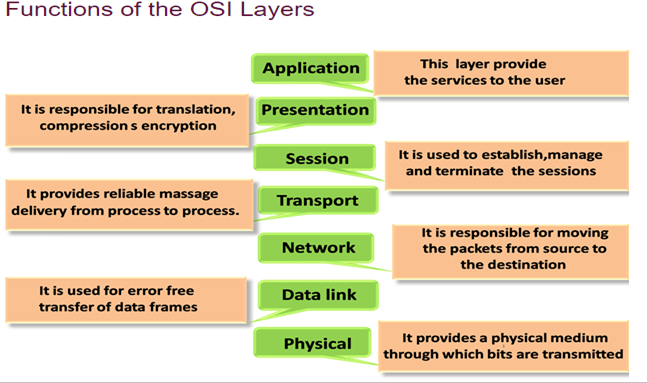
  • The Physical Layer mainly defines standards for media and devices that are used to move the data across the network. 10BaseT, 10Base100, CSU/DSU, DCE and DTE are the few examples of the standards used in this layer.
  • The bottom layer of the OSI model is the Physical layer. It addresses the physical characteristics of the network, such as the types of cables used to connect devices, the types of connectors used, how long the cables can be, and so on
  •  For example, the Ethernet standard for 10BaseT cable specifies the electrical characteristics of the twisted-pair cables, the size and shape of the connectors, the maximum length of the cables, and so on
  • Another aspect of the Physical layer is the electrical characteristics of the signals used to transmit data over the cables from one network node to another. The Physical layer doesn’t define any meaning to those signals other than the basic binary values of 1 and 0. The higher levels of the OSI model must assign meanings to the bits that are transmitted at the Physical layer.
  • One type of Physical layer device commonly used in networks is a repeater, which is used to regenerate the signal whenever you need to exceed the cable length allowed by the Physical layer standard.
  • The network adapter (also called a network interface card; NIC) installed in each computer on the network is a Physical layer device.
  • Encoding of digital signals received from the Data Link layer based on the attached media type such as electrical for copper, light for fiber, or a radio wave for wireless.
  • On sending computer, it converts digital signals received from the Data Link layer, in analog signals and loads them in physical media.
  •  On receiving computer, it picks analog signals from media and converts them in digital signals and transfers them to the Data Link layer for further processing

Functions of a Physical layer:

  • Line Configuration: It defines the way how two or more devices can be connected physically.
  • Data Transmission: It defines the transmission mode whether it is simplex, half-duplex or full-duplex mode between the two devices on the network.
  • Topology: It defines the way how network devices are arranged.
  • Signals: It determines the type of the signal used for transmitting the information.
  • Bit rate control: The Physical layer also defines the transmission rate i.e. the number of bits sent per second.

Data Link Layer  : 

The data link layer is responsible for the node to node delivery of the message. The main function of this layer is to make sure data transfer is error free from one node to another, over the physical layer. When a packet arrives in a network, it is the responsibility of DLL to transmit it to the Host using its MAC address.

The data link layer effectively separates the media transitions that occur as the packet is forwarded from the communication processes of the higher layers. The data link layer receives packets from and directs packets to an upper layer protocol, in this case IPv4 or IPv6. This upper layer protocol does not need to be aware of which media the communication will use.


Data Link Layer is divided into two sub layers :

  1. Logical Link Control (LLC)
  2. Media Access Control (MAC)
  • Since the physical layer merely accepts and transmits a stream of bits without any regard to the meaning of the structure, it is up to the data link layer to create and recognize frame boundaries. This can be accomplished by attaching special bit patterns to the beginning and end of the frame. Encryption can be used to protect the message as it flows between each network node. Each node then decrypts the message received and re-encrypts it for transmission to the next node.
  • The protocol packages the data into frames that contain source and destination addresses
  • These frames refer to the physical hardware address of each network card attached to the network cable.
  • Ethernet, Token Ring, and ARCnet are examples of LAN data link protocols
  • The data link layer sends blocks of data with the necessary synchronization, bit error detection/correction error control, and flow control.
  • Since the physical layer merely accepts and transmits a stream of bits without any regard to the meaning of the structure, it is up to the data link layer to create and recognize frame boundaries
  • DLL also encapsulates Sender and Receiver’s MAC address in the header
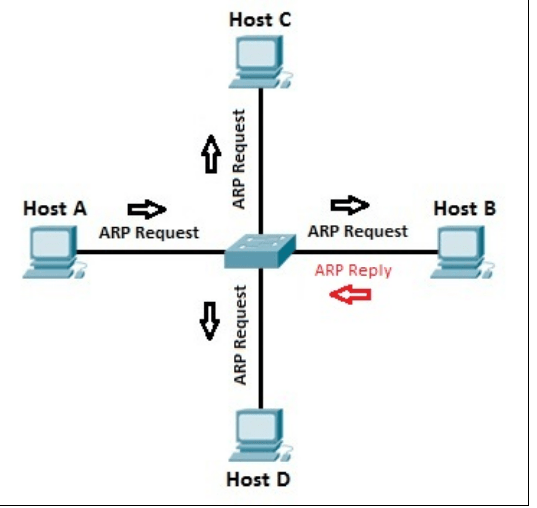
  • The Receiver’s MAC address is obtained by placing an ARP(Address Resolution Protocol) request onto the wire asking “Who has that IP address?” and the destination host will reply with its MAC address.  
  •  Framing: Framing is a function of the data link layer. It provides a way for a sender to transmit a set of bits that are meaningful to the receiver. This can be accomplished by attaching special bit patterns to the beginning and end of the frame.

Physical addressing: After creating frames, Data link layer adds physical addresses (MAC address) of sender and/or receiver in the header of each frame.

  • Error control: Data link layer provides the mechanism of error control in which it detects and retransmits damaged or lost frames.
  • Flow Control: The data rate must be constant on both sides else the data may get corrupted thus , flow control coordinates that amount of data that can be sent before receiving acknowledgement.
  • Access control: When a single communication channel is shared by multiple devices, MAC sub-layer of data link layer helps to determine which device has control over the channel at a given time.

Switch & Bridge are Data Link Layer devices

  • Bridge: An intelligent repeater that’s aware of the MAC addresses of the nodes on either side of the bridge and can forward packets accordingly.
  • Switch: An intelligent hub that examines the MAC address of arriving packets to determine which port to forward the packet to.
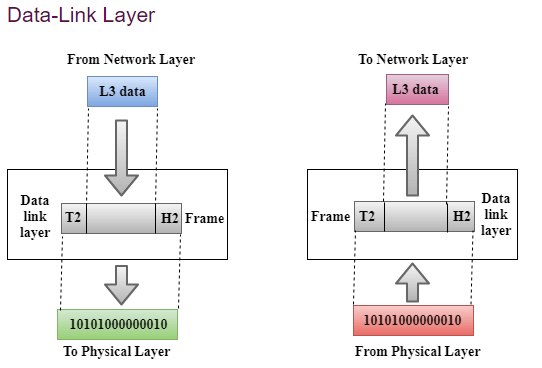
  • The data link layer functionality is usually split it into logical sub-layers, the upper sub-layer, termed as LLC, that interacts with the network layer above and the lower sub-layer, termed as MAC, that interacts with the physical layer below,

The primary responsibilities of LLC are:

Network Layer protocol Multiplexing/De-Multiplexing

Interfacing with the Network (Layer3) above by doing L3 protocol multiplexing/de-multiplexing. On receiving a frame from the physical layer below, the LLC is responsible for looking at the L3 Protocol type and handing over the datagram to the correct L3 protocol (de-multiplexing) at the network layer above. On the sending side, LLC takes packets from different L3 protocols like IP, IPX, ARP etc., and hands it over to the MAC layer after filling the L3 protocol type in the LLC header portion of the frame (multiplexing)

Logical Link Services

LLC can optionally provide reliable frame transmission by the sending node numbering each transmitted frame (sequence number), the receiving node acknowledging each received frame ( acknowledgment number) and the sending node retransmitting lost frames.  It can also optionally provide flow control by allowing the receivers to control the sender’s rate through control frames like RECEIVE READY and RECEIVE NOT READY etc.

MAC

Layer 2 protocols specify the encapsulation of a packet into a frame and the techniques for getting the encapsulated packet on and off each medium. The technique used for getting the frame on and off media is called the media access control method.]

It provides data link layer addressing and delimiting of data according to the physical signaling requirements of the medium and the type of data link layer protocol in use

As packets travel from source host to destination host, they typically traverse over different physical networks. These physical networks can consist of different types of physical media such as copper wires, optical fibers, and wireless consisting of electromagnetic signals, radio and microwave frequencies, and satellite links.

The packets do not have a way to directly access these different media. It is the role of the OSI data link layer to prepare network layer packets for transmission and to control access to the physical media. The media access control methods described by the data link layer protocols define the processes by which network devices can access the network media and transmit frames in diverse network environments.

Without the data link layer, network layer protocols such as IP, would have to make provisions for connecting to every type of media that could exist along a delivery path. Moreover, IP would have to adapt every time a new network technology or medium was developed. This process would hamper protocol and network media innovation and development. This is a key reason for using a layered approach to networking.

The MAC sub-layer interacts with the physical layer and is primarily responsible for framing/de-framing and collision resolution.

 Framing/De-Framing and interaction with PHY: On the sending side, the MAC sub-layer is responsible for creation of frames from network layer packets, by adding the frame header and the frame trailer. While the frame header consists of layer2 addresses (known as MAC address) and a few other fields for control purposes, the frame trailer consists of the CRC/checksum of the whole frame. After creating a frame, the MAC layer is responsible for interacting with the physical layer processor (PHY) to transmit the frame.

On the receiving side, the MAC sub-layer receives frames from the PHY and is responsible for accepting each frame, by examining the frame header. It is  also responsible for verifying the checksum to conclude whether the frame has come uncorrupted through the link without bit errors.

Collision Resolution : On shared or broadcast links, where multiple end nodes are connected to the same link, there has to be a collision resolution protocol running on each node, so that the link is used cooperatively. The MAC sub-layer is responsible for this task and it is the MAC sub-block that implements standard collision resolution protocols like CSMA/CD, CSMA etc. For half-duplex links, it is the MAC sub-layer that makes sure that a node sends data on the link only during its turn. For full-duplex point-to-point links, the collision resolution functionality of MAC sub-layer is not required.
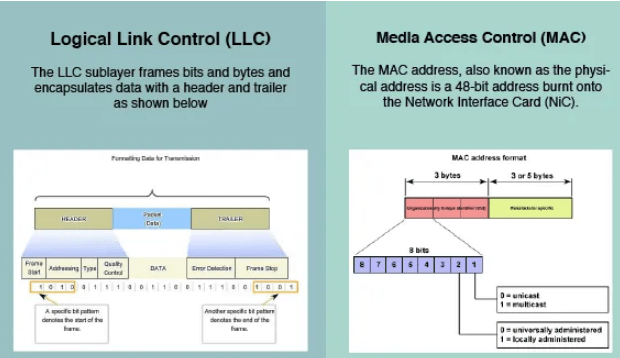
The figure illustrates how the data link layer is separated into the LLC and MAC sublayers. The LLC communicates with the network layer while the MAC sublayer allows various network access technologies. For instance, the MAC sublayer communicates with Ethernet LAN technology to send and receive frames over copper or fiber-optic cable. The MAC sublayer also communicates with wireless technologies such as Wi-Fi and Bluetooth to send and receive frames wirelessly

Layer 2 Frame Structure:

Formatting Data for Transmission

The data link layer prepares a packet for transport across the local media by encapsulating it with a header and a trailer to create a frame. The description of a frame is a key element of each data link layer protocol.

The data link layer frame includes:

Header: Contains control information, such as addressing, and is located at the beginning of the PDU.

Data: Contains the IP header, transport layer header, and application data.

Trailer: Contains control information for error detection added to the end of the PDU

Creating a Frame

When data travels on the media, it is converted into a stream of bits, or 1s and 0s. If a node is receiving long streams of bits, how does it determine where a frame starts and stops or which bits represent the address?

Framing breaks the stream into decipherable groupings, with control information inserted in the header and trailer as values in different fields. This format gives the physical signals a structure that can be received by nodes and decoded into packets at the destination.

Generic Frame Fields:

Frame start and stop indicator flags
Used by the MAC sublayer to identify the beginning and end limits of the frame

Addressing
Used by the MAC sublayer to identify the source and destination nodes.

Type
Used by the LLC to identify the Layer 3 protocol

Control
Identifies special flow control services.

Data
Contains the frame payload (i.e., packet header, segment header, and the data.

Error Detection
Included after the data to form the trailer, these frame fields are used for error detection

The Frame

Although there are many different data link layer protocols that describe data link layer frames, each frame type has three basic parts:Header ,Data ,Trailer

All data link layer protocols encapsulate the Layer 3 PDU within the data field of the frame. However, the structure of the frame and the fields contained in the header and trailer vary according to the protocol.

The data link layer protocol describes the features required for the transport of packets across different media. These features of the protocol are integrated into the encapsulation of the frame. When the frame arrives at its destination and the data link protocol takes the frame off the media, the framing information is read and discarded.

There is no one frame structure that meets the needs of all data transportation across all types of media. Depending on the environment, the amount of control information needed in the frame varies to match the media access control requirements of the media and logical topology.

A fragile environment requires more control. However, a protected environment requires fewer controls.

The Header

The frame header contains the control information specified by the data link layer protocol for the specific logical topology and media used.

Frame control information is unique to each type of protocol. It is used by the Layer 2 protocol to provide features demanded by the communication environment.

The Ethernet frame header fields are as follows:

Start Frame field: Indicates the beginning of the frame.

Source and Destination Address fields: Indicates the source and destination nodes on the media.

Type field: Indicates the upper layer service contained in the frame.

Different data link layer protocols may use different fields from those mentioned. For example other Layer 2 protocol header frame fields could include:

Priority/Quality of Service field: Indicates a particular type of communication service for processing.

Logical connection control field: Used to establish a logical connection between nodes.

Physical link control field: Used to establish the media link.Flow control field: Used to start and stop traffic over the media.Congestion control field: Indicates congestion in the media.

Because the purposes and functions of data link layer protocols are related to the specific topologies and media, each protocol has to be examined to gain a detailed understanding of its frame structure. As protocols are discussed in this course, more information about the frame structure will be explained.

Layer 2 Address

The data link layer provides addressing that is used in transporting a frame across a shared local media. Device addresses at this layer are referred to as physical addresses. Data link layer addressing is contained within the frame header and specifies the frame destination node on the local network. The frame header may also contain the source address of the frame.

Unlike Layer 3 logical addresses, which are hierarchical, physical addresses do not indicate on what network the device is located. Rather, the physical address is a unique device specific address. If the device is moved to another network or subnet, it will still function with the same Layer 2 physical address.

An address that is device-specific and non-hierarchical cannot be used to locate a device across large networks or the Internet. This would be like trying to find a single house within the entire world, with nothing more than a house number and street name. The physical address, however, can be used to locate a device within a limited area. For this reason, the data link layer address is only used for local delivery. Addresses at this layer have no meaning beyond the local network. Compare this to Layer 3, where addresses in the packet header are carried from source host to destination host regardless of the number of network hops along the route.

If the data must pass onto another network segment, an intermediate device, such as a router, is necessary. The router must accept the frame based on the physical address and de-encapsulate the frame in order to examine the hierarchical address, or IP address. Using the IP address, the router is able to determine the network location of the destination device and the best path to reach it. Once it knows where to forward the packet, the router then creates a new frame for the packet, and the new frame is sent onto the next segment toward its final destination.

The Trailer

Data link layer protocols add a trailer to the end of each frame. The trailer is used to determine if the frame arrived without error. This process is called error detection and is accomplished by placing a logical or mathematical summary of the bits that comprise the frame in the trailer. Error detection is added at the data link layer because the signals on the media could be subject to interference, distortion, or loss that would substantially change the bit values that those signals represent.

A transmitting node creates a logical summary of the contents of the frame. This is known as the cyclic redundancy check (CRC) value. This value is placed in the Frame Check Sequence (FCS) field of the frame to represent the contents of the frame..

When the frame arrives at the destination node, the receiving node calculates its own logical summary, or CRC, of the frame. The receiving node compares the two CRC values. If the two values are the same, the frame is considered to have arrived as transmitted. If the CRC value in the FCS differs from the CRC calculated at the receiving node, the frame is discarded.

Therefore, the FCS field is used to determine if errors occurred in the transmission and reception of the frame. The error detection mechanism provided by the use of the FCS field discovers most errors caused on the media.

There is always the small possibility that a frame with a good CRC result is actually corrupt. Errors in bits may cancel each other out when the CRC is calculated. Upper layer protocols would then be required to detect and correct this data loss.

THE NETWORK LAYER :

The Network layer handles the task of routing network messages from one computer to another. The two most popular Layer 3 protocols are IP (which is usually paired with TCP) and IPX (typically paired with SPX for use with Novell and Windows networks).

Network layer protocols provide two important functions: logical addressing and routing. The following sections describe these functions.

The third layer of OSI model is the Network Layer. This layer takes data segment from transport layer and adds logical address to it. A logical address has two components; network partition and host partition. Network partition is used to group networking components together while host partition is used to uniquely identity a system on a network. Logical address is known as IP address. Once logical address and other related information are added in segment, it becomes packet.

To move data packet between two different networks, a device known as router is used. Router uses logical address to take routing decision. Routing is a process of forwarding data packet to its destination.

  • Defining logical addresses and finding the best path to reach the destination are the main functions of this layer. Router works in this layer.

Functions of Network Layer:

  • Internetworking: An internetworking is the main responsibility of the network layer. It provides a logical connection between different devices.
  • Addressing: A Network layer adds the source and destination address to the header of the frame. Addressing is used to identify the device on the internet.
  • Routing: Routing is the major component of the network layer, and it determines the best optimal path out of the multiple paths from source to the destination.
  • Packetizing: A Network Layer receives the packets from the upper layer and converts them into packets. This process is known as Packetizing. It is achieved by internet protocol (IP).

THE TRANSPORT LAYER

  • The Transport layer is where you find two of the most well-known networking protocols: TCP (typically paired with IP) and SPX (typically paired with IPX).
  • The main purpose of the Transport layer is to ensure that packets are transported reliably and without errors. The Transport layer does this task by establishing connections between network devices, acknowledging the receipt of packets, and resending packets that aren’t received or are corrupted when they arrive .
  • Main functionalities of transport layer are segmentation, data transportation and connection multiplexing. For data transportation, it uses TCP and UDP protocols. TCP is a connection-oriented protocol. It provides reliable data delivery.
  • The two protocols used in this layer are:
  • Transmission Control Protocol
    • It is a standard protocol that allows the systems to communicate over the internet.
    • It establishes and maintains a connection between hosts.
    • When data is sent over the TCP connection, then the TCP protocol divides the data into smaller units known as segments. Each segment travels over the internet using multiple routes, and they arrive in different orders at the destination. The transmission control protocol reorders the packets in the correct order at the receiving end.
  • User Datagram Protocol
    • User Datagram Protocol is a transport layer protocol.
    • It is an unreliable transport protocol as in this case receiver does not send any acknowledgment when the packet is received, the sender does not wait for any acknowledgment. Therefore, this makes a protocol unreliable.
  • Common protocols: Transmission Control Protocol (TCP), User Datagram Protocol (UDP), Sequenced Packet Exchange (SPX), Name-Binding Protocol (NBP)

THE SESSION LAYER

  • The Session layer establishes conversations — sessions — between networked devices. session is an exchange of connection-oriented transmissions between two network devices. Each transmission is handled by the Transport layer protocol. The session itself is managed by the Session layer protocol.
  • A single session can include many exchanges of data between the two computers involved in the session. After a session between two computers has been established, it’s maintained until the computers agree to terminate the session.

The Session layer allows three types of transmission modes:

•  Simplex: Data flows in only one direction.

•  Half-duplex: Data flows in both directions, but only in one direction at a time.

•  Full-duplex: Data flows in both directions at the same time.

  • It is responsible for setting up, managing, and dismantling sessions between presentation layer entities and providing dialogs between computers.

When an application makes a network request, this layer checks whether the requested resource is available in local system or in remote system. If requested resource is available in remote system, it tests whether a network connection to access that resource is available or not. If network connection is not available, it sends an error message back to the application informing that connection is not available .

The session layer is responsible establishing, managing, and terminating communications between two computers. RPCs and NFS are the examples of the session layer.

Functions of Session layer:

  • Dialog control: Session layer acts as a dialog controller that creates a dialog between two processes or we can say that it allows the communication between two processes which can be either half-duplex or full-duplex.
  • Synchronization: Session layer adds some checkpoints when transmitting the data in a sequence. If some error occurs in the middle of the transmission of data, then the transmission will take place again from the checkpoint. This process is known as Synchronization and recovery.

Presentation Layer :

  • The presentation layer works as the translator in OSI model.
  • When receiving data from application layer, it converts that data in such a format that can be sent over the network. When receiving data from session layer, it reconverts that data in such a format that the application which will use the incoming data can understand.
  • The Presentation layer is responsible for how data is represented to applications. 
  • Besides simply converting data from one code to another, the Presentation layer can also apply sophisticated compression techniques so that fewer bytes of data are required to represent the information when it’s sent over the network. At the other end of the transmission, the Presentation layer then uncompresses the data .
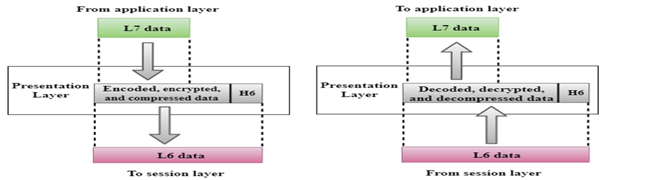
Convert, compress and encrypt are the main functions which presentation layer performs in sending computer while in receiving computer there are reconvert, decompress and decrypt. ASCII, BMP, GIF, JPEG, WAV, AVI, and MPEG are the few examples of standards and protocols which work in this layer.

THE APPLICATION LAYER
  • The highest layer of the OSI model, the Application layer deals with the techniques that application programs use to communicate with the network.
  • An application program is considered as network-aware when it can make any sort of network request. If an application program can’t make any kind of network request, it is considered as network-unaware program.
  • The name of this layer is a little confusing. Application programs (such as Microsoft Office or Quick Books) aren’t a part of the Application layer. Rather, the Application layer represents the programming interfaces that application programs use to request network services.

Network-aware programs are further divided in two categories;

  1. Programs which are mainly created to work in local system but if require can connect with remote system such as MS-Word, Adobe-Photoshop, VLC Player, etc.
  2. Programs which are mainly created to work with remote system such as SSH, FTP, TFTP, etc

Top layer of OSI model is application layer. It provides the protocols and services that are required by the network-aware applications to connect with the network. FTP, TFTP, POP3, SMTP and HTTP are the few examples of standards and protocols used in this layer.Hypertext Transfer Protocol (HTTP), Hypertext Transfer Protocol Secure (HTTPS), Telnet, Secure Shell (SSH), File Transfer Protocol (FTP), Trivial File Transfer Protocol (TFTP), Simple Mail Transfer Protocol (SMTP), Post Office Protocol 3 (POP3), Dynamic Host Configuration Protocol (DHCP), Domain Name System (DNS), Network Time Protocol (NTP)

The OSI reference model Working

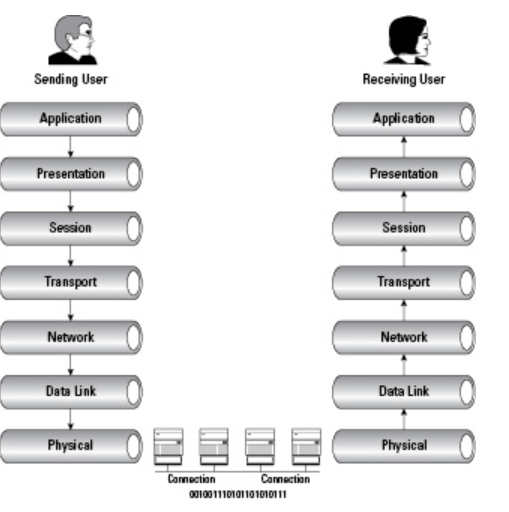
Delivering the data using seven conceptual layers defined by the ISO, these layers divide network communications architecture in a top-to-bottom approach. Moving up the OSI model from the bottommost layer to the top, services are provided to the next-uppermost layer (by the layer just below it), while services are received from the topmost layer to each next-lower layer. Each layer is responsible for a specific, exclusive set of functions not handled at any other layer.

Communication is possible with layers above and below a given layer on the same system and its peer layer on the other side of the connection. The network layer may prepare and hand data off to either the transport or data link layer, depending on the direction of network traffic. If data is being received, it flows up the stack. Data that is being sent travels down the stack. The network layer on the sending computer also communicates with the network layer on the receiving computer, its peer layer.

A good way to remember the names of each layer is to use the mnemonic device “All People Seem TNeed Data Processing” (from the top down), or in reverse order, “Please DNot Throw Sausage Pizza Away.”

What is the layer?

 A layer is an independent entity that implements a fixed set of functionalities. A layer provides services to the upper layer and uses the services of the lower layer.

What are primitives? 

Services offered by a layer is defined in terms of primitives. E.g a transport layer sends the message on user request, so one of the primitives is the message transfer request

Peer To Peer Communication In OSI Model:

First, we will explain what peer to peer communication is?  What is a peer in the OSI model? A peer is a remote layer at the same level.  For example. The transport layer of the remote protocol stack is the peer of the local transport layer. When a local peer sends a message to the remote, it adds its address and peer address in the header. For the lower layer, the header is user data only. The remote peer uses the header to handle the message.

PDU In The OSI Model:

Protocol data unit or PDU  in networking is the information unit exchange between the two layers. There is one to one relationship between a primitive and protocol data unit.   A PDU contains a header part and the data part.  The header part is optional. In the OSI model till layer 4  a PDU has header and data. From layers 4 to 7 there is only user data.

Demystifying data encapsulation

Encapsulation in telecommunications is defined as the inclusion of one data structure inside another so that the first data structure is temporarily hidden from view. Data is encapsulated and decapsulated in this way as it travels through the different layers of the OSI

Starting from the application layer and moving downward, user information is formed into data and handed to the presentation layer for encapsulation. The presentation layer encapsulates the data provided by the application layer and passes it on to the session layer. The session layer synchronizes with the corresponding session layer on the destination host and passes the data to the transport layer, which converts the data into segments and delivers these segments from source to destination. The network layer encapsulates the segments from the transport layer into packets, or datagrams, and gives a network header defining the source and destination IP addresses. These packets of data are given to the data link layer and converted into frames. Frames are then converted into binary data, ready for network transfer.

User information goes through a five-step process during encapsulation to arrive at the physical wire:


1. User information is processed by the application, presentation, and session layers and prepares the data for transmission.

For example, Robert opens his Web browser application on his laptop and types in the URL http://www.cisco.com.

2. The upper layers present the data to the transport layer, which converts the user data into segments.

Continuing with the example, Robert’s data request passes down from the upper layers to the transport layer and a header is added, acknowledging the HTTP request.

3. The network layer receives the segments and converts them into packets.

The transport layer passes the data down to the network layer, where source and destination information is added, providing the address to the destination.

4. The data link layer converts the packets into frames.

The data link layer frames the packets and adds the Ethernet hardware address of the source computer and the MAC address of the nearest connected device on the remote network.

5. The physical layer receives the data frames and converts them into binary format.

Data frames are converted into bits and transmitted over the network, returning Robert’s requested Web page.
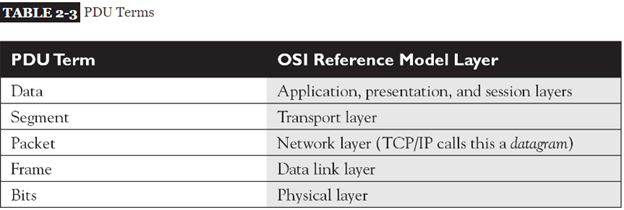
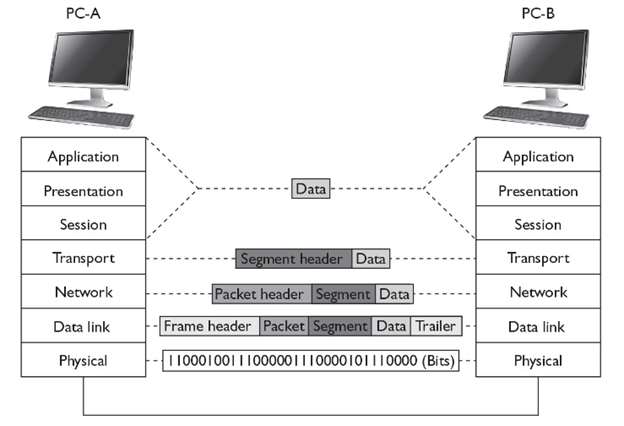
Encapsulation-Decapsulation & Different Standard Ethernet Frame Formats

ENCAPSULATION AND DE-ENCAPSULATION

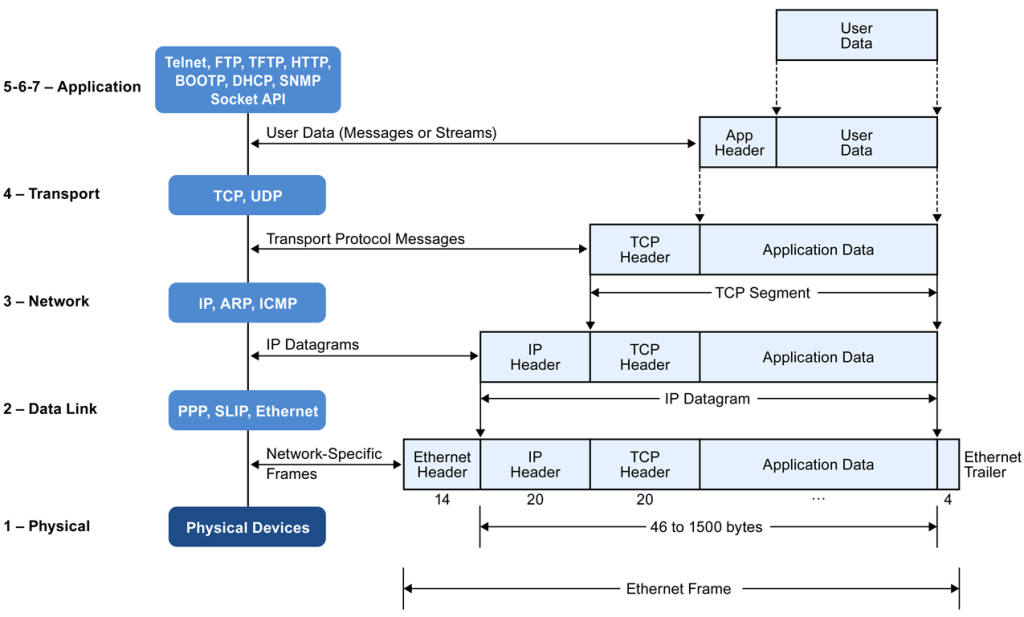
  • As this information is passed from higher to lower layers, each layer adds information to the original data—typically a header and possibly a trailer. This process is called encapsulation
  • Generically speaking, the term protocol data unit (PDU) is used to describe data and its overhead.

Going Down the Protocol Stack

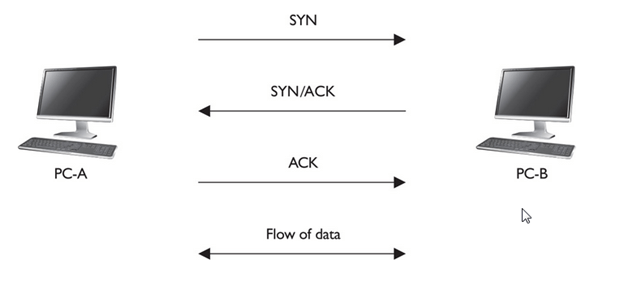
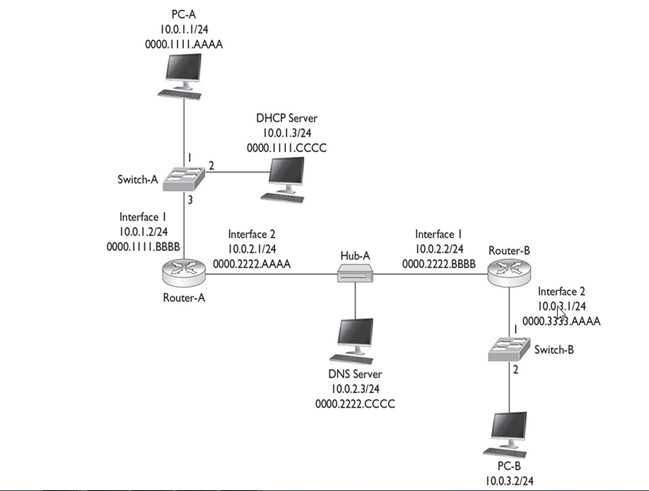
  • The first thing that occurs on PC-A is that the user, sitting in front of the computer, creates some type of information, called data, and then sends it to another location (PC-B)
  •  This includes the actual user input (application layer), as well as any formatting information (presentation layer)
  • The application (or operating system), at the session layer, then determines whether or not the data’s intended destination is local to this computer (possibly a disk drive) or a remote location.
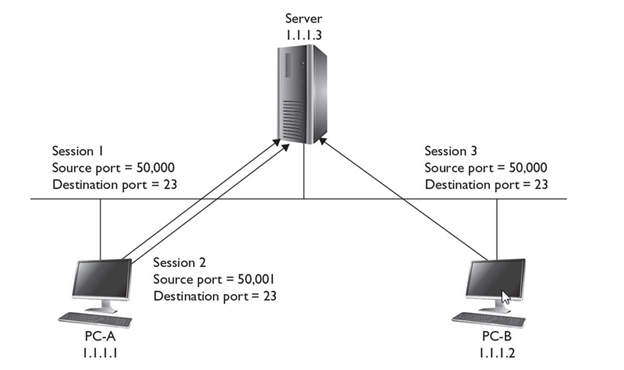
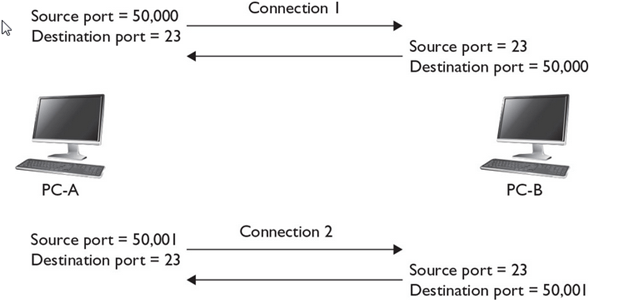
  • The session layer determines that this location is remote and has the transport layer deliver the information. A telnet connection uses TCP/IP and reliable connections (TCP) at the transport layer, which encapsulates the data from the higher layers into a segment. With TCP, as you will see in  only a header is added. The segment contains such information as the source and destination port numbers. ” the source port is a number above 1023 that is currently not being used by PC-A. The destination port number is the well-known port number (23) that the destination will understand and forward to the telnet application.
  • The transport layer passes the segment down to the network layer, which encapsulates the segment into a packet. The packet adds only a header, which contains layer 3 logical addressing information (source and destination address), as well as other information, such as the upper-layer protocol that created this information. In this example, TCP created this information, so this fact is noted in the packet header, and PC-A places its IP address as the source address in the packet and PC-B’s IP address as the destination. This helps the destination, at the network layer, determine whether the packet is for itself and which upper-layer process should handle the encapsulated segment. In the TCP/IP protocol stack, the terms packet and datagram are used interchangeably to describe this PDU. As you will see in  many protocols are within the TCP/IP protocol stack—ARP, TCP, UDP, ICMP, OSPF, EIGRP, and many others.
  • The network layer then passes the packet down to the data link layer. The data link layer encapsulates the packet into a frame by adding both a header and a trailer. This example uses Ethernet as the data link layer medium, discussed in more depth in other post. The important components placed in the Ethernet frame header are the source and destination MAC addresses, as well as a field checksum sequence (FCS) value so that the destination can determine whether the frame is valid or corrupted when it is received. In this example, PC-A places its MAC address in the frame in the source field and PC-B’s MAC address in the destination field.
  • The data link layer frame is then passed down to the physical layer. At this point, remember that the concept of “PDUs” is a human concept that we have placed on the data to make it more readable to us, as well as to help deliver the information to the destination. However, from a computer’s perspective, the data is just a bunch of binary values, 1s and 0s, called bits. The physical layer converts these bits into a physical property based on the cable or connection type. In this example, the cable is a copper cable, so the physical layer will convert the bits into voltages: one voltage level for a bit value of 1 and a different voltage level for a 0.

Going Up the Protocol Stack

For sake of simplicity, assume PC-A and PC-B are on the same piece of copper. Once the destination receives the physical layer signals, the physical layer translates the voltage levels back to their binary representation and passes these bit values up to the data link layer.

The data link layer takes the bit values and reassembles them into the original data link frame (Ethernet). The NIC, at the MAC layer, examines the FCS to make sure the frame is valid and examines the destination MAC address to ensure that the Ethernet frame is meant for itself. If the destination MAC address doesn’t match its own MAC address, or it is not a multicast or broadcast address, the NIC drops the frame. Otherwise, the NIC processes the frame. In this case, the NIC sees that the encapsulated packet is a TCP/IP packet, so it strips off (de-encapsulates) the Ethernet frame information and passes the packet up to the TCP/IP protocol stack at the network layer.

The network layer then examines the logical destination address in the packet header. If the destination logical address doesn’t match its own address or is not a multicast or broadcast address, the network layer drops the packet. If the logical address matches, then the destination examines the protocol information in the packet header to determine which protocol should handle the packet. In this example, the logical address matches and the protocol is defined as TCP. Therefore, the network layer strips off the packet information and passes the encapsulated segment up to the TCP protocol at the transport layer.

Upon receiving the segment, the transport layer protocol can perform many functions, depending on whether this is a reliable or unreliable connection. This discussion focuses on the multiplexing function of the transport layer. In this instance, the transport layer examines the destination port number in the segment header. In our example, the user from PC-A was using telnet to transmit information to PC-B, so the destination port number is 23. The transport layer examines this port number and realizes that the encapsulated data needs to be forwarded to the telnet application. If PC-B doesn’t support telnet, the transport layer drops the segment. If it does, the transport layer strips off the segment information and passes the encapsulated data to the telnet application. If this is a new connection, a new telnet process is started up by the operating system.

Note that a logical communication takes place between two layers of two devices. For instance, a logical communication occurs at the transport layer between PC-A and PC-B, and this is also true at the network and data link layers.

In this example, PC-A wants to send data to PC-B. Notice that each device needs to process information at specific layers

For instance, once PC-A places its information on the wire, the switch connected to PC-A needs to process this information

images


Layers and Communication

As you can see from the encapsulation and de-encapsulation process, many processes are occurring on both the source and destination computers to transmit and receive the information. This can become even more complicated if the source and destination are on different segments, separated by other networking devices, such as hubs, switches, and routers. Figure shows an example of this process.

Switches function at layer 2 of the OSI Reference Model. Whereas routers make path decisions based on destination layer 3 logical addresses, switches make path decisions based on layer 2 destination MAC addresses found in frames. Therefore, the switch’s physical layer will have to convert the physical layer signal into bits and pass these bits up to the data link layer, where they are reassembled into a frame. The switch examines the destination MAC address and makes a switching decision, finding the port the frame needs to exit. It then passes the frame down to the physical layer, where the bits of the frame are converted into physical layer signals.

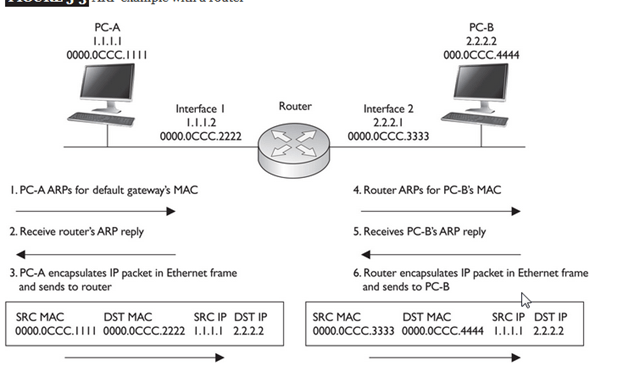
The next device the physical layers encounter is a router routers function at layer 3 of the OSI Reference Model. The router first converts the physical layer signals into bits at the physical layer. The bits are passed up to the data link layer and reassembled into a frame. The router then examines the destination MAC address in the frame. If the MAC address doesn’t match its own MAC address, the router drops the frame. If the MAC address matches, the router strips off the data link layer frame and passes the packet up to the network layer.

At the network layer, one of the functions of the router is to route packets to destinations. To accomplish this, the router examines the destination logical address in the packet and extracts a network number from this address. The router then compares the network number to entries in its routing table. If the router doesn’t find a match, it drops the packet; if it does find a match, it forwards the packet out the destination interface (the local interface designated by the router’s routing table).

To accomplish the packet forwarding, the router passes the packet down to the data link layer, which encapsulates the packet into the correct data link layer frame format. If this were an Ethernet frame, for this example, the source MAC address would be that of the router and the destination would be PC-B. At the data link layer, the frame is then passed down to the physical layer, where the bits are converted into physical layer signals.

When sending traffic between two devices on different segments, the source device has a layer 2 frame with its own MAC address as the source and the default gateway’s (router) MAC address as the destination; however, in the layer 3 packet, the source layer 3 address is the source device and the destination layer 3 address is not the default gateway, but the actual destination the source is trying to reach. Remember that layer 2 addresses are used to communicate with devices on the same physical or logical layer 2 segment/network, and layer 3 addresses are used to communicate with devices across the network (multiple segments). Another way to remember this is that MAC addresses can change from link to link, but layer 3 logical addresses, by default, cannot.

The next device that receives these physical layer signals is the hub Basically, a hub is a multiport repeater: It repeats any physical layer signal it receives. Therefore, a signal received on one interface of a hub is repeated on all of its other interfaces. These signals are then received by PC-B, which passes this information up the protocol stack 

Ethernet Frame Format :

  • When transmitting data over Ethernet, the Ethernet frame is primarily responsible for the correct rule making and successful transmission of data packets. Essentially, data sent over Ethernet is carried by the frame. An Ethernet frame is between 64 bytes and 1,518 bytes big, depending on the size of the data to be transported.
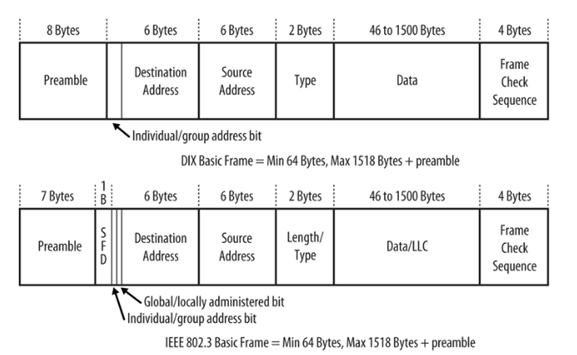
  • The frame was first defined in the original Ethernet DEC-Intel-Xerox (DIX) standard, and was later redefined and modified in the IEEE 802.3 standard. The changes between the two standards were mostly cosmetic, except for the type or length field.
  • The DIX standard defined a type field in the frame. The first 802.3 standard (published in 1985) specified this field as a length field, with a mechanism that allowed both versions of frames to coexist on the same Ethernet system

The standard recommends that new implementations support the most recent frame definition, called an envelope frame, which has a maximum size of 2,000 bytes. The two other sizes are basic frames, with a maximum size of 1,518 bytes, and Q-tagged frames with a maximum of 1,522 bytes


  • Because the DIX and IEEE basic frames both have a maximum size of 1,518 bytes and are identical in terms of the number and length of fields, Ethernet interfaces can send either DIX or IEEE basic frames. The only difference in these frames is in the contents of the fields and the subsequent interpretation of those contents by the network interface software.

ETHERNET FRAME FORMATS

The explanation for the many types of Ethernet Frame Formats currently on the marketplace lies in Ethernet’s history. In 1972, work on the original version of Ethernet, Ethernet Version 1, began at the Xerox Palo Alto Research Center. Version 1 Ethernet was released in 1980 by a consortium of companies comprising DEC, Intel, and Xerox. In the same year, the IEEE meetings on Ethernet began. In 1982, the DIX (DEC/Intel/Xerox) consortium released Version II Ethernet and since then it has almost completely replaced Version I in the marketplace. In 1983 Novell NetWare ’86 was released, with a proprietary frame format based on a preliminary release of the 802.3 spec. Two years later, when the final version of the 802.3 spec was released, it had been modified to include the 802.2 LLC Header, making NetWare’s proprietary format incompatible. Finally, the 802.3 SNAP format was created to address backwards compatibility issues between Version 2 and 802.3 Ethernet.

There are several types of Ethernet frames:

In addition, all four Ethernet frame types may optionally contain an IEEE 802.1Q tag to identify what VLAN it belongs to and its priority (quality of service). This encapsulation is defined in the IEEE 802.3ac specification and increases the maximum frame by 4 octets.

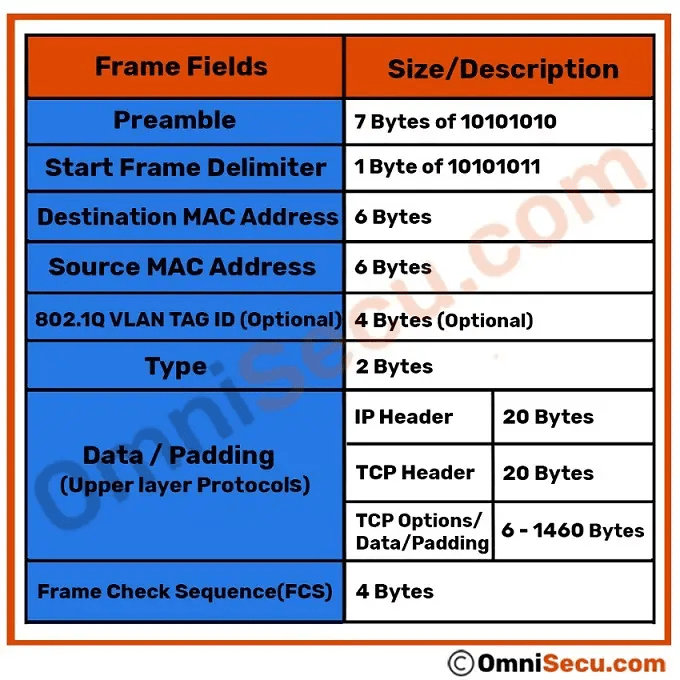
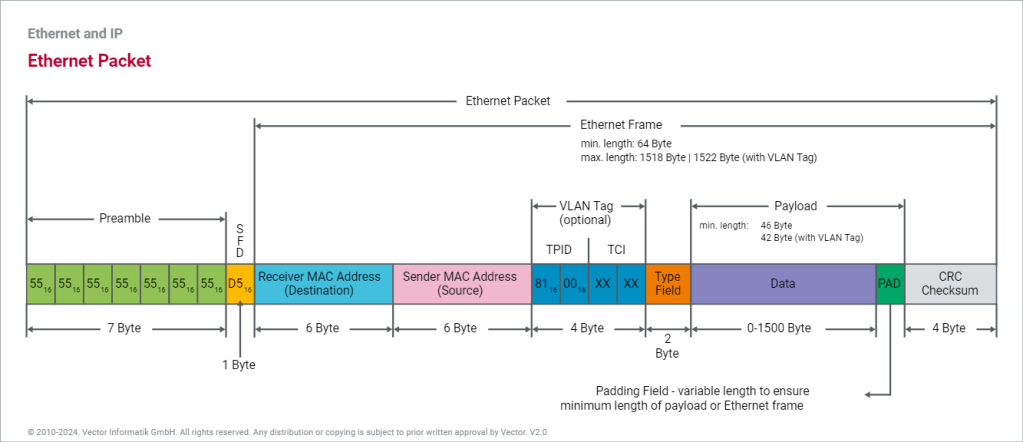
There is a size limitation for Ethernet Frame. The total size of the ethernet frame must be between 64 bytes and 1,518 bytes (not including the preamble)

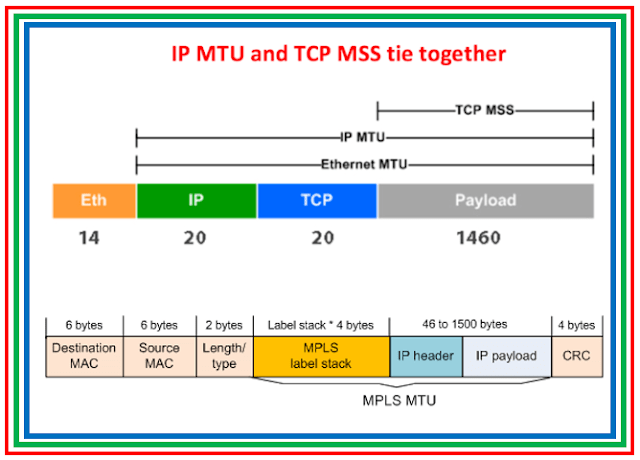
the minimum size of an Ethernet Frame must be 64 bytes (6+6+2+46+4) and maximum size of an Ethernet Frame 1,518 bytes (6+6+2+1500+4).

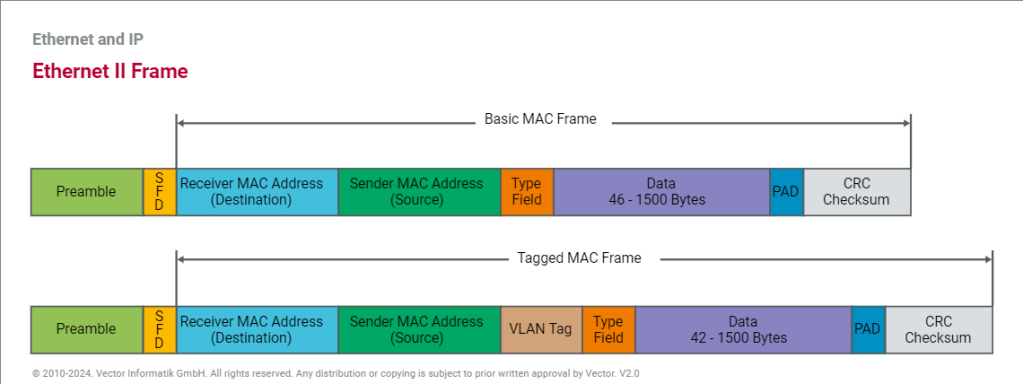
THE ETHERNET II FRAME FORMAT

  • PREAMBLE

The frame begins with the 64-bit preamble field, which was originally incorporated to allow 10 Mb/s Ethernet interfaces to synchronize with the incoming data stream before the fields relevant to

A sequence of 56 bits (7 bytes) having alternating 1 and 0 values (10101010101010101010101010101010101010101010101010101010) that are used for synchronization.

  • It is a 7 byte field that contains a pattern of alternating 0’s and 1’s.
  • It alerts the stations that a frame is going to start.
  • It also enables the sender and receiver to establish bit synchronization.

Why Need of PREAMBLE Bits ?

  • The preamble was initially provided to allow for the loss of a few bits due to signal start-up delays as the signal propagates through a cabling system. Like the heat shield of a spacecraft, which protects the spacecraft from burning up during reentry, the preamble was originally developed as a shield to protect the bits in the rest of the frame when operating at 10 Mb/s.
  • The original 10 Mb/s cabling systems could include long stretches of coaxial cables, joined by signal repeaters. The preamble ensures that the entire path has enough time to start up, so that signals are received reliably for the rest of the frame.
  • While there are differences in how the two standards formally defined the preamble bits, there is no practical difference between the DIX and IEEE preambles. The pattern of bits being sent is identical

Start Frame Delimiter (SFD)-

  • It is a 1 byte field which is always set to 10101011.
  • The last two bits “11” indicate the end of Start Frame Delimiter and marks the beginning of the frame
  • SFD indicates that upcoming bits are starting the frame, which is the destination address. Sometimes SFD is considered part of PRE, this is the reason Preamble is described as 8 Bytes in many places. The SFD warns station or stations that this is the last chance for synchronization.

NOTES

  • The above two fields are added by the physical layer and represents the physical layer header.
  • Sometimes, Start Frame Delimiter (SFD) is considered to be a part of Preamble.
  • That is why, at many places, Preamble field length is described as 8 bytes.

DESTINATION ADDRESS

The destination address field follows the preamble. Each Ethernet interface is assigned a unique 48-bit address, called the interface’s physical or hardware address. The destination address field contains either the 48-bit Ethernet address that corresponds to the address of the interface in the station that is the destination of the frame, a 48-bit multicast address, or the broadcast address

  • The Destination Address specifies to which adapter the data frame is being sent. A Destination Address of all ones specifies a Broadcast Message that is read in by all receiving Ethernet adapters.
  • The first three bytes of the Destination Address are assigned by the IEEE to the vendor of the adapter and are specific to the vendor.
  • The Destination Address format is identical in all implementations of Ethernet.

The first bit of the destination address, as sent onto the network medium, is used to distinguish physical addresses from multicast addresses. If the first bit is zero, then the address is the physical address of an interface, which is also known as a unicast address, because a frame sent to this address only goes to one destination.00 If all 48 bits are ones, this indicates the broadcast, or all-stations, address.

IEEE standard

The IEEE 802.3 version of the frame adds significance to the second bit of the destination address, which is used to distinguish between locally and globally administered addresses. A globally administered address is a physical address assigned to the interface by the manufacturer, which is indicated by setting the second bit to zero. (DIX Ethernet addresses are always globally administered.) If the address of the Ethernet interface is administered locally for some reason, then the second bit is supposed to be set to a value of one. In the case of a broadcast address, the second bit and all other bits are ones in both the DIX and IEEE standards.

Understanding physical addresses

In Ethernet, the 48-bit physical address is written as 12 hexadecimal digits with the digits paired in groups of two, representing an octet (8 bits) of information

This means that an Ethernet address that is written as the hexadecimal string F0-2E-15-6C-77-9B is equivalent to the following sequence of bits, sent over the Ethernet channel from left to right:0000 1111 0111 0100 1010 1000 0011 0110 1110 1110 1101 1001

Therefore, the 48-bit destination address that begins with the hexadecimal value 0xF0 is a unicast address, because the first bit sent on the channel is a zero.

The Source Address

The next six bytes of an Ethernet frame make up the Source Address. The Source Address specifies from which adapter the message originated. Like the Destination Address, the first three bytes specify the vendor of the card.

The Source Address format is identical in all implementations of Ethernet.

The source address is not interpreted in any way by the Ethernet MAC protocol, although it must always be the unicast address of the device sending the frame

Ethernet equipment acquires an organizationally unique identifier (OUI), which is a unique 24-bit identifier assigned by the IEEE. The OUI forms the first half of the physical address of any Ethernet interface that the vendor manufactures. As each interface is manufactured, the vendor also assigns a unique address to the interface using the second 24 bits of the 48-bit address space, and that, combined with the OUI, creates the 48-bit address. 

Offset 12-13: The Ethertype

  • Following the Source Address is a 2 byte field called the Ethertype.

An interesting question arises when one considers the 802.3 and Version II frame formats: Both formats specify a 2 byte field following the source address (an Ethertype in Version II, and a Length field in 802.3) — So how does a driver know which format it is seeing, if it is configured to support both Ethernet frames?

The answer is actually quite simple. All Ethertypes have a value greater than 05DC hex, or 1500 decimal. Since the maximum frame size in Ethernet is 1518 bytes, there is no point in overlapping between Ethertypes and lengths. If the field that follows the Source Address is greater than O5DC hex, the frame is a Version II, otherwise it is something else (either 802.3, 802.3 SNAP or Novell Proprietary)

Network Layer ProtocolHexadecimal Code
IPv40x0800
IPv60x86DD
IEEE 802.1Q (VLAN Tagged Frame)0x8100
IEEE 802.1X (EAP over LAN)0x888E
ARP (Address Resolution Protocol)0x0806
RARP (Reverse Address Resolution Protocol)0x8035
Simple Network Management Protocol (SNMP)0x814C

Maximum Length of Data Field

  • The maximum amount of data that can be sent in a Ethernet frame is 1500 bytes.
  • This is to avoid the monopoly of any single station.
  • If Ethernet allows the frames of big sizes, then other stations may not get the fair chance to send their data

 FCS FIELD

  • The last field in both the DIX and IEEE frames is the frame check sequence (FCS) field, also called the cyclic redundancy check (CRC).This 32-bit field contains a value that is used to check the integrity of the various bits in the frame fields (not including the preamble/SFD).
  • This value is computed using the CRC, a polynomial that is calculated using the contents of the destination, source, type (or length), and data fields
  • As the frame is generated by the transmitting station, the CRC value is simultaneously being calculated. The 32 bits of the CRC value that are the result of this calculation are placed in the FCS field as the frame is sent.
  • The CRC is calculated again by the interface in the receiving station as the frame is read in. The result of this second calculation is compared with the value sent in the FCS field by the originating station. If the two values are identical, then the receiving station is provided with a high level of assurance that no errors have occurred during transmission over the Ethernet channel. If the values are not identical, then the interface can discard the frame and increment the frame error counter.
  • END OF FRAME DETECTION

The presence of a signal on the Ethernet channel is known as carrier

  • The transmitting interface stops sending data after the last bit of a frame is transmitted, which causes the Ethernet channel to become idle.

V-LAN Tagged Frame

The IEEE specifications define different formats for Ethernet frames. The automotive industry typically uses the Ethernet II frame, which can also contain information for VLAN as an extension. For this reason, a distinction is made between the basic MAC frame (without VLAN) and the tagged MAC frame (including VLAN).

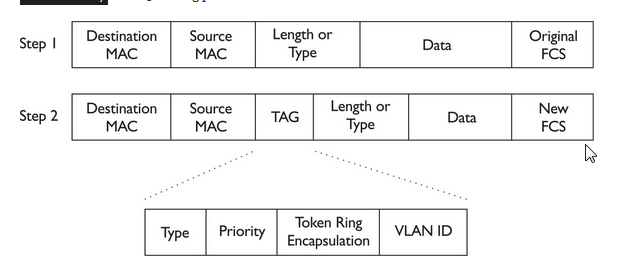
A VLAN tag consists of a protocol identifier (TPID) and control information (TCI). While the TPID contains the value of the original type field, the TCI consists of a Priority (PCP), a Drop Eligible or Canonical Form Indicator (DEI or CFI), and an Identifier (VID). Identifier and Priority are mainly used in the automotive industry. The Identifier distinguishes the respective virtual network for the different application areas. The Priority allows optimization of run-times through switches so that important information is forwarded preferentially.

THE IEEE 802.3 SNAP FRAME FORMAT

While the original 802.3 specification worked well, the IEEE realized that some upper layer protocols required an Ether type to work properly. For example, TCP/IP uses the Ether type to differentiate between ARP packets and normal IP data frames. In order to provide this backwards compatibility with the Version II frame type, the 802.3 SNAP (Sub Network Access Protocol) format was created.

The SNAP Frame Format consists of a normal 802.3 Data Link Header followed by a normal 802.2 LLC Header and then a 5-byte SNAP field, followed by the normal user data and FCS.

Ethernet 802.3 SNAP Frame Format - Analysis


Offset 0-5: The Destination Address

  • The first six bytes of an Ethernet frame make up the Destination Address. The Destination Address specifies to which adapter the data frame is being sent. A Destination Address of all ones specifies a Broadcast Message that is read in by all receiving Ethernet adapters.
  • The first three bytes of the Destination Address are assigned by the IEEE to the vendor of the adapter and are specific to the vendor.
  • The Destination Address format is identical in all implementations of Ethernet.

Offset 6-11: The Source Address

  • The next six bytes of an Ethernet frame make up the Source Address. The Source Address specifies from which adapter the message originated. Like the Destination Address, the first three bytes specify the vendor of the card.
  • The Source Address format is identical in all implementations of Ethernet.

Offset 12-13: Length

  • Bytes 13 and 14 of an Ethernet frame contain the length of the data in the frame, not including the preamble32 bit CRCDLC addresses, or the Length field itself. An Ethernet frame can be no shorter than 64 bytes total length and no longer than 1518 bytes total length.

Following the Datalink Header is the Logical Link Control (LLC) Header, which is described in the IEEE 802.2 Specification. The purpose of the LLC header is to provide a “hole in the ceiling” of the Datalink Layer. By specifying into which memory buffer the adapter places the data frame, the LLC header allows the upper layers to know where to find the data.

Offset 15: The Destination Service Access Point (DSAP)

  • The Destination Service Access Point or DSAP, is a 1 byte field that simply acts as a pointer to a memory buffer in the receiving station. It tells the receiving network interface card in which buffer to put this information. This functionality is crucial in situations where users are running multiple protocol stacks, etc…

Offset 16: The Source Service Access Point (SSAP)

  • The Source Service Access Point or SSAP is analogous to the DSAP and specifies the Source of the sending process.

Offset 17: The Control Byte

  • Following the SAPs is a one byte control field that specifies the type of LLC frame that this is.

The LLC header includes two eight-bit address fields, called service access points (SAPs) in OSI terminology; when both source and destination SAP are set to the value 0xAA, the LLC header is followed by a SNAP header. The SNAP header allows EtherType values to be used with all IEEE 802 protocols, as well as supporting private protocol ID spaces.

  • Common SAP values include:
ohex ’04’ – IBM SNA (Systems Network Architecture)
ohex ’06’ – IP (Internet Protocol)
ohex ’12’ – LAN Printing
ohex ‘AA’ – SNAP (Sub-Network Access Protocol)
ohex ‘BC’ – Banyan
ohex ‘C8’ – HPR (High Performance Routing)
ohex ‘E0’ – Novell

Offset 18-20: The Vendor Code

  • The first 3 bytes of the SNAP header is the vendor code, generally the same as the first three bytes of the source address although it is sometimes set to zero.

Offset 21-22: The Local Code

  • Following the Vendor Code is a 2 byte field that typically contains an Ether type for the frame. This is where the backwards compatibility with Version II Ethernet is implemented.

USER DATA AND THE FRAME CHECK SEQUENCE (FCS) 

Ethernet 802.3 SNAP Frame Format - Analysis

Data: 38-1492 Bytes

  • Following the 802.2 header are 38 to 1492 bytes of data, generally consisting of upper layer headers such as TCP/IP or IPX and then the actual user data.

FCS: Last 4 Bytes

  • The last 4 bytes that the adapter reads in are the Frame Check Sequence or CRC. When the voltage on the wire returns to zero, the adapter checks the last 4 bytes it received against a checksum that it generates via a complex polynomial. If the calculated checksum does not match the checksum on the frame, the frame is discarded and never reaches the memory buffers in the station.
  • When using a SNAP header, the 802.2 LLC header is always the same:

    DSAP (1 byte) = hex ‘AA’
    SSAP (1 byte) = hex ‘AA’
    Control (1 byte) = hex ’03’
  • The SNAP header is 5 bytes and is included in the frame immediately following the 802.2 LLC header.

    The first 3 bytes of the SNAP header are referred to as the Organization Unique Identifier (OUI), or simply the Organization ID. This indicates the company to which the embedded non-compliant protocol belongs.

    Common OUI values include:

    ’00-02-55′ – IBM Corporation (along with many other OUIs)
    ’00-00-0C’ – Cisco Systems (along with many other OUIs)
    ’00-80-C2′ – IEEE 802.1 Committee

    Note: Most of the time, this field is set to ’00-00-00′.

    The last 2 bytes of the SNAP header include the EtherType (sometimes called the protocol ID), which indicates the embedded non-compliant protocol. These are the same as the EtherTypes included in the Ethernet Version 2 frame format.

References:

https://www.ionos.com/digitalguide/server/know-how/ethernet-frame

TCP/IP Protocol & Frame Structure of IP

Introduction

Internet addresses allow any machine on the network to communicate with any other machine on the network.

TCP/IP provides facilities that make the computer system an Internet host, which can attach to a network and communicate with other Internet hosts

The TCP/IP protocol stack actually doesn’t define the components of the network access layer in the TCP/IP standards, but it uses the term to refer to layer 2 and layer 1 functions.

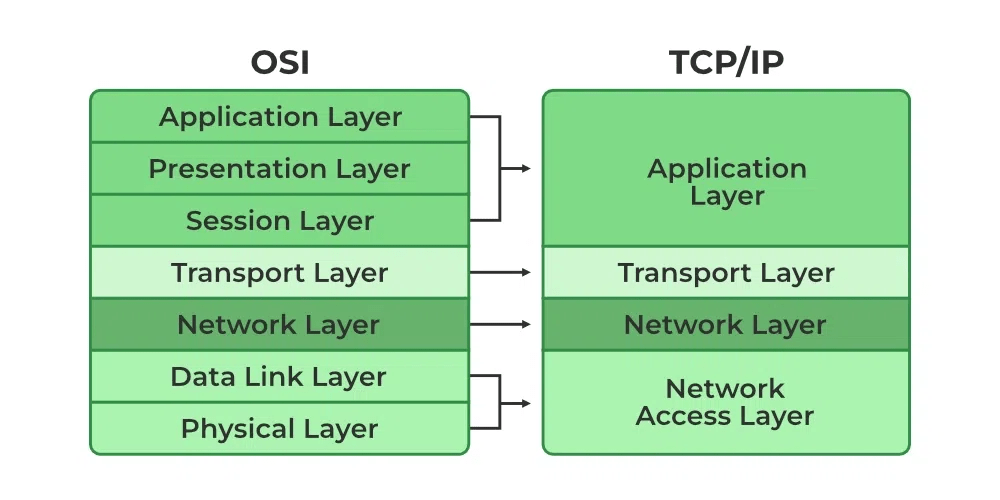
Whereas the OSI model has seven layers, the TCP/IP protocol stack has only four layers. Its application layer covers the application, presentation, and session layers of the OSI Reference Model, its Internet layer corresponds to the OSI model’s network layer to describe layer 3, and its network access layer includes both the data link and physical layers of the OSI model.

As the name implies, TCP/IP is a combination of two separate protocols: TCP(transmission control protocol) and IP (Internet protocol). The Internet Protocol standard dictates the logistics of packets sent out over networks; it tells packets where to go and how to get there. IP has a method that lets any computer on the Internet forward a packet to another computer that is one or more intervals closer to the packet’s recipient. You can think of it like workers in a line passing boulders from a quarry to a mining cart.

What is the Difference between TCP and IP?

TCP and IP are different protocols of Computer Networks. The basic difference between TCP (Transmission Control Protocol) and IP (Internet Protocol) is in the transmission of data. In simple words, IP finds the destination of the mail and TCP has the work to send and receive the mail. UDP is another protocol, which does not require IP to communicate with another computer. IP is required by only TCP. This is the basic difference between TCP and IP.

What are the different layers of TCP/IP?

There are four total layers of TCP/IP protocol, listed below with a brief description.

  • Network Access Layer – This layer is concerned with building packets
  • Internet Layer – This layer uses IP (Internet Protocol) to describe how packets are to be delivered. IP: IP stands for Internet Protocol and it is responsible for delivering packets from the source host to the destination host by looking at the IP addresses in the packet headers. IP has 2 versions: IPv4 and IPv6. IPv4 is the one that most websites are using currently. But IPv6 is growing as the number of IPv4 addresses is limited in number when compared to the number of users.
  • Transport Layer – This layer utilizes UDP(User Datagram Protocol) and TCP(Transmission Control Protocol) to ensure the proper transmission of data.The TCP/IP transport layer protocols exchange data receipt acknowledgments and retransmit missing packets to ensure that packets arrive in order and without error. End-to-end communication is referred to as such. Transmission Control Protocol (TCP) and User Datagram Protocol are transport layer protocols at this level (UDP).TCP: Applications can interact with one another using TCP as though they were physically connected by a circuit. TCP transmits data in a way that resembles character-by-character transmission rather than separate packets. A starting point that establishes the connection, the whole transmission in byte order, and an ending point that closes the connection make up this transmission.UDP: The datagram delivery service is provided by UDP, the other transport layer protocol. Connections between receiving and sending hosts are not verified by UDP. Applications that transport little amounts of data use UDP rather than TCP because it eliminates the processes of establishing and validating connections.
  • Application Layer – This layer deals with application network processes. These processes include FTP(File Transfer Protocol), HTTP(Hypertext Transfer Protocol), and SMTP(Simple Mail Transfer Protocol).

The IP protocol is mainly responsible for these functions:

  • Connectionless data delivery: best-effort delivery with no data recovery capabilities
  •    Hierarchical logical addressing to provide for highly scalable internetworks

The Internet layer is primarily responsible for network addressing and routing of IP packets. IP protocols at the Internet layer include Address Resolution Protocol (ARP), Reverse Address Resolution Protocol (RARP), Internet Control Management Protocol (ICMP), Open Shortest Path First (OSPF)

Where the transport layer uses segments to transfer information between machines, the Internet layer uses datagrams. (Datagram is just another word for packet

The main function of the IP datagram is to carry protocol information for either Internet layer protocols (other TCP/IP layer 3 protocols) or encapsulated transport layer protocols (TCP and User Datagram Protocol, or UDP). To designate what protocol the IP datagram is carrying in the data field, the IP datagram carries the protocol’s number in the Protocol field.

some common IP protocols and their protocol numbers: ICMP (1), IPv6 (41), TCP (6), UDP (17), Enhanced Interior Gateway Routing Protocol (EIGRP) (88), and OSPF (89). Notice that routing occurs at the Internet layer

Frame Structure

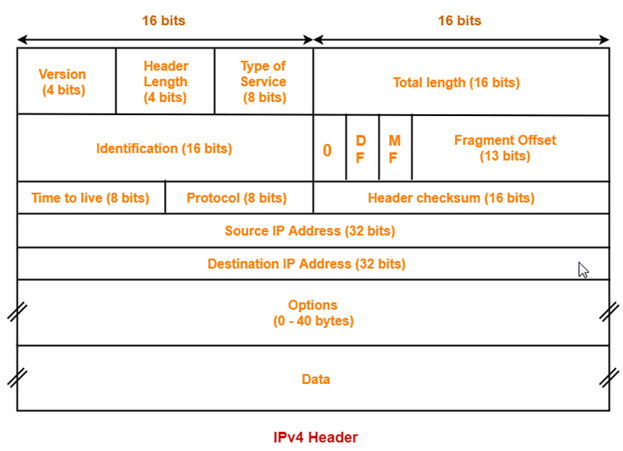
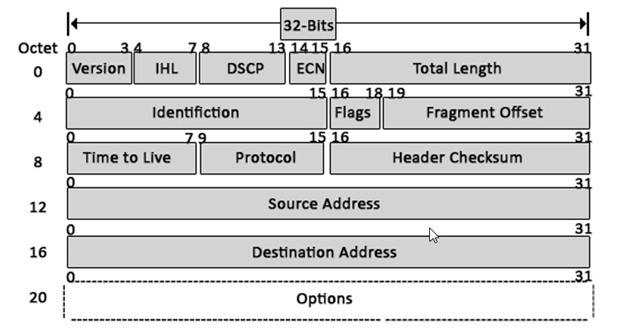
1) Version: The first header field is a 4-bit version indicator. In the case of IPv4, the value of its four bits is set to 0100 which indicates 4 in binary.

2) Internet Header Length: IHL is the 2nd field of an IPv4 header and it is of 4 bits in size. This header component is used to show how many 32-bit words are present in the header. As we know, IPv4 headers have a variable size so this is used to specify the size of the header to avoid any errors. This size can be between 20 bytes to 60 bytes.

  • The initial 5 rows of the IP header are always used.
  • So, minimum length of IP header = 5 x 4 bytes = 20 bytes.
  • The size of the 6th row representing the Options field vary.
  • The size of Options field can go up to 40 bytes.
  • So, maximum length of IP header = 20 bytes + 40 bytes = 60 bytes.

Concept of Scaling Factor-

  • Header length is a 4 bit field.
  • So, the range of decimal values that can be represented is [0, 15].
  • But the range of header length is [20, 60].
  • So, to represent the header length, we use a scaling factor of 4.

In general,

Header length = Header length field value x 4 bytes

Examples-

  • If header length field contains decimal value 5 (represented as 0101), then-

Header length = 5 x 4 = 20 bytes

  • If header length field contains decimal value 10 (represented as 1010), then-

Header length = 10 x 4 = 40 bytes

  • If header length field contains decimal value 15 (represented as 1111), then-

Header length = 15 x 4 = 60 bytes

3) Type Of Service

  • Type of service is a 8 bit field that is used for Quality of Service (QoS).
  • The datagram is marked for giving a certain treatment using this field.
  • ToS is also called Differentiated Services Code Point or DSCP. This field is used to provide features related to the quality of service such as for data streaming or Voice over IP (VoIP) calls. It is used to specific how a datagram will be handled.

4) Total Length-

  • Total length is a 16 bit field that contains the total length of the datagram (in bytes).
  • Total Length: Size of this field is 16 bit and it is used to denote the size of the entire datagram. The minimum size of an IP datagram is 20 bytes and at the maximum, it can be 65,535 bytes. Practically, all hosts are required to be able to read 576-byte datagrams. If a datagram is too large for the hosts in the network, fragmentation is used which is handled in the host or packet switch.

5) Identification-

  • Identification is a 16 bit field.
  • It is used for the identification of the fragments of an original IP datagram.

When an IP datagram is fragmented,

  • Each fragmented datagram is assigned the same identification number.
  • This number is useful during the re assembly of fragmented datagrams.
  • It helps to identify to which IP datagram, the fragmented datagram belongs to.

6) Flags: flag in an IPv4 header is a three-bit field that is used to control and identify fragments. The following can be their possible configuration:

  • Bit 0: this is reserved and has to be set to zero
  • Bit 1: DF or do not fragment
  • Bit 2: MF or more fragments

DF Bit-

  • DF bit stands for Do Not Fragment bit.
  • Its value may be 0 or 1.

When DF bit is set to 0,

  • It grants the permission to the intermediate devices to fragment the datagram if required.

When DF bit is set to 1,

  • It indicates the intermediate devices not to fragment the IP datagram at any cost.
  • If network requires the datagram to be fragmented to travel further but settings does not allow its fragmentation, then it is discarded.
  • An error message is sent to the sender saying that the datagram has been discarded due to its settings.

7. MF Bit-

  • MF bit stands for More Fragments bit.
  • Its value may be 0 or 1.

When MF bit is set to 0,

  • It indicates to the receiver that the current datagram is either the last fragment in the set or that it is the only fragment.

When MF bit is set to 1,

  • It indicates to the receiver that the current datagram is a fragment of some larger datagram.
  • More fragments are following.
  • MF bit is set to 1 on all the fragments except the last one.
  • Time to live (or TTL in short) is an 8-bit field to indicate the maximum time the datagram will be live in the internet system. The time here is measured in seconds and in case the value of TTL is zero, the datagram is erased. Every time a datagram is processed, it’s Time to live is decreased by one second. These are used so that datagrams that are not delivered are discarded automatically. TTL can be between 0 – 255.
  • Time to live (TTL) is a 8 bit field.
  • It indicates the maximum number of hops a datagram can take to reach the destination.
  • The main purpose of TTL is to prevent the IP datagrams from looping around forever in a routing loop.

The value of TTL is decremented by 1 when-

  • Datagram takes a hop to any intermediate device having network layer.
  • Datagram takes a hop to the destination.

If the value of TTL becomes zero before reaching the destination, then datagram is discarded

It is important to note-

  • Both intermediate devices having network layer and destination decrements the TTL value by 1.
  • If the value of TTL is found to be zero at any intermediate device, then the datagram is discarded.
  • So, at any intermediate device, the value of TTL must be greater than zero to proceed further.
  • If the value of TTL becomes zero at the destination, then the datagram is accepted.
  • So, at the destination, the value of TTL may be greater than or equal to zero.

8) Protocol: This is a filed in the IPv4 header reserved to denote which protocol is used in the later (data) portion of the datagram. For Example, number 6 is used to denote TCP and 17 is used to denote UDP protocol

·  It tells the network layer at the destination host to which protocol the IP datagram belongs to.

·  In other words, it tells the next level protocol to the network layer at the destination side.

·  Protocol number of ICMP is 1, IGMP is 2, TCP is 6 and UDP is 17.

Why Protocol Number Is A Part Of IP Header?

Consider-

  • An IP datagram is sent by the sender to the receiver.
  • When datagram reaches at the router, it’s buffer is already full.

In such a case,

  • Router does not discard the datagram directly.
  • Before discarding, router checks the next level protocol number mentioned in its IP header.
  • If the datagram belongs to TCP, then it tries to make room for the datagram in its buffer.
  • It creates a room by eliminating one of the datagrams having lower priority.
  • This is because it knows that TCP is a reliable protocol and if it discards the datagram, then it will be sent again by the sender.
  • The order in which router eliminate the datagrams from its buffer is-

ICMP > IGMP > UDP > TCP

If protocol number would have been inside the datagram, then-

  • Router could not look into it.
  • This is because router has only three layers- physical layer, data link layer and network layer.

That is why, protocol number is made a part of IP header.

9) Header Checksum-

  • Header checksum is a 16 bit field.
  • It contains the checksum value of the entire header.
  • The checksum value is used for error checking of the header.

At each hop,

  • The header checksum is compared with the value contained in this field.
  • If header checksum is found to be mismatched, then the datagram is discarded.
  • Router updates the checksum field whenever it modifies the datagram header.
  • ·  Source Address: It is a 32-bit address of the source of the IPv4 packet.
  • ·  Destination Address: the destination address is also 32 bit in size and it contains the address of the receiver.

Options-

  • Options is a field whose size vary from 0 bytes to 40 bytes.
  • This field is used for several purposes such as-
  1. Record route
  2. Source routing
  3. Padding

1. Record Route-

  • A record route option is used to record the IP Address of the routers through which the datagram passes on its way.
  • When record route option is set in the options field, IP Address of the router gets recorded in the Options field.
The maximum number of IPv4 router addresses that can be recorded in the Record Route option field of an IPv4 header is 9.

Explanation-

  • In IPv4, size of IP Addresses = 32 bits = 4 bytes.
  • Maximum size of Options field = 40 bytes.
  • So, it seems maximum number of IP Addresses that can be recorded = 40 / 4 = 10.
  • But some space is required to indicate the type of option being used.
  • Also, some space is to be left between the IP Addresses.
  • So, the space of 4 bytes is left for this purpose.
  • Therefore, the maximum number of IP addresses that can be recorded = 9.

Padding-

  • Addition of dummy data to fill up unused space in the transmission unit and make it conform to the standard size is called as padding.
  • Options field is used for padding.

Example-

  • When header length is not a multiple of 4, extra zeroes are padded in the Options field.
  • By doing so, header length becomes a multiple of 4.
  • If header length = 30 bytes, 2 bytes of dummy data is added to the header.
  • This makes header length = 32 bytes.
  • Then, the value 32 / 4 = 8 is put in the header length field.
  • In worst case, 3 bytes of dummy data might have to be padded to make the header length a multiple of 4.

Transport Layer Protocols TCP-UDP

Transmission Control Protocol

  • TCP uses a reliable delivery system to deliver layer 4 segments to the destination. This would be analogous to using a certified, priority, or next-day service with the US Postal Service.
  • For example, with a certified letter, the receiver must sign for it, indicating the destination actually received the letter: Proof of the delivery is provided. TCP operates under a similar premise: It can detect whether or not the destination received a sent segment
  • TCP’s main responsibility is to provide a reliable, full-duplex, connection-oriented, logical service between two devices. TCP goes through a three-way handshake to establish a session before data can be sent.
  • Both the source and destination can simultaneously send data across the session. It uses windowing to implement flow control so that a source device doesn’t overwhelm a destination with too many segments.
  • it supports data recovery, where any missed or corrupted information can be re-sent by the source. Any packets that arrive out of order because the segments traveled different paths to reach the destination can easily be reordered, since segments use sequence numbers to keep track of the ordering.
  • TCP provides a reliable, connection-oriented, logical service through the use of sequence and acknowledgment numbers, windowing for flow control, error detection and correction (resending bad segments) through checksums, reordering packets, and dropping extra duplicated packets.
  • IP datagram contains a protocol field, indicating the protocol that is encapsulated in the payload. In the case of TCP, the protocol field contains 6 as a value, indicating that a TCP segment is encapsulated.

TCP segments are encapsulated in the IP datagram

1) Source Port-
  • Source Port is a 16 bit field.
  • It identifies the port of the sending application.

2) Destination Port

  • Destination Port is a 16 bit field.
  • It identifies the port of the receiving application.

Source Port and Destination Port fields together identify the two local end points of the particular connection. A port plus its hosts’ IP address forms a unique end point. Ports are used to communicate with the upper layer and distinguish different application sessions on the host.

It is important to note-

  • A TCP connection is uniquely identified by using-
  • Combination of port numbers and IP Addresses of sender and receiver
  • IP Addresses indicate which systems are communicating.
  • Port numbers indicate which end to end sockets are communicating.

3) Sequence Number-

  • Sequence number is a 32 bit field.
  • TCP assigns a unique sequence number to each byte of data contained in the TCP segment.
  • This field contains the sequence number of the first data byte.
  •  It ensures that the data is received in proper order by ordered segmenting and reassembling them at the receiving end.

4) Acknowledgement Number-

  • Acknowledgment number is a 32 bit field.
  • It contains sequence number of the data byte that receiver expects to receive next from the sender.
  • It is always sequence number of the last received data byte incremented by 1.
5) Header Length
  • Header length is a 4 bit field.
  • It contains the length of TCP header.
  • It helps in knowing from where the actual data begins.
Minimum and Maximum Header length-
The length of TCP header always lies in the range- [20 bytes , 60 bytes]
  • The initial 5 rows of the TCP header are always used.
  • So, minimum length of TCP header = 5 x 4 bytes = 20 bytes.
  • The size of the 6th row representing the Options field vary.
  • The size of Options field can go up to 40 bytes.
  • So, maximum length of TCP header = 20 bytes + 40 bytes = 60 bytes.
Concept of Scaling Factor-
  • Header length is a 4 bit field.
  • So, the range of decimal values that can be represented is [0, 15].
  • But the range of header length is [20, 60].
  • So, to represent the header length, we use a scaling factor of 4.

In general,

Header length = Header length field value x 4 bytes
Examples-
  • If header length field contains decimal value 5 (represented as 0101), then-

Header length = 5 x 4 = 20 bytes

  • If header length field contains decimal value 10 (represented as 1010), then-

Header length = 10 x 4 = 40 bytes

  • If header length field contains decimal value 15 (represented as 1111), then-

Header length = 15 x 4 = 60 bytes

NOTES

It is important to note-

  • Header length and Header length field value are two different things.
  • The range of header length field value is always [5, 15].
  • The range of header length is always [20, 60].

While solving questions-

  • If the given value lies in the range [5, 15] then it must be the header length field value.
  • This is because the range of header length is always [20, 60].
6. Reserved Bits-
  • The 6 bits are reserved.
  • These bits are not used.

7) Flags

URG Bit-
URG bit is used to treat certain data on an urgent basis.

When URG bit is set to 1,

  • It indicates the receiver that certain amount of data within the current segment is urgent.
  • Urgent data is pointed out by evaluating the urgent pointer field.
  • The urgent data has be prioritized.
  • Receiver forwards urgent data to the receiving application on a separate channel.
ACK Bit-
ACK bit indicates whether acknowledgement number field is valid or not.
ACK (Acknowledgment): Its purpose is transfer the acknowledgement of whether the the sender has received data.
  • When ACK bit is set to 1, it indicates that acknowledgement number contained in the TCP header is valid.
  • For all TCP segments except request segment, ACK bit is set to 1.
  • Request segment is sent for connection establishment during Three Way Handshake.
PSH Bit-
PSH bit is used to push the entire buffer immediately to the receiving application.

When PSH bit is set to 1,

  • All the segments in the buffer are immediately pushed to the receiving application.
  • No wait is done for filling the entire buffer.
  • This makes the entire buffer to free up immediately.
NOTE It is important to note- Unlike URG bit, PSH bit does not prioritize the data. It just causes all the segments in the buffer to be pushed immediately to the receiving application. The same order is maintained in which the segments arrived. It is not a good practice to set PSH bit = 1. This is because it disrupts the working of receiver’s CPU and forces it to take an action immediately.
RST Bit-
RST bit is used to reset the TCP connection.

When RST bit is set to 1,

  • It indicates the receiver to terminate the connection immediately.
  • It causes both the sides to release the connection and all its resources abnormally.
  • The transfer of data ceases in both the directions.
  • It may result in the loss of data that is in transit.

This is used only when-

  • There are unrecoverable errors.
  • There is no chance of terminating the TCP connection normally.
SYN Bit-
SYN bit is used to synchronize the sequence numbers.
Responsible for connecting the sender and receiver.

When SYN bit is set to 1,

  • It indicates the receiver that the sequence number contained in the TCP header is the initial sequence number.
  • Request segment sent for connection establishment during Three way handshake contains SYN bit set to 1.
FIN Bit-

FIN (Finish): It informs whether the TCP connection is terminated or not.

When FIN bit is set to 1,

  • It indicates the receiver that the sender wants to terminate the connection.
  • FIN segment sent for TCP Connection Termination contains FIN bit set to 1.
8. Window Size-
  • Window size is a 16 bit field.
  • It contains the size of the receiving window of the sender.
  • It advertises how much data (in bytes) the sender can receive without acknowledgement.
  • Thus, window size is used for Flow Control.
NOTE It is important to note- The window size changes dynamically during data transmission. It usually increases during TCP transmission up to a point where congestion is detected. After congestion is detected, the window size is reduced to avoid having to drop packets.
9. Checksum-
  • Checksum is a 16 bit field used for error control.
  • It verifies the integrity of data in the TCP payload.
  • Sender adds CRC checksum to the checksum field before sending the data.
  • Receiver rejects the data that fails the CRC check.

10. Urgent Pointer-
  • Urgent pointer is a 16 bit field.
  • It indicates how much data in the current segment counting from the first data byte is urgent.
  • Urgent pointer added to the sequence number indicates the end of urgent data byte.
  • This field is considered valid and evaluated only if the URG bit is set to 1.
USEFUL FORMULAS   Formula-01: Number of urgent bytes = Urgent pointer + 1   Formula-02: End of urgent byte = Sequence number of the first byte in the segment + Urgent pointer
11. Options-
  • Options field is used for several purposes.
  • The size of options field vary from 0 bytes to 40 bytes.

Options field is generally used for the following purposes-

  1. Time stamp
  2. Window size extension
  3. Parameter negotiation
  4. Padding
A. Time Stamp-

When wrap around time is less than life time of a segment,

  • Multiple segments having the same sequence number may appear at the receiver side.
  • This makes it difficult for the receiver to identify the correct segment.
  • If time stamp is used, it marks the age of TCP segments.
  • Based on the time stamp, receiver can identify the correct segment.
B. Window Size Extension-
  • Options field may be used to represent a window size greater than 16 bits.
  • Using window size field of TCP header, window size of only 16 bits can be represented.
  • If the receiver wants to receive more data, it can advertise its greater window size using this field.
  • The extra bits are then appended in Options field.
C. Parameter Negotiation-

Options field is used for parameters negotiation.

Example- During connection establishment,

  • Both sender and receiver have to specify their maximum segment size.
  • To specify maximum segment size, there is no special field.
  • So, they specify their maximum segment size using this field and negotiates.
D. Padding-
  • Addition of dummy data to fill up unused space in the transmission unit and make it conform to the standard size is called as padding.
  • Options field is used for padding.

Example-

  • When header length is not a multiple of 4, extra zeroes are padded in the Options field.
  • By doing so, header length becomes a multiple of 4.
  • If header length = 30 bytes, 2 bytes of dummy data is added to the header.
  • This makes header length = 32 bytes.
  • Then, the value 32 / 4 = 8 is put in the header length field.
  • In worst case, 3 bytes of dummy data might have to be padded to make the header length a multiple of 4.

User Datagram Protocol

  • While TCP provides a reliable connection, UDP provides an unreliable connection. UDP doesn’t go through a three-way handshake to set up a connection—it simply begins sending the data.
    • UDP does have an advantage over TCP: It has less overhead
    • For example, if you need to send only one segment and receive one segment in reply, and that’s the end of the transmission, it makes no sense to go through a three-way handshake to establish a connection and then send and receive the two segments; this is not efficient. DNS queries are a good example in which the use of UDP makes sense.
  • UDP is more efficient than TCP because it has less overhead.
    • When transmitting a UDP segment, an IP header will show 17 as the protocol number in the protocol field.
    • First, since UDP is connectionless, sequence and acknowledgment numbers are not necessary. Second, since there is no flow control, a window size field is not needed. As you can see, UDP is a lot simpler and more efficient than TCP. Its only reliability component, like TCP, is a checksum field, which allows UDP, at the destination, to detect a bad UDP segment and then drop it. Any control functions or other reliability functions that need to be implemented for the session are not accomplished at the transport layer; instead, these are handled at the application layer.
Characteristics of UDP-
  • It is a connectionless protocol.
  • It is a stateless protocol.
  • It is an unreliable protocol.
  • It is a fast protocol.
  • It offers the minimal transport service.
  • It is almost a null protocol.
  • It does not guarantee in order delivery.
  • It does not provide congestion control mechanism.
  • It is a good protocol for data flowing in one direction.
Need of UDP-
  • TCP proves to be an overhead for certain kinds of applications.
  • The Connection Establishment Phase, Connection Termination Phase etc of TCP are time consuming.
  • To avoid this overhead, certain applications which require fast speed and less overhead use UDP.
Applications Using UDP-

Following applications use UDP-

  • Applications which require one response for one request use UDP. Example- DNS.
  • Routing Protocols like RIP and OSPF use UDP because they have very small amount of data to be transmitted.
  • Trivial File Transfer Protocol (TFTP) uses UDP to send very small sized files.
  • Broadcasting and multicasting applications use UDP.
  • Streaming applications like multimedia, video conferencing etc use UDP since they require speed over reliability.
  • Real time applications like chatting and online games use UDP.
  • Management protocols like SNMP (Simple Network Management Protocol) use UDP.
  • Bootp / DHCP uses UDP.
  • Other protocols that use UDP are- Kerberos, Network Time Protocol (NTP), Network News Protocol (NNP), Quote of the day protocol etc.

Note-01:

Size of UDP Header= 8 bytes
  • Unlike TCP header, the size of UDP header is fixed.
  • This is because in UDP header, all the fields are of definite size.
  • Size of UDP Header = Sum of the size of all the fields = 8 bytes.

Note-02:

UDP is almost a null protocol.

This is because-

  • UDP provides very limited services.
  • The only services it provides are check summing of data and multiplexing by port number.

Note-03:

UDP is an unreliable protocol.

This is because-

  • UDP does not guarantee the delivery of datagram to its respective user (application).
  • The lost datagrams are not retransmitted by UDP.

Note-04:

Checksum calculation is not mandatory in UDP.

This is because-

  • UDP is already an unreliable protocol and error checking does not make much sense.
  • Also, time is saved and transmission becomes faster by avoiding to calculate it.

It may be noted-

  • To disable the checksum, the field value is set to all 0’s.
  • If the computed checksum is zero, the field value is set to all 1’s.

Note-05:

UDP does not guarantee in order delivery.

This is because-

  • UDP allows out of order delivery to ensure better performance.
  • If some data is lost on the way, it does not call for retransmission and keeps transmitting data.

Note-06:

Application layer can perform some tasks through UDP.

Application layer can do the following tasks through UDP-

  1. Trace Route
  2. Record Route
  3. Time stamp

When required,

  • Application layer conveys to the UDP which conveys to the IP datagram.
  • UDP acts like a messenger between the application layer and the IP datagram.

Which One Should You Use?

Choosing the right transport protocol to use depends on the type of data to be transferred. For information that needs reliability, sequence transmission and data integrity — TCP is the transport protocol to use. For data that require real-time transmission with low overhead and less processing — UDP is the right choice.

Common TCP/IP Ports

TCP/IP’s transport layer uses port numbers and IP addresses to multiplex sessions between multiple hosts. If you look back at Tables , you’ll see that both the TCP and UDP headers have two port fields: a source port and a destination port. These, as well as the source and destination IP addresses in the IP header, are used to identify each session uniquely between two or more hosts. As you can see from the port number field, the port numbers are 16 bits in length, allowing for port numbers from 0 to 65,535 (a total of 65,536 ports).

Port numbers fall under three types:

Well-known These port numbers range from 0 to 1023 and are assigned by the Internet Assigned Number Authority (IANA) to applications commonly used on the Internet, such as HTTP, DNS, and SMTP.

Registered These port numbers range from 1024 to 49,151 and are assigned by IANA for proprietary applications, such as Microsoft SQL Server, Shockwave, Oracle, and many others.

Dynamically assigned These port numbers range from 49,152 to 65,535 and are dynamically assigned by the operating system to use for a session.

Remember a few examples of applications (and their ports) that use TCP: HTTP (80), FTP (21), POP3 (110), SMTP (25), SSH (22), and telnet (23). Remember a few examples of UDP applications, along with their assigned port numbers: DNS queries (53), RIP (520), SNMP (161), and TFTP (69).

Application Mapping

When you initiate a connection to a remote application, your operating system should pick a currently unused dynamic port number from 49,152 to 65,535 and assign this number as the source port number in the TCP or UDP header. Based on the application that is running, the application will fill in the destination port number with the well-known or registered port number of the application. When the destination receives this segment, it looks at the destination port number and knows by which application this segment should be processed. This is also true for traffic returning from the destination.

No matter where a session begins, or how many sessions a device encounters, a host can easily differentiate between various sessions by examining the source and destination port numbers, as well as the source and destination layer 3 IP addresses.

TCP and UDP provide a multiplexing function for simultaneously supporting multiple sessions to one or more hosts: This allows multiple applications to send and receive data to and from many devices simultaneously. With these protocols, port numbers (at the transport layer) and IP addresses (at the Internet layer) are used to differentiate the sessions.

As shown in Tables 8-1 and 8-2, however, two port numbers are included in the segment: source and destination. When you initiate a connection to a remote application, your operating system should pick a currently unused dynamic port number from 49,152 to 65,535 and assign this number as the source port number in the TCP or UDP header. Based on the application that is running, the application will fill in the destination port number with the well-known or registered port number of the application. When the destination receives this segment, it looks at the destination port number and knows by which application this segment should be processed. This is also true for traffic returning from the destination.

Let’s look at an example, shown in Figure 8-1, that uses TCP for multiplexing sessions. In this example, PC-A has two telnet connections between itself and the server. You can tell these are telnet connections by examining the destination port number (23). When the destination receives the connection setup request, it knows that it should start up the telnet process. Also notice that the source port number is different for each of these connections (50,000 and 50,001). This allows both the PC and the server to differentiate between the two separate telnet sessions. This is a simple example of multiplexing connections.

FIGURE 8-1 Multiplexing connections

Of course, if more than one device is involved, things become more complicated. In the example shown in Figure 8-1, PC-B also has a session to the server. This connection has a source port number of 50,000 and a destination port number of 23—another telnet connection. This brings up an interesting dilemma. How does the server differentiate between PC-A’s connection that has port numbers 50,000/23 and PC-B’s, which has the same? Actually, the server uses not only the port numbers at the transport layer to multiplex sessions, but also the layer 3 IP addresses of the devices associated with these sessions. In this example, notice that PC-A and PC-B have different layer 3 addresses: 1.1.1.1 and 1.1.1.2, respectively.

Figure 8-2 shows a simple example of using port numbers between two computers. PC-A opens two telnet sessions to PC-B. Notice that the source port numbers on PC-A are different, which allows PC-A to differentiate between the two telnet sessions. The destination ports are 23 when sent to PC-B, which tells PC-B which application should process the segments. Notice that when PC-B returns data to PC-A, the port numbers are reversed, since PC-A needs to know what application this is from (telnet) and which session is handling the application.

No matter where a session begins, or how many sessions a device encounters, a host can easily differentiate between various sessions by examining the source and destination port numbers, as well as the source and destination layer 3 IP addresses.

Session Establishment in UDP & TCP

The source sends a UDP segment to the destination and receives a response. As to which of the two are used, that depends on the application. And as to when a UDP session is over, that is also application specific The application can send a message, indicating that the session is now over, which could be part of the data payload. An idle timeout is used, so if no segments are encountered over a predefined period, the application assumes the session is over.

TCP, on the other hand, is much more complicated. It uses what is called a defined state machine. A defined state machine defines the actual mechanics of the beginning of the state (building the TCP session), maintaining the state (maintaining the TCP session), and ending the state (tearing down the TCP session). The following sections cover TCP’s mechanics in much more depth

TCP’s Three-Way Handshake

With reliable TCP sessions, before a host can send information to another host, a handshake process must take place to establish the connection.

The two hosts go through a three-way handshake to establish the reliable session. The following three steps occur during the three-way handshake:

1.  The source sends a synchronization (SYN) segment (where the SYN control flag is set in the TCP header) to the destination, indicating that the source wants to establish a reliable session.

  • The destination responds with both an acknowledgment and synchronization in the same segment. The acknowledgment indicates the successful receipt of the source’s SYN segment, and the destination’s SYN flag indicates that a session can be set up (it’s willing to accept the setup of the session). Together, these two flag settings in the TCP segment header are commonly referred to as SYN/ACK; they are sent together in the same segment header.
  • Upon receiving the SYN/ACK, the source responds with an ACK segment (where the ACK flag is set in the TCP header). This indicates to the destination that its SYN was received by the source and that the session is now fully established.
Concept Of Wrap Around-

Here is a simple example of a three-way handshake with sequence and acknowledgment numbers:

1.  Source sends a SYN: sequence number = 1

2.  Destination responds with a SYN/ACK: sequence number = 10, acknowledgment = 2

3.  Source responds with an ACK segment: sequence number = 2, acknowledgment = 11

In this example, the destination’s acknowledgment (step 2) number is one greater than the source’s sequence number, indicating to the source that the next segment expected is 2. In the third step, the source sends the second segment, and, within the same segment in the acknowledgment field, indicates the receipt of the destination’s segment with an acknowledgment of 11—one greater than the sequence number in the destination’s SYN/ACK segment.

TCP’s Flow Control and Windowing

The larger the window size for a session, the fewer acknowledgments that are sent, thus making the session more efficient. Too small a window size can affect throughput, since a host has to send a small number of segments, wait for an acknowledgment, send another bunch of small segments, and wait again. The trick is to figure out an optimal window size that allows for the best efficiency based on the current conditions in the network and on the two hosts’ current capabilities.

A nice feature of this TCP windowing process is that the window size can be dynamically changed through the lifetime of the session. This is important because many more sessions may arrive at a host with varying bandwidth needs. Therefore, as a host becomes saturated with segments from many different sessions, it can, assuming that these sessions are using TCP

Advantage of Changing Window Size:

A nice feature of this TCP windowing process is that the window size can be dynamically changed through the lifetime of the session. This is important because many more sessions may arrive at a host with varying bandwidth needs. Therefore, as a host becomes saturated with segments from many different sessions, it can, assuming that these sessions are using TCP, lower the window size to slow the flow of segments it is receiving. Likewise, a congestion problem might crop up in the network between the source and destination, where segments are being lost; the window size can be lowered to accommodate this problem and, when the network congestion disappears, can be raised to take advantage of the extra bandwidth that now exists in the network path between the two.

Reducing the window size increases reliability but reduces throughput.

What makes this situation even more complicated is that the window sizes on the source and destination hosts can be different for a session. For instance, PC-A might have a window size of 3 for the session, while PC-B has a window size of 10. In this example, PC-A is allowed to send ten segments to PC-B before waiting for an acknowledgment, while PC-B is allowed to send only three segments to PC-A.

Applications that use TCP include FTP (21), HTTP (80), SMTP (25), SSH (22), and telnet (23). UDP provides unreliable connections and is more efficient than TCP. Examples of applications that use UDP include DNS (53), RIP (520), SNMP (161), and TFTP (69). Please note that some protocols, like DNS and syslog, support both TCP and UDP.

  The transport layer provides for flow control through windowing and acknowledgments, reliable connections through sequence numbers and acknowledgments, session multiplexing through port numbers and IP addresses, and segmentation through segment PDUs.

 The TCP header is 20 bytes long and contains two port fields, sequence and acknowledgment number fields, code bit fields, a window size field, a checksum field, and others.

UDP provides a best-effort delivery and is more efficient than TCP because of its lower overhead.

   The UDP header has source and destination port fields, a length field, and a checksum field.

Well-known (0 to 1023) and registered (1024 to 49,151) port numbers are assigned to applications; dynamic port numbers (49,152 to 65,535) are assigned by the operating system to the source connection of a session.

   Common TCP applications/protocols and their ports are FTP (21), SSH (22), telnet (23), SMTP (25), and HTTP (80). Common UDP applications/protocols and their ports are DNS (53), TFTP (69), and SNMP (161)

Multiplexing sessions are achieved through source and destination port numbers and IP addresses.

Here’s a quick overview of the protocols:

   DHCP Dynamically acquires IP addressing information on a host, including an IP address, subnet mask, default gateway address, and a DNS server address.

   DNS Resolves names to layer 3 IP addresses.

   ARP Resolves layer 3 IP addresses to layer 2 MAC addresses so that devices can communicate in the same broadcast domain.

   TCP Reliably transmits data between two devices. It uses a three-way handshake to build a session and windowing to implement flow control, and it can detect and resend lost or bad segments.

   UDP Delivers data with a best effort. No handshaking is used to establish a session—a device starts a session by sending data.

References

https://www.geeksforgeeks.org/tcp-ip-packet-format

ARP (Address Resolution Protocol)

ARP (Address Resolution Protocol) is a network protocol used to find out the hardware (MAC) address of a device from an IP address. It is used when a device wants to communicate with some other device on a local network (for example on an Ethernet network that requires physical addresses to be known before sending packets). The sending device uses ARP to translate IP addresses to MAC addresses. The device sends an ARP request message containing the IP address of the receiving device. All devices on a local network segment see the message, but only the device that has that IP address responds with the ARP reply message containing its MAC address. The sending device now has enough information to send the packet to the receiving device.

Basically stated, you have the IP address you want to reach, but you need a physical (MAC) address to send the frame to the destination at layer 2. ARP resolves an IP address of a destination to the MAC address of the destination on the same data link layer medium, such as Ethernet. Remember that for two devices to talk to each other in Ethernet (as with most layer 2 technologies), the data link layer uses a physical address (MAC) to differentiate the machines on the segment. When Ethernet devices talk to each other at the data link layer, they need to know each other’s MAC addresses.

ARP uses a local broadcast (255.255.255.255) at layer 3 and FF:FF:FF:FF:FF:FF at layer 2 to discover neighboring devices.

Single-Segment ARP Example

The top part of above figure shows an example of the use of ARP. In this example, PC-A wants to send information directly to PC-B. PC-A knows PC-B’s IP address (or has DNS resolve it to an IP address); however, it doesn’t know PC-B’s Ethernet MAC address. To resolve the IP address to a MAC address, PC-A generates an ARP request. In the ARP datagram, the source IP address is 10.1.1.1 and the destination is 255.255.255.255 (the local broadcast represents every device on the Ethernet segment). PC-A includes PC-B’s IP address in the data field of the ARP datagram. This is encapsulated into an Ethernet frame, with a source MAC address of 0000.0CCC.1111 (PC-A’s MAC address) and a destination MAC address of FF:FF:FF:FF:FF:FF (the local broadcast address) and is then placed on the Ethernet segment. Both PC-B and PC-C see this frame. Both devices’ NICs notice the data link layer broadcast address and assume that this frame is for them since the destination MAC address is a broadcast, so they strip off the Ethernet frame and pass the IP datagram with the ARP request up to the Internet layer. Again, there is a broadcast address in the destination IP address field, so both devices’ TCP/IP protocol stacks will examine the data payload. PC-B notices that this is an ARP request and that this is its own IP address in the query, and therefore responds directly back to PC-A with PC-B’s MAC address. PC-C, however, sees that this is not an ARP for its own MAC address and ignores the requested datagram

One important thing that both PC-B and PC-C will do is add PC-A’s MAC address to their local ARP tables. They do this so that if either device needs to communicate with PC-A, neither will have to perform the ARP request as PC-A had to. Entries in the ARP table will time out after a period of non-use of the MAC address.

Two-Segment ARP Example

Figure below shows a more detailed example of the use of ARP. In this example, PC-A wants to connect to PC-B using IP. The source address is 1.1.1.1 (PC-A) and the destination is 2.2.2.2 (PC-B). Since the two devices are on different networks, a router is used to communicate between the networks. Therefore, if PC-A wants to send something to PC-B, it has to be sent via the intermediate router. However, this communication does not occur at the network layer using IP; instead, it occurs at the data link layer.

Assume that Ethernet is being used in this example. The first thing that PC-A will do is determine whether the destination, based on the layer 3 address, is local to this subnet or on another subnet. In this example, it’s a remote location, so PC-A will need to know the MAC address of the default gateway router. If the address isn’t already in its local ARP table, PC-A will generate an ARP request for the default gateway’s MAC address. (Note that one thing you must configure on PC-A, other than its own IP address and subnet mask, is the default gateway address, or you must acquire this information via DHCP.) This is shown in step 1 of Figure. In step 2, the router responds with the MAC address of its Ethernet interface connected to PC-A. In step 3, PC-A creates an IP packet with the source and destination IP addresses (the source is 1.1.1.1 and the destination is 2.2.2.2, PC-B) and encapsulates this in an Ethernet frame, with the source MAC address of PC-A and the destination MAC address of the router. PC-A then sends the Ethernet frame to the router.

When the router receives the Ethernet frame, the router compares the frame to the MAC address on its Ethernet interface, which it matches. The router strips off the Ethernet frame and makes a routing decision based on the destination address of 2.2.2.2. In this case, the network is directly connected to the router’s second interface, which also happens to be Ethernet. In step 4, if the router doesn’t have PC-B’s MAC address in its local ARP table, the router ARPs for the MAC address of PC-B (2.2.2.2) and receives the response in step 5. The router then encapsulates the original IP packet in a new Ethernet frame in step 6, placing its second interface’s MAC address, which is sourcing the frame, in the source MAC address field and PC-B’s MAC address in the destination field. When PC-B receives this, it knows the frame is for itself (matching destination MAC address) and that PC-A originated the IP packet that’s encapsulated based on the source IP address in the IP header at layer 3.

Note that in this example, the original IP addressing in the packet was not altered by the router, but two Ethernet frames are used to get the IP packet to the destination. Also, each device will keep the MAC addresses in a local ARP table, so the next time PC-A needs to send something to PC-B, the devices will not have to ARP other intermediate devices again.

ARP is used to determine the layer 2 address to use to communicate to a device in the same broadcast domain. Be familiar with which device talks to which other device at both layer 2 and layer 3. With a router between the source and destination, the source at layer 2 uses its own MAC address as the source but uses the default gateway MAC address as the destination. Note that the IP addresses used at layer 3 are not changed by the router

Traditional ARP

  • Address Resolution Protocol (ARP) is the process by which a known L3 address is mapped to an unknown L2 address . The purpose for creating such a mapping is so a packet’s L2 header can be properly populated to deliver a packet to the next NIC in the path between two end points.
  • If a host is speaking to another host on the same IP network, the target for the ARP request is the other host’s IP address. . If a host is speaking to another host on a different IP network, the target for the ARP request will be the Default Gateway’s IP address..
  • In the same way, if a Router is delivering a packet to the destination host, the Router’s ARP target will be the Host’s IP address. If a Router is delivering a packet to the next Router in the path to the host, the ARP target will be the other Router’s Interface IP address – as indicated by the relative entry in the Routing table.

ARP Process

The Address Resolution itself is a two step process – a request and a response.

It starts with the initiator sending an ARP Request as a broadcast frame to the entire network. This request must be a broadcast, because at this point the initiator does not know the target’s MAC address, and is therefore unable to send a unicast frame to the target.

Since it was a broadcast, all nodes on the network will receive the ARP Request. All nodes will take a look at the content of the ARP request to determine whether they are the intended target. The nodes which are not the intended target will silently discard the packet.

The node which is the target of the ARP Request will then send an ARP Response back to the original sender. Since the target knows who sent the initial ARP Request, it is able to send the ARP Response unicast, directly back to the initiator.

ARP Frame Format and types

Hardware type

Each data link layer protocol is assigned a number used in this field. For Ethernet it is 1.


Protocol type

PRO2Protocol Type: This field is the complement of the Hardware Type field, specifying the type of layer three addresses used in the message. For IPv4 addresses, this value is 2048 (0800 hex), which corresponds to the EtherType code for the Internet Protocol
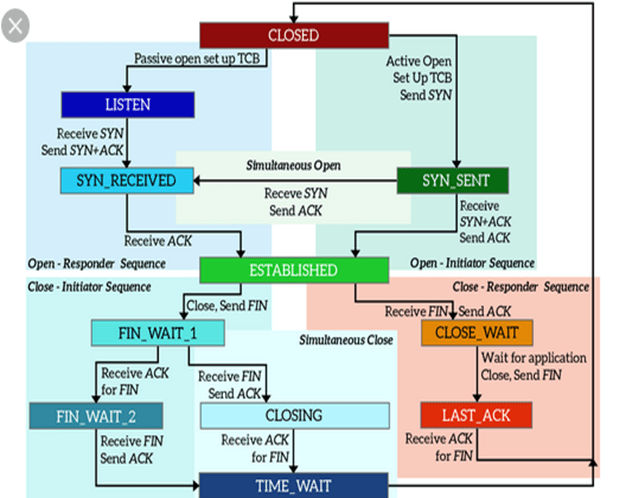
HLN1Hardware Address Length: Specifies how long hardware addresses are in this message. For Ethernet or other networks using IEEE 802 MAC addresses, the value is 6.
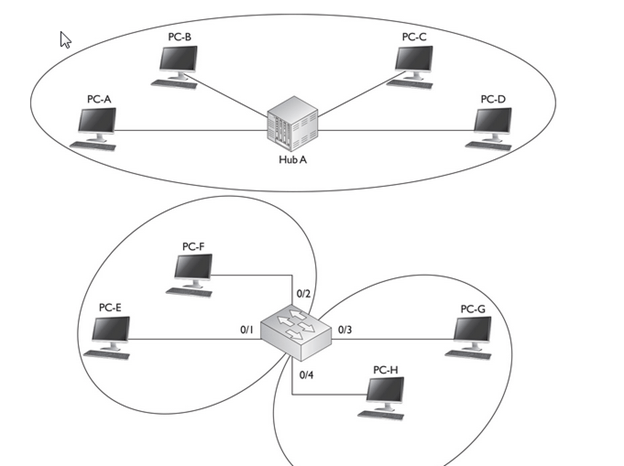
Length in bytes of a hardware address. Ethernet addresses are 6 bytes long.

Protocol length

Length in bytes of a logical address. IPv4 addresses are 4 bytes long.

PLN1Protocol Address Length: Again, the complement of the preceding field; specifies how long protocol (layer three) addresses are in this message. For IP(v4) addresses this value is of course 4.
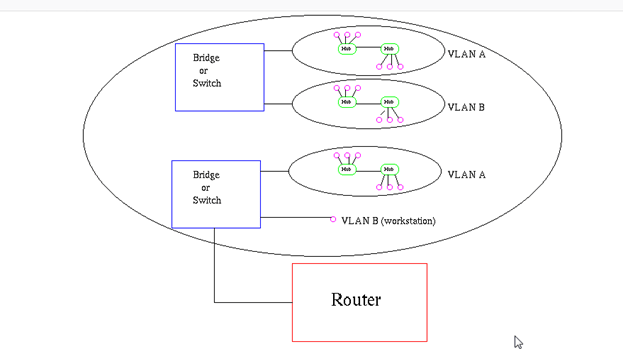
Sender hardware address

Hardware address of the sender.

Sender Protocol Address: The IP address of the device sending this message.

Target hardware address

Hardware address of the intended receiver. This field is zero on request.

Target protocol address

Protocol address of the intended receiver.

ARP Function explained

ARP is used in four cases when two hosts are communicating:

1.When two hosts are on the same network and one desires to send a packet to the other
2.When two hosts are on the different networks and must use a gateway or router to reach the other host
3.When a router needs to forward a packet for one host through another router
4.When a router needs to forward a packet from one host to the destination host on the same network

  • The assumption with ARP is that the device being ARPed is on the same segment

The following are four different cases in which the services of ARP can be used

  1. The sender is a host and wants to send a packet to another host on the same network. In this case, the logical address that must be mapped to a physical address is the destination IP address in the datagram header.

The sender is a host and wants to send a packet to another host on another network.
In this case, the host looks at its routing table and finds the IP address of the next
hop (router) for this destination. Ifit does not have a routing table, it looks for the
IP address of the default router. The IP address of the router becomes the logical
address that must be mapped to a physical address.

  1. The sender is a router that has received a datagram destined for a host on another network. It checks its routing table and finds the IP address of the next router. The IP address of the next router becomes the logical address that must be mapped to a physical address.
  2. The sender is a router that has received a datagram destined for a host on the same network. The destination IP address of the datagram becomes the logical address that must be mapped to a physical address.

Complete End-End connection Establishment

10.0.1.0/24 PC-A, Switch-A, and Router-A

 10.0.2.0/24 Router-A, Hub-A, and Router-B

  10.0.3.0/24 Router-B, Switch-B, and PC-B

Goal :

How PC-A acquires its IP addressing information using DHCP, how DNS works to resolve names, how PC-A and PC-B use TCP to perform telnet, how the three-way handshake occurs, how the switches switch frames, and how the routers route the packets. In this example, assume that the routers have static routes defined to reach the IP destinations and that the two switches have just booted up and haven’t learned any MAC addresses

PC-A Acquires Addressing Information

1.  PC-A creates an Ethernet frame with an encapsulated DHCP Discover packet. The source MAC address in the frame is PC-A’s 0000.1111.AAAA, and the destination is a broadcast of FFFF.FFFF.FFFF.

2.  When Switch-A receives the frame, it performs its learning process, adding 0000.1111.AAAA and port 1 to the CAM table. Since it is a broadcast, the switch floods the frame out ports 2 and 3.

3.  Off port 3, when the router receives the frame, it processes it at layer 2, since the destination MAC address is a broadcast; but then it drops the frame at layer 3, since it isn’t a DHCP server.

4.  Off port 2, when the DHCP server receives the frame, it processes it at layer 2, since it is a local broadcast, and forwards it up to layer 3.

  • Assuming the DHCP server has a free address in its pool, the DHCP server responds with a DHCP OFFER message with IP addressing information: IP address of 10.0.1.1/24, DNS server address of 10.0.2.3, and a default gateway of 10.0.1.2. This is encapsulated in an Ethernet frame with a source MAC address of the server’s 0000.1111.CCCC and a destination MAC address of PC-A, 0000.1111.AAAA.
  • When Switch-A receives the OFFER message, it does its learning function, adding 0000.1111.CCCC and port 2 to the CAM table. It then does its forwarding function, comparing the destination MAC address of 0000.1111 .AAAA to the CAM table, and sees that this is associated with port 1; so the switch forwards the frame out that port.
  • PC-A receives the frame. The NIC compares its MAC address to the destination MAC address and sees a match, so it passes the IP packet up to layer 3, where the PC accepts the OFFER by sending a DHCP REQUEST message directly to the DHCP server: Switch-A switches the frame directly between these MAC addresses. PC-A also incorporates the IP addressing information into its NIC configuration.
  • The DHCP server responds with a DHCP ACK message directly to PC-A, which the switch again directly switches to port 1.

Now that PC-A has IP addressing information, it can begin communicating, via TCP/IP, to other IP-enabled devices

Note : I have not gone through IP Renewal Process and DHCP Discover Process Packet Format.

PC-A Opens Up a Session to PC-B

  • PC-A Resolving PC-B’s Name Assume that PC-A doesn’t know the IP address of PC-B, but it does know its name. So from the Windows command prompt, the user on PC-A types the following:

C:\> telnet PC-B

  • PC-A creates a DNS query for the name PC-B and sends this to the DNS server. Notice that since the DNS server is in a different subnet, the frame must be forwarded to the router first; therefore, the destination MAC address needed is Router-A’s MAC address.
  • Since this is not originally known, PC-A will have to ARP for the MAC address associated with 10.0.1.2, the default gateway
  • The source MAC address in the ARP is PC-A’s, and the destination MAC address is a broadcast, which Switch-A will flood. Router-A will respond to the ARP with the correct IP addressing information. (The router will also add PC-A’s IP and MAC addresses to its local ARP table.) In the Ethernet frame, the source MAC address will be the router’s destination MAC address, PC-B. The switch will perform its learning function, adding 0000.1111.BBBB (the router’s MAC address) to the CAM table.
  • When PC-A receives the ARP reply, it can build the DNS query and forward it to the switch.
  • Switch-A forwards the frame out port 3 directly to the router. Router-A, upon receiving the frame, examines the destination MAC address and sees that it matches the local interface’s MAC address. Router-A strips off the Ethernet frame and passes it up the TCP/IP stack. Since the destination IP address doesn’t match its own interface 1 address, the router examines its local routing table and notices that it is directly connected to subnet 10.0.2.0/24 on interface 2.
  • Router-A knows that to get the frame to 10.0.2.3, the router will have to know the corresponding MAC address of the DNS server. If the router doesn’t have it in its local ARP table, the router will have to ARP for it
  • The DNS server will add Router-A to its local ARP table and send an ARP reply to Router-A containing the DNS server’s MAC address.
  • Router-A can now forward the DNS query to the DNS server, using the information in PDU 2 in Table 9-1. Notice that the only thing that has changed from PDU 1 to PDU 2 is the Ethernet frame header information—the original IP packet and encapsulated UDP segment are still the same.
  • When the DNS server receives the Ethernet frame, the NIC sees a match in the destination MAC address, strips off the Ethernet header, and forwards the IP packet up the protocol stack. The Internet layer compares the destination IP address with the server’s address, sees a match, sees that the protocol is UDP, and passes this up to the transport layer.
  • The transport layer sees a destination port number of 53 and knows that the DNS application on the server should process the DNS query. The server looks up the name and then sends back an appropriate DNS reply, with an IP address of 10.0.3.2 for the PC-B lookup.
  • notice that the source and destination UDP port numbers are reversed from the original DNS query. The source port number is the number the source uses, which is 53 in this case since the connection was directed to this port. The destination port number is 50,000, which PC-A is listening on for the returning UDP DNS reply.
  • When Router-A receives the frame, it does its MAC comparison, strips off the Ethernet frame, does its route lookup, determines that the destination is directly off interface 1, examines the ARP table and sees the MAC address, and then re-encapsulates the DNS reply in a new Ethernet frame with a source MAC address of 0000.1111.BBBB and a destination MAC address of 0000.1111.AAAA
  • The switch intelligently forwards the frame out of port 1. PC-A receives the frame, passes it up to layer 3, passes it up to layer 4, and sees the destination port of 50,000. PC-A compares this to its local connection table and knows that this is the DNS reply it’s waiting for, so it now knows the IP address of PC-B.


PC-A Sending a TCP SYN to PC-B

  • Now that PC-A knows the IP address of PC-B, the telnet application can proceed with the actual telnet. Telnet uses TCP at the transport layer, so the three-way handshake must take place first. The first step is for PC-A to send a TCP segment with the SYN code (commonly called a flag) set. It uses a dynamic port above 49,151 and a destination, the well-known port of 23 for telnet.
  • When the router receives this and processes the information, at layer 3 the router notices that the destination IP address is not its own; so the router does a lookup in its routing table and sees that the next hop at layer 3 is Router-B.
  • If Router-A doesn’t know the IP-to-MAC address mapping of Router-B, it will ARP for it. Router-A then re-encapsulates the IP packet in a new Ethernet frame, shown in PDU 2 in Table 9-2: the IP and TCP headers remain the same, but a new frame header was generated to get its information across the 10.0.2.0/24 subnet.
  • When Router-B receives the frame, it notices that the IP address doesn’t match its own, so Router-B looks in its routing table to see where the packet should be forwarded.
  • If Router-B doesn’t know the IP-to-MAC address mapping for PC-B, Router-B will ARP for it. During the ARP request process, Switch-B will learn about Router-B’s MAC address and add it and port 1 to its CAM table (if it hasn’t already done this). Likewise, Switch-B will learn PC-B’s MAC address during the ARP reply process, if it doesn’t know it already. Router-B then encapsulates the IP packet in a new frame to get the data to PC-B. The Ethernet frame header, IP packet header, and TCP segment header are shown in PDU 3 of Table 9-2.

PC-B Sending a TCP SYN/ACK to PC-A

  • PC-B is processing the frame, sending the IP packet up to layer 3, and then sending the TCP segment up to layer 4. At the transport layer, PC-B notices that this is a new connection based on the TCP SYN code and that the application that should handle it is telnet
  • Assuming that a telnet server is running on the host, PC-B will add the connection to its local connection table and reply back with a TCP SYN/ACK segment.
  • The source port is 23 (the server) and the destination port is 50001, PC-A. The process basically works in reverse when sending the SYN/ACK back to PC-A: the source and destination addresses and ports are reversed. Also, no ARPs need to be performed since this was already done in the PC-A–to–PC-B direction. Also, both switches have the destination MAC addresses in their CAM tables, so no flooding will occur.

Completing the Session

The last part of the handshake is the ACK, which, with the exception of the ACK flag being set instead of the SYN flag, is the process described earlier in the “PC-A Sending a TCP SYN to PC-B” section. Again, no ARPs are necessary, nor does the switch need to do any re-learning, since this already occurred when PC-A sent the SYN to PC-B.Once the telnet is completed and the user types exit to end the telnet session, the session will be gracefully torn down. PC-A sends a special TCP segment with the FIN flag set (FIN is short for finish). Upon receiving this teardown message, PC-B will respond with a TCP segment where the FIN and ACK (FIN/ACK) flags are set, indicating that the telnet session is now over. A flag or code of RST is used to indicate that a session is being abnormally terminated.

Establishment of a TCP connection, state diagram

Short introduction to TCP protocol

The TCP protocol is used by a large majority of client/server applications like the millions of Internet Web servers.

TCP stands for Transmission Control Protocol and works on the transport network IP (Internet Protocol).

TCP is used to exchange data reliably through mechanisms of sequence and acknowledgment, error detection, error recovery. The performance and memory management of reception are controlled by a system of workflow management.

TCP is a connection-oriented protocol, a formal relationship (handshake) is established before exchanging data. The system that initiates the connection is considered as the client in the TCP terminology while the system that accepts this connection is considered as the server.

Two systems can establish connections to one another and simultaneously, in this case they are both server and client. The client and server exchange units of information called “TCP segments, the segments being composed of a header and a data area.

TCP is a connection-oriented, end-to-end reliable protocol designed to fit into a layered hierarchy of protocols which support multi-network applications.

The TCP provides for reliable inter-process communication between pairs of processes in host computers attached to distinct but interconnected computer communication networks

TCP assumes it can obtain a simple, potentially unreliable datagram service from the lower level protocols. In principle, the TCP should be able to operate above a wide spectrum of communication systems ranging from hard-wired connections to packet-switched or circuit-switched networks.

  • Some computer systems will be connected to networks via front-end computers which house the TCP and internet protocol layers, as well as network specific software. The TCP specification describes an interface to the higher level protocols which appears to be implementable even for the front-end case, as long as a suitable host-to-front end protocol is implemented.

Interfaces

The TCP interfaces on one side to user or application processes and on the other side to a lower level protocol such as Internet Protocol.

The interface between an application process and the TCP consists of a set of calls much like the calls an operating system provides to an application process for manipulating files. For example, there are calls to open and close connections and to send and receive data on established connections. It is also expected that the TCP can asynchronously communicate with application programs.

TCP is designed to work in a very general environment of interconnected networks. The lower level protocol which is assumed throughout this document is the Internet Protocol

To provide this service on top of a less reliable internet communication system requires facilities in the following areas:

Basic Data Transfer

Reliability

Flow Control

Multiplexing

Connections

Precedence and Security

Basic Data Transfer:

The TCP is able to transfer a continuous stream of octets in each direction between its users by packaging some number of octets into segments for transmission through the internet system. In general, the TCPs decide when to block and forward data at their own convenience.

Reliability:

The TCP must recover from data that is damaged, lost, duplicated, or delivered out of order by the internet communication system. This is achieved by assigning a sequence number to each octet transmitted, and requiring a positive acknowledgment (ACK) from the

receiving TCP. If the ACK is not received within a timeout interval, the data is retransmitted. At the receiver, the sequence numbers are used to correctly order segments that may be received out of order and to eliminate duplicates. Damage is handled by adding a checksum to each segment transmitted, checking it at the receiver, and discarding damaged segments.

Flow Control:

TCP provides a means for the receiver to govern the amount of data sent by the sender. This is achieved by returning a “window” with every ACK indicating a range of acceptable sequence numbers beyond the last segment successfully received. The window indicates an allowed number of octets that the sender may transmit before receiving further permission.

Multiplexing:

To allow for many processes within a single Host to use TCP communication facilities simultaneously, the TCP provides a set of addresses or ports within each host. Concatenated with the network and host addresses from the internet communication layer, this forms a socket. A pair of sockets uniquely identifies each connection. That is, a socket may be simultaneously used in multiple connections.

The binding of ports to processes is handled independently by each Host. However, it proves useful to attach frequently used processes (e.g., a “logger” or timesharing service) to fixed sockets which are made known to the public.

Connections:

The reliability and flow control mechanisms described above require that TCPs initialize and maintain certain status information for each data stream. The combination of this information, including sockets, sequence numbers, and window sizes, is called a connection.

Each connection is uniquely specified by a pair of sockets

identifying its two sides. When two processes wish to communicate, their TCP’s must first

establish a connection (initialize the status information on each side). When their communication is complete, the connection is terminated or closed to free the resources for other uses. Since connections must be established between unreliable hosts and

over the unreliable internet communication system, a handshake mechanism with clock-based sequence numbers is used to avoid erroneous initialization of connections.

The term packet is used generically here to mean the data of one transaction between a host and its network. The format of data blocks exchanged within the a network will generally not be of concern to us.

Hosts are computers attached to a network, and from the communication network’s point of view, are the sources and destinations of packets. Processes are viewed as the active elements in host computers (in accordance with the fairly common definition of a process as a programin execution). Even terminals and files or other I/O devices are viewed as communicating with each other through the use of processes. Thus, all communication is viewed as inter-process communication.

Model of Operation :

                                      Refer PDF

Reliable Communication : Refer PDF

A stream of data sent on a TCP connection is delivered reliably and in order at the destination.The matching of local and foreign sockets determines when a connection has been initiated. The connection becomes “established” when sequence numbers have been synchronized in both directions. The clearing of a connection also involves the exchange of segments, in this case carrying the FIN control flag.

Data Communication

The data that flows on a connection may be thought of as a stream of

octets. The sending user indicates in each SEND call whether the data in that call (and any preceeding calls) should be immediately pushed through to the receiving user by the setting of the PUSH flag. A sending TCP is allowed to collect data from the sending user and to send that data in segments at its own convenience, until the push function is signaled, then it must send all unsent data. When a receiving TCP sees the PUSH flag, it must not wait for more data from the sending TCP before passing the data to the receiving process.

There is no necessary relationship between push functions and segment boundaries. The data in any particular segment may be the result of a single SEND call, in whole or part, or of multiple SEND calls.The purpose of push function and the PUSH flag is to push data through from the sending user to the receiving user. It does not provide a record service.

  • The TCP makes use of the internet protocol type of service field and security option to provide precedence and security on a per connection basis to TCP users
  • TCP implementations will follow a general principle of robustness: be conservative in what you do, be liberal in what you accept from others.

Sequence Number: 32 bits

The sequence number of the first data octet in this segment (except when SYN is present). If SYN is present the sequence number is the initial sequence number (ISN) and the first data octet is ISN+1.

Acknowledgment Number: 32 bits

If the ACK control bit is set this field contains the value of the next sequence number the sender of the segment is expecting to receive. Once a connection is established this is always sent.

Window: 16 bits

The number of data octets beginning with the one indicated in the acknowledgment field which the sender of this segment is willing to accept.

TCP :

  • A connection progresses through a series of states during its lifetime. The states are:
  • LISTEN,
  • SYN-SENT,
  • SYN-RECEIVED,
  • ESTABLISHED,
  • FIN-WAIT-1,
  • FIN-WAIT-2,
  • CLOSE-WAIT,
  • CLOSING,
  • LAST-ACK,
  • TIME-WAIT,
  • CLOSED

LISTEN – represents waiting for a connection request from any remote TCP and port.

SYN-SENT – represents waiting for a matching connection request after having sent a connection request. Waiting for an acknowledgment from the remote endpoint after having sent a connection request. Results after step 1 of the three-way TCP handshake.

SYN-RECEIVED

This endpoint has received a connection request and sent an acknowledgment. This endpoint is waiting for final acknowledgment that the other endpoint did receive this endpoint’s acknowledgment of the original connection request. Results after step 2 of the three-way TCP handshake

Established :

Represents a fully established connection; this is the normal state for the data transfer phase of the connection.

The client application opens a connection to the server by sending a TCP segment which only the header is present (no data). This header contains a flag SYN stands for “Synchronize” and the TCP port number the server (application). The client is in SYN_SENT state (SYN sent).
If a connection is in the LISTEN state and a SYN segment arrives, the connection makes a transition to the SYN_RCVD state and takes the action of replying with an ACK+SYN segment. The client does an active open which causes its end of the connection to send a SYN segment to the server and to move to the SYN_SENT state. The arrival of the SYN+ACK segment causes the client to mo ve to the ESTABLISHED state and to send an ack back to the server. When this ACK arrives the server finally moves to the ESTABLISHED state. In other words, we have just traced the THREE-WAY HANDSHAKE.

The server (application) is listening (listen) and on receipt of the SYN from the client, it changes of state and responds with a SYN and ACK flag. The server is then able SYN_RCVD (SYN received).


The client receives the server’s TCP segment with SYN ACK indicators and move in status ESTABLISHED. He also sent a response ACK to the server that also passes in status ESTABLISHED. This exchange in three phases (three-way handshake) complete the establishment of the TCP connection can now be used to exchange data between the client and server


In the event that a connection request arrives on the server and that no application is listening on the requested port, a segment with flag RST (reset) is sent to the client by the server, the connection attempt is immediately terminated.

FIN-WAIT-1 – represents waiting for a connection termination request from the remote TCP, or an acknowledgment of the connection termination request previously sent.

  • Waiting for a connection termination request from the remote TCP after this endpoint has sent its connection termination request. This state is normally of short duration, but if the remote socket endpoint does not close its socket shortly after it has received information that this socket endpoint closed the connection, then it might last for some time. Excessive FIN-WAIT-2 states can indicate an error in the coding of the remote application.

FIN-WAIT-2 :  Waiting for a connection termination request from the remote TCP after this endpoint has sent its connection termination request. This state is normally of short duration, but if the remote socket endpoint does not close its socket shortly after it has received information that this socket endpoint closed the connection, then it might last for some time. Excessive FIN-WAIT-2 states can indicate an error in the coding of the remote application.

CLOSE-WAIT – represents waiting for a connection termination request from the local user. This endpoint has received a close request from the remote endpoint and this TCP is now waiting for a connection termination request from the local application.

CLOSING – Waiting for a connection termination request acknowledgment from the remote TCP. This state is entered when this endpoint receives a close request from the local application, sends a termination request to the remote endpoint, and receives a termination request before it receives the acknowledgment from the remote endpoint.

LAST-ACK – represents waiting for an acknowledgment of the connection termination request previously sent to the remote TCP (which includes an acknowledgment of its connection termination request).

Time wait : Waiting for enough time to pass to be sure the remote TCP received the acknowledgment of its connection termination request.

In the process of terminating a connection, the important thing to keep in mind is that the application process on both sides of the connection must independently close its half of the connection. Thus, on any one side there are three combinations of transition that get a connection from the ESTABLISHED state to the CLOSED state:

  • This side closes first:

ESTABLISHED -> FIN_WAIT_1-> FIN_WAIT_2 -> TIME_WAIT -> CLOSED.

  • The other side closes first:

ESTABLISHED -> CLOSE_WAIT -> LAST_ACK -> CLOSED.

  • Both sides close at the same time:

ESTABLISHED -> FIN_WAIT_1-> CLOSING ->TIME_WAIT -> CLOSED.

Vlan

A VLAN is a group of devices in the same broadcast domain or subnet. VLANs are good at logically separating/segmenting traffic between different groups of users. VLANs contain/isolate broadcast traffic, where you need a router to move traffic between VLANs. VLANs create separate broadcast domains: they increase the number of broadcast domains, but decrease the size of the broadcast domains.

  • layer 2 devices, including bridges and switches, always propagate certain kinds of traffic in the broadcast domain.
  • It affects the bandwidth of these devices’ connections as well as their local processing. If you were using bridges, the only solution available to solve this problem would be to break up the broadcast domain into multiple broadcast domains and interconnect these domains with a router.
  • With this approach, each new broadcast domain would be a new logical segment and would need a unique network number to differentiate it from the other layer 3 logical segments.
  • Unfortunately, this is a costly solution, since each broadcast domain, each logical segment, needs its own port on a router. The more broadcast domains that you have from bridges, the bigger the router required

VLAN Overview

A virtual LAN (VLAN) is a logical grouping of network devices in the same broadcast domain that can span multiple physical segments.

  • By default, all ports on a switch are in the same broadcast domain. In this example, however, the configuration of the switch places PC-E and PC-F in one broadcast domain (VLAN) and PC-G and PC-H in another broadcast domain.
  • Switches are used to create VLANs, or separate broadcast domains. VLANs are not restricted to any physical boundary in the switched network, assuming that all the devices are interconnected via switches and that there are no intervening layer 3 devices. For example, a VLAN could be spread across multiple switches, or it could be contained in the same switch, as is shown in Figure
images
  • This example shows three VLANs. Notice that VLANs are not tied to any physical location: PC-A, PC-B, PC-E, and PC-F are in the same VLAN but are connected to different ports of different switches. However, a VLAN could be contained to one switch, as PC-C and PC-D are connected to SwitchA.

Subnets and VLANs

Logically speaking, VLANs are also subnets. A subnet, or a network, is a contained broadcast domain. A broadcast that occurs in one subnet will not be forwarded, by default, to another subnet. Routers, or layer 3 devices, provide this boundary function. Each of these subnets requires a unique network number. And to move from one network number to another, you need a router. In the case of broadcast domains and switches, each of these separate broadcast domains is a separate VLAN; therefore, you still need a routing function to move traffic between different VLANs.

Remember that each VLAN must be associated with a unique subnet or network number.

Advantage of VLAN

VLAN provides following advantages:-

  • Solve broadcast problem
  • Reduce the size of broadcast domains
  • Allow us to add additional layer of security
  • Make device management easier
  • Allow us to implement the logical grouping of devices by function instead of location

Solve broadcast problem

When we connect devices into the switch ports, switch creates separate collision domain for each port and single broadcast domain for all ports. Switch forwards a broadcast frame from all possible ports. In a large network having hundreds of computers, it could create performance issue. Of course we could use routers to solve broadcast problem, but that would be costly solution since each broadcast domain requires its own port on router. Switch has a unique solution to broadcast issue known as VLAN. In practical environment we use VLAN to solve broadcast issue instead of router.

Each VLAN has a separate broadcast domain. Logically VLANs are also subnets. Each VLAN requires a unique network number known as VLAN ID. Devices with same VLAN ID are the members of same broadcast domain and receive all broadcasts. These broadcasts are filtered from all ports on a switch that aren’t members of the same VLAN.

Reduce the size of broadcast domains

VLAN increase the numbers of broadcast domain while reducing their size. For example we have a network of 100 devices. Without any VLAN implementation we have single broadcast domain that contain 100 devices. We create 2 VLANs and assign 50 devices in each VLAN. Now we have two broadcast domains with fifty devices in each. Thus more VLAN means more broadcast domain with less devices

Allow us to add additional layer of security

VLANs enhance the network security. In a typical layer 2 network, all users can see all devices by default. Any user can see network broadcast and responds to it. Users can access any network resources located on that specific network. Users could join a workgroup by just attaching their system in existing switch. This could create real trouble on security platform. Properly configured VLANs gives us total control over each port and users. With VLANs, you can control the users from gaining unwanted access over the resources. We can put the group of users that need high level security into their own VLAN so that users outside from VLAN can’t communicate with them.

Make device management easier

Device management is easier with VLANs. Since VLANs are a logical approach, a device can be located anywhere in the switched network and still belong to the same broadcast domain. We can move a user from one switch to another switch in same network while keeping his original VLAN. For example our company has a five story building and a single layer two network. In this scenario, VLAN allows us to move the users from one floor to another floor while keeping his original VLAN ID. The only limitation we have is that device when moved, must still be connected to the same layer 2 network.

Different VLAN can communicate only via Router where we can configure wild range of security options.

Since this is a logical segmentation and not a physical one, workstations do not have to be physically located together. Users on different floors of the same building, or even in different buildings can now belong to the same LAN.

Scalability

Through segmentation of broadcast domains, VLANs increase your network’s scalability. Since VLANs are a logical construct, a user can be located anywhere in the switched network and still belong to the same broadcast domain. If you move a user from one switch to another switch in the same switched network, you can still keep the user in his or her original VLAN

Many network administrators use VLANs not only to separate different types of user traffic (commonly separated by job function), but also to separate it based on the type of traffic, placing network management, multicast, and voice over IP (VoIP) traffic into their own distinctive VLANs .Different data types, such as delay-sensitive voice or video (multicast), network management, and data application traffic, should be separated into different VLANs via connected switches to prevent problems in one data type from affecting others.

  • VLAN’s also allow broadcast domains to be defined without using routers. Bridging software is used instead to define which workstations are to be included in the broadcast domain. Routers would only have to be used to communicate between two VLAN’s

VLAN Membership

VLAN membership can be assigned to a device by one of two methods

  1. Static
  2. Dynamic

These methods decide how a switch will associate its ports with VLANs.

Static

Assigning VLANs statically is the most common and secure method. It is pretty easy to set up and supervise. In this method we manually assign VLAN to switch port. VLANs configured in this way are usually known as port-based VLANs.

Static method is the most secure method also. As any switch port that we have assigned a VLAN will keep this association always unless we manually change it. It works really well in a networking environment where any user movement within the network needs to be controlled.

Dynamic

In dynamic method, VLANs are assigned to port automatically depending on the connected device. In this method we have configure one switch from network as a server. Server contains device specific information like MAC address, IP address etc. This information is mapped with VLAN. Switch acting as server is known as VMPS (VLAN Membership Policy Server). Only high end switch can configured as VMPS. Low end switch works as client and retrieve VLAN information from VMPS.

Dynamic VLANs supports plug and play movability. For example if we move a PC from one port to another port, new switch port will automatically be configured to the VLAN which the user belongs. In static method we have to do this process manually.

  • Dynamic VLANs have one main advantage over static VLANs: they support plug-and-play movability. For instance, if you move a PC from a port on one switch to a port on another switch and you are using dynamic VLANs, the new switch port will automatically be configured for the VLAN to which the user belongs. About the only time that you have to configure information with dynamic VLANs.
  • If you are using static VLANs, not only will you have to configure the switch port manually with this updated information, but, if you move the user from one switch to another, you will also have to perform this manual configuration to reflect the user’s new port.
  • One advantage, though, that static VLANs have over dynamic VLANs is that the configuration process is easy and straightforward. Dynamic VLANs require a lot of initial preparation involving matching users to VLANs

VLAN Connections

During the configuration of VLAN on port, we need to know what type of connection it has.

Switch supports two types of VLAN connection

  • Access link
  • Trunk link
  • Access link connections can be associated only with a single VLAN (voice VLAN ports are an exception to this). This means that any device or devices connected to this port will be in the same broadcast domain.
  • An access link connection is a connection between a switch and a device with a normal Ethernet NIC, where the Ethernet frames are transmitted unaltered (untagged). An access link connection normally can be associated only with a single VLAN.
  • For example, if ten users are connected to a hub, and you plug the hub into an access link interface on a switch, then all of these users will belong to the same VLAN that is associated with the switch port. If you wanted five users on the hub to belong to one VLAN and the other five to a different VLAN, you would need to purchase an additional hub and plug each hub into a different switch port. Then, on the switch, you would need to configure each of these ports with the correct VLAN identifier.

Trunk Connections

  • Unlike access link connections, trunk connections are capable of carrying traffic for multiple VLANs. To support trunking, the original Ethernet frame must be modified to carry VLAN information, commonly called a VLAN identifier or number. This ensures that the broadcast integrity is maintained. For instance, if a device from VLAN 1 has generated a broadcast and the connected switch has received it, when this switch forwards it to other switches, these switches need to know the VLAN origin so that they can forward this frame out only VLAN 1 ports and not other VLAN ports.
  • Usually trunk link connection is used to connect two switches or switch to router. Remember earlier in this article I said that VLAN can span anywhere in network, that is happen due to trunk link connection. Trunking allows us to send or receive VLAN information across the network. To support trunking, original Ethernet frame is modified to carry VLAN information.
  • In tagging switch adds the source port’s VLAN identifier to the frame so that other end device can understands what VLAN originated this frame. Based on this information destination switch can make intelligent forwarding decisions on not just the destination MAC address, but also the source VLAN identifier.
  • Since original Ethernet frame is modified to add information, standard NICs will not understand this information and will typically drop the frame. Therefore, we need to ensure that when we set up a trunk connection on a switch’s port, the device at the other end also supports the same trunking protocol and has it configured. If the device at the other end doesn’t understand these modified frames it will drop them. The modification of these frames, commonly called tagging. Tagging is done in hardware by application-specific integrated circuits (ASICs).
  • All the devices connected to a trunk link, including workstations, must be VLAN-aware. All frames on a trunk link must have a special header attached. These special frames are called tagged frames
  • An access link connects a VLAN-unaware device to the port of a VLAN-aware bridge. All frames on access links must be implicitly tagged (untagged) (see Figure8). The VLAN-unaware device can be a LAN segment with VLAN-unaware workstations or it can be a number of LAN segments containing VLAN-unaware devices (legacy LAN).

How VLAN’s work

When a LAN bridge receives data from a workstation, it tags the data with a VLAN identifier indicating the VLAN from which the data came. This is called explicit tagging. It is also possible to determine to which VLAN the data received belongs using implicit tagging. In implicit tagging the data is not tagged, but the VLAN from which the data came is determined based on other information like the port on which the data arrived. Tagging can be based on the port from which it came, the source Media Access Control (MAC) field, the source network address, or some other field or combination of fields. VLAN’s are classified based on the method used. To be able to do the tagging of data using any of the methods, the bridge would have to keep an updated database containing a mapping between VLAN’s and whichever field is used for tagging. For example, if tagging is by port, the database should indicate which ports belong to which VLAN. This database is called a filtering database. Bridges would have to be able to maintain this database and also to make sure that all the bridges on the LAN have the same information in each of their databases. The bridge determines where the data is to go next based on normal LAN operations. Once the bridge determines where the data is to go, it now needs to determine whether the VLAN identifier should be added to the data and sent. If the data is to go to a device that knows about VLAN implementation (VLAN-aware), the VLAN identifier is added to the data. If it is to go to a device that has no knowledge of VLAN implementation (VLAN-unaware), the bridge sends the data without the VLAN identifier.

Filtering Database

Membership information for a VLAN is stored in a filtering database. The filtering database consists of the following types of entries:

i) Static Entries

Static information is added, modified, and deleted by management only. Entries are not automatically removed after some time (ageing), but must be explicitly removed by management. There are two types of static entries:

a) Static Filtering Entries: which specify for every port whether frames to be sent to a specific MAC address or group address and on a specific VLAN should be forwarded or discarded, or should follow the dynamic entry, and

b) Static Registration Entries: which specify whether frames to be sent to a specific VLAN are to be tagged or untagged and which ports are registered for that VLAN.

ii) Dynamic Entries

Dynamic entries are learned by the bridge and cannot be created or updated by management. The learning process observes the port from which a frame, with a given source address and VLAN ID (VID), is received, and updates the filtering database. The entry is updated only if all the following three conditions are satisfied:

a) this port allows learning,

b) the source address is a workstation address and not a group address, and

c) there is space available in the database.

Entries are removed from the database by the ageing out process where, after a certain amount of time specified by management (10 sec — 1000000 sec), entries allow automatic reconfiguration of the filtering database if the topology of the network changes. There are three types of dynamic entries:

Tagging:

When frames are sent across the network, there needs to be a way of indicating to which VLAN the frame belongs, so that the bridge will forward the frames only to those ports that belong to that VLAN, instead of to all output ports as would normally have been done. This information is added to the frame in the form of a tag header. In addition, the tag header:

i) allows user priority information to be specified,

ii) allows source routing control information to be specified, and

iii) indicates the format of MAC addresses.

Frames in which a tag header has been added are called tagged frames. Tagged frames convey the VLAN information across the network.

The tagged frames that are sent across hybrid and trunk links contain a tag header. There are two formats of the tag header:

VLAN tagging is used to tell which packet belongs to which VLAN on the other side.

The switches need to be configured beforehand for working properly with the process of VLAN tagging

When an Ethernet frame traverses a trunk link, a special VLAN tag is added to the frame and sent across the trunk link.

Unlike access link connections, trunk connections are capable of carrying traffic for multiple VLANs. To support trunking, the original Ethernet frame must be modified to carry VLAN information, commonly called a VLAN identifier or number

This ensures that the broadcast integrity is maintained. For instance, if a device from VLAN 1 has generated a broadcast and the connected switch has received it, when this switch forwards it to other switches, these switches need to know the VLAN origin so that they can forward this frame out only VLAN 1 ports and not other VLAN ports.

Cisco supports two Ethernet trunking methods:

   Cisco’s proprietary InterSwitch Link (ISL) protocol for Ethernet

   IEEE’s 802.1Q, commonly referred to as dot1q for Ethernet

A trunk modifies the original frame to carry VLAN information, including a VLAN identifier in the frame. 802.1Q defines a standard method of VLAN trunking.

Trunking methods create the illusion that instead of a single physical connection between the two trunking devices, a separate logical connection exists for each VLAN between them. When trunking, the switch adds the source port’s VLAN identifier to the frame so that the device (typically a switch) at the other end of the trunk understands what VLAN originated this frame, and the destination switch can make intelligent forwarding decisions on not just the destination MAC address, but also the source VLAN identifier.

Since information is added to the original Ethernet frame, normal NICs will not understand this information and will typically drop the frame. Therefore, you need to ensure that when you set up a trunk connection on a switch’s interface, the device at the other end also supports the same trunking protocol and has it configured. If the device at the other end doesn’t understand these modified frames or is not set up for trunking, it will, in most situations, drop them.

The modification of these frames, commonly called tagging, is done in hardware by application-specific integrated circuits (ASICs). ASICs are specialized processors. Since the tagging is done in hardware at faster-than-wire speeds, no latency is involved in the actual tagging process. And to ensure compatibility with access link devices, switches will strip off the tagging information and forward the original Ethernet frame to the device or devices connected to access link connections.

From the user’s perspective, the source generates a normal Ethernet frame and the destination receives this frame, which is an Ethernet 802.3 or II frame coming in and the same going out. In reality, this frame is tagged as it enters the switched infrastructure and sheds the tag as it exits the infrastructure: the process of tagging and untagging the frame is hidden from the users connected to access link ports.

Trunk-Capable Devices

Trunk links are common between certain types of devices, including switch-to-switch, switch-to-router, and switch-to-file server connections. Using a trunk link on a router is a great way of reducing your layer 3 infrastructure costs. For instance, in the old days of bridging, in order to route between different broadcast domains, you needed a separate physical router interface for each broadcast domain. So if you had two broadcast domains, you needed two router ports; if you had 20 broadcast domains, you needed 20 router ports. As you can see, the more broadcast domains you had with bridges, the more expensive the router would become.

Today, with the advent of VLANs and trunk connections, you can use a single port on a router to route between your multiple broadcast domains. If you had 2 or 20 broadcast domains, you could use just one port on the router to accomplish the routing between these different subnets. Of course, you would need a router and an interface that supported trunking. Not every Cisco router supports trunking; you would need at least a 1751 or higher router with the correct type of Ethernet interface. If your router didn’t support trunking, you would need a separate router interface for each VLAN you had created to route between the VLANs. Therefore, if you have a lot of VLANs, it makes sense to economize and buy a router and the correct type of interface that supports trunking

A good example of a device that might need a trunk-capable NIC is a DHCP server, since it might need to assign IP addresses to users across multiple VLANs. If you don’t have a trunk-capable NIC, but users are spread across multiple VLANs, you could use the IP helper feature on a Cisco router connected to the users’ VLANs and have the router forward the DHCP broadcasts to the DHCP server located in a different VLAN.

Trunking Example

Figure 12-4 shows an example of a trunk connection between SwitchA and SwitchB in a network that has three VLANs. In this example, PC-A, PC-F, and PC-H belong to one VLAN; PC-B and PC-G belong to a second VLAN; and PC-C, PC-D, and PC-E belong to a third VLAN. The trunk between the two switches is also tagging VLAN information so that the remote switch understands the source VLAN of the originator.

FIGURE 12-4 Trunking example

Let’s take a look at an example of the use of VLANs and the two different types of connections by using the network shown in Figure 12-5. In this example, PC-C generates a local broadcast. When SwitchA receives the broadcast, it examines the incoming port and knows that the source device is from the gray VLAN (the access link connections are marked with dots). Seeing this, the switch knows to forward this frame only out of ports that belong to the same VLAN: this includes access link connections with the same VLAN identifier and trunk connections. On this switch, one access link connection belongs to the same VLAN, PC-D, so the switch forwards the frame directly out this interface.

FIGURE 12-5 Broadcast traffic example

The trunk connection between SwitchA and SwitchB handles traffic for multiple VLANs. A VLAN tagging mechanism is required to differentiate the source of traffic when moving it between the switches. For instance, assume that no tagging mechanism took place between the switches. PC-C generates a broadcast frame, and SwitchA forwards it unaltered to PC-D and then SwitchB across the trunk. The problem with this process is that when SwitchB receives the original Ethernet frame, it has no idea what port or ports to forward the broadcast to, since it doesn’t know the origin VLAN.

As shown in Figure 12-5, SwitchA tags the broadcast frame, adding the source VLAN to the original Ethernet frame (the broadcast frame is tagged). When SwitchB receives the frame, it examines the tag and knows that this is meant only for the VLAN to which PC-E belongs. Of course, since PC-E is connected via an access link connection, SwitchB first strips off the tagging and then forwards the original Ethernet frame to PC-E. This is necessary because PC-E has a standard NIC and doesn’t understand VLAN tagging. Through this process, both switches maintained the integrity of the broadcast domain.

802.1Q trunks support two types of frames: tagged and untagged. An untagged frame does not carry any VLAN identification information in it—basically, this is a standard, unaltered Ethernet frame. The VLAN membership for the frame is determined by the switch’s port configuration: if the port is configured in VLAN 1, the untagged frame belongs to VLAN 1. This VLAN is commonly called a native VLAN. A tagged frame contains VLAN information, and only other 802.1Q-aware devices on the trunk will be able to process this frame.

One of the unique aspects of 802.1Q trunking is that you can have both tagged and untagged frames on a trunk connection, such as that shown in Figure 12-6. In this example, the white VLAN (PC-A, PC-B, PC-E, and PC-F) uses tagged frames on the trunk between SwitchA and SwitchB. Any other device that is connected on this trunk line would need to have 802.1Q trunking enabled to see the tag inside the frame to determine the source VLAN of the frame. In this network, a third device is connected to the trunk connection: PC-G. This example assumes that a hub connects the two switches and the PC together.

PC-G has a normal Ethernet NIC and obviously wouldn’t understand the tagging and would drop these frames. However, this presents a problem: PC-G belongs to the dark VLAN, where PC-C and PC-D are also members. Therefore, in order for frames to be forwarded among these three members, the trunk must also support untagged frames so that PC-G can process them. To set this up, you would configure the switch-to-switch connection as an 802.1Q trunk but set the native VLAN as the dark one, so that frames from this VLAN would go untagged across it and allow PC-G to process them.PC-G has a normal Ethernet NIC and obviously wouldn’t understand the tagging and would drop these frames. However, this presents a problem: PC-G belongs to the dark VLAN, where PC-C and PC-D are also members. Therefore, in order for frames to be forwarded among these three members, the trunk must also support untagged frames so that PC-G can process them. To set this up, you would configure the switch-to-switch connection as an 802.1Q trunk but set the native VLAN as the dark one, so that frames from this VLAN would go untagged across it and allow PC-G to process them

Frame Format :

As with all ‘open standards’ the IEEE 802.1q tagging method is by far the most popular and commonly used even in Cisco oriented network installations mainly for compatability with other equipment and future upgrades that might tend towards different vendors.

In addition to the compatability issue, there are several more reasons for which most engineers prefer this method of tagging. These include:

  • Support of up to 4096 VLANs
  • Insertion of a 4-byte VLAN tag with no encapsulation
  • Smaller final frame sizes when compared with ISL

Amazingly enough, the 802.1q tagging method supports a whopping 4096 VLANs (as opposed to 1000 VLANs ISL supports), a large amount indeed which is merely impossible to deplet in your local area network.

  • As you may have already concluded yourself, the maximum Ethernet frame is considerably smaller in size (by 26 bytes) when using the IEEE 802.1q tagging method rather than ISL. This difference in size might also be interpreted by many that the IEEE 802.1q tagging method is much faster than ISL, but this is not true. In fact, Cisco recommends you use ISL tagging when in a Cisco native environment, but as outlined earlier, most network engineers and administrators believe that the IEEE802.1q approach is much safer, ensuring maximum compatability.
  • With the 802.1Q tagging method, the original Ethernet frame is modified. A 4-byte field, called a tag field, is inserted into the header of the original Ethernet frame, and the original frame’s FCS (checksum) is recomputed on the basis of this change.
  • The first 2 bytes of the tag are the protocol identifier. For instance, an Ethernet type frame has a protocol identifier value of 0x8100, indicating that this is an Ethernet tagged frame. The next 3 bits are used to prioritize the frame, which is defined in the IEEE 802.1p standard. The fourth bit indicates if this is an encapsulated Token Ring frame (Cisco no longer sells Token Ring products), and the last 12 bits are used for the VLAN identifier (number).
  • Shows the process that occurs when tagging an Ethernet frame by inserting the 802.1Q field into the Ethernet frame header. As you can see in this figure, step 1 is the normal, untagged Ethernet frame. Step 2 inserts the tag and recomputes a new FCS value. Below step 2 is a blow-up of the actual tag field. As you can see in this figure, the tag is inserted directly after the source and destination MAC addresse

One advantage of using this tagging mechanism is that, since you are adding only 4 bytes, your frame size will not exceed 1518 bytes, and thus you could actually forward 802.1Q frames through the access link connections of switches, since these switches would forward the frame as a normal Ethernet frame.

Tag protocol identifier (TPID) :

A 16-bit field set to a value of 0x8100 in order to identify the frame as an IEEE 802.1Q-tagged frame. This field is located at the same position as the EtherType field in untagged frames, and is thus used to distinguish the frame from untagged frames.

Tag control information (TCI):

A 16-bit field containing the following sub-fields:

Priority code point (PCP) :

A 3-bit field which refers to the IEEE 802.1p class of service and maps to the frame priority level. Different PCP values can be used to prioritize different classes of traffic.[5]

The Canonical Format Indicator (CFI) bit indicates whether the following 12 bits of VLAN identifier conform to Ethernet or not. For Ethernet frames, this bit is always set to 0. (The other possible value, CFI=1, is used for Token Ring LANs, and tagged frames should never be bridged between an Ethernet and Token Ring LAN regardless of the VLAN tag or MAC address.)

VLAN identifier (VID) :

A 12-bit field specifying the VLAN to which the frame belongs. The hexadecimal values of 0x000 and 0xFFF are reserved. All other values may be used as VLAN identifiers, allowing up to 4,094 VLANs. The reserved value 0x000 indicates that the frame does not carry a VLAN ID; in this case, the 802.1Q tag specifies only a priority (in PCP and DEI fields) and is referred to as a priority tag. On bridges, VID 0x001 (the default VLAN ID) is often reserved for a network management VLAN; this is vendor-specific. The VID value 0xFFF is reserved for implementation use; it must not be configured or transmitted. 0xFFF can be used to indicate a wildcard match in management operations or filtering database entries

IPv4 – Addressing

An IP address is an address used in order to uniquely identify a device on an IP network. The address is made up of 32 binary bits, which can be divisible into a network portion and host portion with the help of a subnet mask

The 32 binary bits are broken into four octets (1 octet = 8 bits). Each octet is converted to decimal and separated by a period (dot). For this reason, an IP address is said to be expressed in dotted decimal format (for example, 172.16.81.100). The value in each octet ranges from 0 to 255 decimal, or 00000000 – 11111111 binary.

Here is how binary octets convert to decimal: The right most bit, or least significant bit, of an octet holds a value of 20. The bit just to the left of that holds a value of 21. This continues until the left-most bit, or most significant bit, which holds a value of 27. So if all binary bits are a one, the decimal equivalent would be 255 as shown here:

    1  1  1  1 1 1 1 1

  128 64 32 16 8 4 2 1 (128+64+32+16+8+4+2+1=255)

Here is a sample octet conversion when not all of the bits are set to 1.

  0  1 0 0 0 0 0 1
  0 64 0 0 0 0 0 1 (0+64+0+0+0+0+0+1=65)

And this sample shows an IP address represented in both binary and decimal.

        10.       1.      23.      19 (decimal)
  00001010.00000001.00010111.00010011 (binary)

Types of Addresses

Many different types of IP addresses exist. offers a brief description of these types.

  • Network component Defines on what segment in the network, a device is located
  • Host component Defines the specific device on a particular network segment

The network number uniquely identifies a segment in the network and a host number uniquely identifies a device on a segment. The combination of these two numbers must be unique throughout the entire network. TCP/IP uses the same two components for addressing, but it adds a twist by breaking up network numbers into five classes: A, B, C, D, and E. Each of these classes has a predefined network and host boundary:

  • Class A address The first byte is a network number (8 bits) and the last 3 bytes are for host numbers (24 bits).
  •   Class B address The first 2 bytes are a network number (16 bits) and the last 2 bytes are for host numbers (16 bits).
  •    Class C address The first 3 bytes are a network number (24 bits) and the last 1 byte is for host numbers (8 bits).
  •    Class D address Used for multi casting services and applications.
  •    Class E address Reserved for research purposes
  • In a Class A address, the first octet is the network portion, so the Class A example in Figure 1 has a major network address of 1.0.0.0 – 127.255.255.255. Octets 2, 3, and 4 (the next 24 bits) are for the network manager to divide into subnets and hosts as he/she sees fit. Class A addresses are used for networks that have more than 65,536 hosts (actually, up to 16777214 hosts!).
  • In a Class B address, the first two octets are the network portion, so the Class B example in Figure 1 has a major network address of 128.0.0.0 – 191.255.255.255. Octets 3 and 4 (16 bits) are for local subnets and hosts. Class B addresses are used for networks that have between 256 and 65534 hosts.
  • In a Class C address, the first three octets are the network portion. The Class C example in Figure 1 has a major network address of 192.0.0.0 – 223.255.255.255. Octet 4 (8 bits) is for local subnets and hosts – perfect for networks with less than 254 hosts.

Class A addresses always begin with a 0 in the highest order bit.

   Class B addresses always begin with 10 in the highest order bits.

   Class C addresses always begin with 110 in the highest order bits.

   Class D addresses always begin with 1110 in the highest order bits.

   Class E addresses always begin with 11110 in the highest order bits.

Class A addresses range from 1 to 126: 0 is reserved and represents all IP addresses; 127 is a reserved address and is used for testing, such as a loop back on an interface.

   Class B addresses range from 128 to 191: binary 10000000–10111111

   Class C addresses range from 192 to 223: binary 11000000–11011111

   Class D addresses range from 224 to 239: binary 11100000–11101111

   Class E addresses range from 240 to 254: 255 is a reserved address and is used for local broadcasting purposes.

Public and Private Addresses

Public addresses are Class A, B, and C addresses that can be used to access devices in other public networks, such as the Internet. The Internet Assigned Numbers Authority (IANA) is ultimately responsible for handing out and managing public addresses. Normally, you get public addresses directly from your ISP, which, in turn, requests them from one of five upstream address registries

What is public IP address?

A public IP address is the address that is assigned to a computing device to allow direct access over the Internet. A web server, email server and any server device directly accessible from the Internet are candidate for a public IP address. A public IP address is globally unique, and can only be assigned to a unique device.

What is private IP address?

A private IP address is the address space allocated by InterNIC to allow organizations to create their own private network. There are three IP blocks (1 class A, 1 class B and 1 class C) reserved for a private use. The computers, tablets and smartphones sitting behind your home, and the personal computers within an organizations are usually assigned private IP addresses. A network printer residing in your home is assigned a private address so that only your family can print to your local printer.

When a computer is assigned a private IP address, the local devices see this computer via it’s private IP address. However, the devices residing outside of your local network cannot directly communicate via the private IP address, but uses your router’s public IP address to communicate. To allow direct access to a local device which is assigned a private IP address, a Network Address Translator (NAT) should be used.

Public and Private Addresses

Public addresses are Class A, B, and C addresses that can be used to access devices in other public networks, such as the Internet. The Internet Assigned Numbers Authority (IANA) is ultimately responsible for handing out and managing public addresses. Normally, you get public addresses directly from your ISP, which, in turn, requests them from one of five upstream address registries

What is public IP address?

A public IP address is the address that is assigned to a computing device to allow direct access over the Internet. A web server, email server and any server device directly accessible from the Internet are candidate for a public IP address. A public IP address is globally unique, and can only be assigned to a unique device.

What is private IP address?

A private IP address is the address space allocated by InterNIC to allow organizations to create their own private network. There are three IP blocks (1 class A, 1 class B and 1 class C) reserved for a private use. The computers, tablets and smartphones sitting behind your home, and the personal computers within an organizations are usually assigned private IP addresses. A network printer residing in your home is assigned a private address so that only your family can print to your local printer.

When a computer is assigned a private IP address, the local devices see this computer via it’s private IP address. However, the devices residing outside of your local network cannot directly communicate via the private IP address, but uses your router’s public IP address to communicate. To allow direct access to a local device which is assigned a private IP address, a Network Address Translator (NAT) should be used

Example:

For example, before landing on this page, your device (such as a computer, phone, or tablet), which uses a private IP address, requested this page through a router, which has a public IP address. Once the request was made and Lifewire responded to deliver the page, it was downloaded to your device through a public IP address before reaching your router, after which it was handed off to your private/local address to reach your device.

Private IP addresses also provide a way for devices that don’t need a connection to the internet, such as file servers and printers, to communicate with the other devices on a network without being directly exposed to the public.

Subletting–To be updated

DHCP :

DNS :

VECTOR CANoe

Introduction

  • Vector Provide software and Hardware solutions for Automotive Electronics
  • Tools, software components, hardware and services that relieve embedded systems engineers and simplify the development of automotive electronics.
  • Vector tools, software components and services help to develop the mobility of tomorrow
  • Vector provides reliable products and solutions that simplify your complex tasks in different application areas:
  1. Tools and services for diagnostics
  2. Designing and developing networks and networked ECUs
  3. Tools and services for ECU calibration
  4. Embedded software and communication ECUs
  5. Measurement technology
  6. Tools and services for testing of ECUs and entire networks

Designing and developing networks and networked ECUs

  • Vector tools and services to support you in designing and developing networks and networked ECUs especially for simulation, analysis and testing of network communication and for model-based electric/electronic development from architecture design to series production.
  • Vector’s refined tools and complex services support you in designing, simulating, analyzing and testing network communication.
Application        Tool
Design, management and documentation of complete E/E systems      PREEvision
Development, test and analysis of entire ECU networks and individual ECUs      CANoe

Only one comprehensive software tool for all development and testing tasks:

  • Analysis of network communication
  • ECU diagnostics
  • Simulation of entire networks and remaining bus simulation
  • Stimulation to detect and correct error situations early in the development process
  • Easy automated testing of ECUs and entire networks

Tools and services for testing of ECUs and entire networks

ECU testing tools from Vector support you in the implementation of simulation and test environments in an efficient way. Regardless of your task in the development process the Vector testing tools provide a scalable and re-usable solution from pure SIL simulations to HIL testing with functional acceptance tests.

Analysis of ECUs, entire networks and distributed systemsCANalyzer
Multibus-tool for testing, simulation, diagnostics and analysis of ECUs, entire networks and distributed systemsCANoe

What is CANoe ?

CANoe is the comprehensive software tool for development, test and analysis of individual ECUs and entire ECU networks. It supports network designers, development and test engineers throughout the entire development process – from planning to system-level test.

Create and test individual ECUs or whole ECU networks. Perform various types of analyses and view the results using the Trace Window, Graphics Window, Statistics Window, Data Window, and State Tracker. Carry out the testing tasks in the manual or automated modes and identify error situations in the development process to fix them on time.

Canoe is very well known for its network simulation capabilities. The Canoe tool not only has the capability to simulate multiple nodes in network, it can also simulate multiple network of various bus types such as CAN,LIN,MOST .Canoe can be used to model all the network data and functions in these bus systems. When network data and functions need to be evaluated and validated at the design implementation or Production stage, CANoe can become a test tool as well as network simulation tool to test these network functions.

This is made Possible in CANoe with the Test Feature set it provides the user ability to implement and execute a sequential set of test instruction written in XML,CAPL or Both  

Advantages

  • Only one tool for all development and testing tasks
  • Easy automated testing
  • Extensive possibilities for simulating and testing ECU diagnostics
  • Detect and correct error situations early in the development process
  • User-friendly graphic and text-based evaluation of results

Manual Testing v/s Automation Testing: A Snapshot

Manual TestingAutomation Testing
May take one week to 15 days to test a software module of an ECU (Electronic Control Unit).Can be completed  in half an hour or 1 hour
Testing multiple signals simultaneously is not possibleMultiple signals can be tested simultaneously using routines (part of code that performs some specific task)
Test reports are created manually using excel sheets.Test reports are created automatically
Test-cases are written  manually.Test cases are written using script and can be re-used in other projects as well
Each test case must be run separately, thereby, increasing the time for testingMultiple test cases can run simultaneously on different systems
Batch testing (keeping the test cases in queue for execution) is not possible.Batch testing is possible without any manual interference
Performance testing cannot be done accuratelyStress testing, spike testing, load testing can be easily inserted into the test-case script

What is vTesT studio?

vTESTstudio is a powerful development environment for creating automated ECU tests. In order to increase the efficiency in terms of test design and to simplify the reusability it provides either

  • programming-based,
  • table-based and
  • graphical test notations and test development methods.

What are the Value-Adds of Using vTest Studio for Automation of Testing:

  • vTest Studio can cater to a broad range of ECU applications, as this tool is equipped with several test-case editors
  • The test sequences can be given parameters with scalar values, test vectors written in multiple test design languages like CAPL, C# etc.
  • Test projects can be created and maintained in a simple manner using the user-friendly GUI
  • vTest Studio offers universal traceability of the test specifications defined externally
  • This automation testing tool can also provide high test coverage, without the need for writing any complex test case scripts
  • vTest Studio supports Open Interface, this facilitates easy integration with other automation tools = like CANoe.

How to Set-up Automated Testing Environment Using vTest Studio

Implementation of automation in testing, for an automotive electronic control unit (ECU), requires a set of tools (both hardware and software).

Essentially, while testing an ECU, we simulate it inside a test bench that mimics the actual vehicle environment.

The target is to validate all the functionalities of the ECU and its behavior against the given requirements.

The set-up should be such that the simulated environment exactly mimics the actual vehicle environment.

in order to set up such a test bench, the following three important components are required:

  1. vTest Studio– For writing the test cases in CAPL editor
  2. CANoe Testing tool– For executing the test cases
  3. CAN Case VN 1600/10/30- Network interface for CAN, LIN, K-Line, IO , in order to understand and visualize communication between the target ECU and the simulated ECU

The three components mentioned above interact with each other to make the automation testing happen. Let’s now understand how they are setup to build a testing environment.

  1. ECU Pins are connected to the corresponding modules of the CANoe Hardware (CAN Case VN 1600), as per the project requirements. This piece of hardware is connected to the PC
  2. CANoe Tool is loaded with messages and CAN Databases, that are required for data to be transmitted between the ECUs along with the diagnostics services
  3. Using the CANoe tool GUI, the modules to be tested are loaded in the CANoe tool
  4. In the CANoe tool, these modules are configured as per the project requirements
  5. Now, vTest Studio is initiated and CANoe configuration (performed in step 4) is imported into it.
  6. The required environment for testing automation is now setup and vTest Studio is ready to design the relevant test cases.

This is the minimum setup required for the automation of the software testing of an automotive ECU (electronic control unit).

After the test cases are created, they are executed on the target control unit and reports are generated.

Understanding the Workflow of the Automated Testing of an Electronic Control Unit (ECU):

Step 1: Creation of Test Cases

  • Scripting for test case creation is done in CAPL. It is a programming language very similar to ‘C’. CAPL was created by Vector to test Electronic Control Units using CANoe tool.
  • Let’s say you are required to test three modules of an ECU (electronic control unit);viz; – Functionalities, Specifications and Error Handling. The test cases for these three modules will be designed in CAPL editor. All the test cases can be compiled as a single ‘build’ or multiple ones, depending on the modules to be tested.

Step 2: Execution of the Test Cases in CANoe tool

  • Now, the build with all the test cases will be run on the target ECU using the CANoe tool. CANoe acts a separate ECU that interacts with the target ECU and runs the test cases.
  • The response from the target ECU is displayed on the CANoe tool and test reports are generated.


The point to be noted here is, that vTest Studio is used only for creating the test cases. These test cases are run on a separate tool called CANoe.

So, these two tools (vTest Studio and CANoe) complement each other in carrying out automation testing of an electronic control unit.

VT System Concept

The simulation of the loads and sensors are done using a Vector tool called VT System. It is important for the ECU to be in an environment that closely resembles that of the real vehicle. VT System fulfills these needs. The VT System is a modular I/O system that drives ECU inputs and outputs for functionality related testing with CANoe. It is able to create faults which should be detected by the ECU and display an error code. This is a way of partly testing an ECU .

The ECU’s I/O lines and any necessary sensors and actuators are connected to the VT System modules. The PC with CANoe is connected to the real-time Ether CAT via the computer’s Ethernet port .

The VT System is connected to ECU’s particular pins instead of the real loads such as LED channels in the headlamp. The loads and sensors are simulated by the VT System modules or panels. However these modules can also be connected to the original actuators and sensors. All equipments required for testing the connected ECU inputs or outputs are integrated into the VT System modules

The functions of VT System are

(1) It can be used to simulate loads or sensors

(2) It has relays for switching different signal paths (eg. internal or external load)

(3) It can be used to create faults such as short circuits between the two signal lines and signal to ground or battery voltage

(4) It also acts as a measuring unit with signal conditioning

(5) It is possible to connect additional measurement and test devices via two additional bus bars

(6) It displays status clearly on the front panel

The ECU’s output signals are measured and processed, and are passed to the test cases in VTestStudio in processed form so that they can be printed in the test report generated after the test cases are executed

ECU environment in the vehicle

In the vehicle, an ECU communicates with other ECUs via bus interface; it is supplied with power from the battery and is connected to sensors and actuators via I/O lines.

Testing with original loads and sensors

The VT System is placed between the ECU’s I/O lines and the original sensors and acuators. CANoe executes the automated tests and simulates the rest of the network nodes.

Testing with simulated actuators and sensors

The VT System can also simulate the sensors and actuators. This lets you reconstruct any desired test situations and error cases.

Testing the functionality of ECU includes simulating it via software and hardware interfaces and evaluating its responses. It is important for the ECU to be in a surrounding that closely resembles that of the real vehicle, and most important is that the ECU should not be able to detect any difference between the actual environment in the vehicle and the simulated environment of the test bench. The use of tool CANoe for simulation of other ECUs in the car is well-suited for tests on all development phases, due to its high scalability and flexibility. Manual testing is performed by an engineer using the software tool in the computer, carefully executing the test steps constructed based on the requirements. Manual testing is time consuming and may not be very accurate. Test Engineer may feel it as a very tedious work as he has to test the same requirements in all the development phases of an ECU. So, automating these testing processes can help a lot for the Test Engineer. Automation Testing is using an automation tool to execute the test case suite. The automation software can also enter test data for the parameters in the services of an ECU, compare expected and actual results and generate detailed and validated test reports. Test Automation demands considerable investments of resources and money. Successive development phases will require execution of same test suite repeatedly. This is reusability of the test cases. Using a test automation tool called VTestStudio it is possible to document this test suite and use it as required. Any human intervention is not required once the test suite has been automated. The VT System is modular hardware for accessing ECU hardware inputs or outputs for testing purposes. The VT System can be easily integrated with CANoe and the test cases are scripted in VTestStudio. The actuator and sensor connections of the ECU to be tested are linked directly to the VT System modules. And ECU is also connected to CANoe through CAN case VN1610 for Understanding and visualizing CAN communication [5] between real ECU and simulated ECUs

Network Interfaces :

interface to inter connect your PC With CAN,CAN(FD),LIN, Ethernet bus system.

Software tools used to develop, simulate, test and maintain distributed systems require powerful and flexible network interfaces. Vector offers you interfaces for CAN (FD), LIN, J1708, Automotive Ethernet, FlexRay, 802.11p and MOST as well as driver software and programming interfaces for use with Vector software tools and in customer-specific solutions.

System Design Of Testing Environment :

All the pins of the ECU are connected to the particular modules of the VT System as per the requirements. VT System is connected to the computer through Ether CAT cable. CANoe will contain the database which has the messages to be transmitted between several ECUs, .cdd file containing the diagnostic services of the ECU and the other simulated ECUs attached to the periphery bus. CANoe with other simulated ECUs in the car is opened and then VT system configuration panel is opened in CANoe. All the modules connected in the VT System are added to CANoe. All the modules are configured as per requirements. For e.g. VT7001A module is configured with the supply mode as “sup1” as it is connected with the external power supply. CAN pins from the ECU are connected with the CAN case VN1610 and then the CAN case is connected to the computer using its USB cable. After this minimum setup, VTestStudio software is opened with the CANoe configuration imported to it. After importing the VTestStudio will contain the Messages present in the database, diagnostic services present in the .cdd file and the parameters of the VT System modules. Now the VTestStudio can be used to write test cases with having access to messages, diagnostic services and the VT System module parameters.

CAN Database

The CAN database defines the network nodes containing the CAN messages transmitted and received by them and the signals within each message. The names in this database can be imported in the VTestStudio for application in test cases and can also be used throughout the CANoe configuration. For example, displaying signal values in CANoe’s graphical output windows, or creating test cases in the VTestStudio.

Design a site like this with WordPress.com
Get started