An IP address is an address used in order to uniquely identify a device on an IP network. The address is made up of 32 binary bits, which can be divisible into a network portion and host portion with the help of a subnet mask
The 32 binary bits are broken into four octets (1 octet = 8 bits). Each octet is converted to decimal and separated by a period (dot). For this reason, an IP address is said to be expressed in dotted decimal format (for example, 172.16.81.100). The value in each octet ranges from 0 to 255 decimal, or 00000000 – 11111111 binary.
Here is how binary octets convert to decimal: The right most bit, or least significant bit, of an octet holds a value of 20. The bit just to the left of that holds a value of 21. This continues until the left-most bit, or most significant bit, which holds a value of 27. So if all binary bits are a one, the decimal equivalent would be 255 as shown here:
1 1 1 1 1 1 1 1
128 64 32 16 8 4 2 1 (128+64+32+16+8+4+2+1=255)
Here is a sample octet conversion when not all of the bits are set to 1.
0 1 0 0 0 0 0 1
0 64 0 0 0 0 0 1 (0+64+0+0+0+0+0+1=65)
And this sample shows an IP address represented in both binary and decimal.
10. 1. 23. 19 (decimal)
00001010.00000001.00010111.00010011 (binary)
Types of Addresses
Many different types of IP addresses exist. offers a brief description of these types.
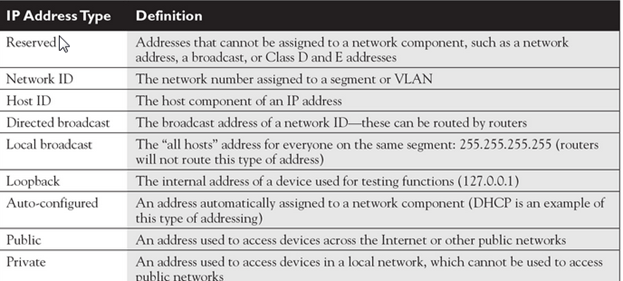
- Network component Defines on what segment in the network, a device is located
- Host component Defines the specific device on a particular network segment
The network number uniquely identifies a segment in the network and a host number uniquely identifies a device on a segment. The combination of these two numbers must be unique throughout the entire network. TCP/IP uses the same two components for addressing, but it adds a twist by breaking up network numbers into five classes: A, B, C, D, and E. Each of these classes has a predefined network and host boundary:
- Class A address The first byte is a network number (8 bits) and the last 3 bytes are for host numbers (24 bits).
- Class B address The first 2 bytes are a network number (16 bits) and the last 2 bytes are for host numbers (16 bits).
- Class C address The first 3 bytes are a network number (24 bits) and the last 1 byte is for host numbers (8 bits).
- Class D address Used for multi casting services and applications.
- Class E address Reserved for research purposes
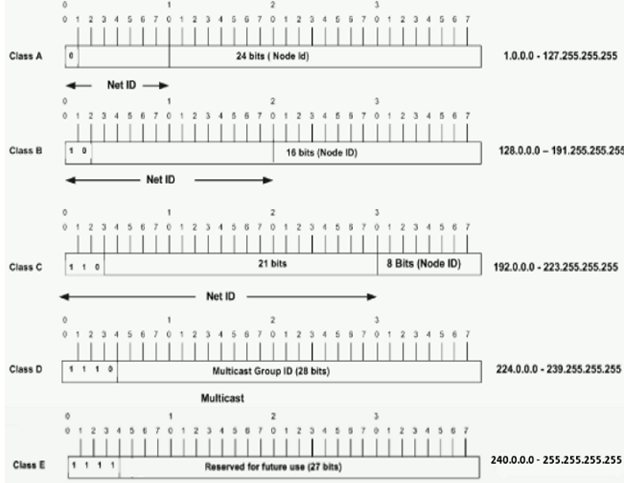
- In a Class A address, the first octet is the network portion, so the Class A example in Figure 1 has a major network address of 1.0.0.0 – 127.255.255.255. Octets 2, 3, and 4 (the next 24 bits) are for the network manager to divide into subnets and hosts as he/she sees fit. Class A addresses are used for networks that have more than 65,536 hosts (actually, up to 16777214 hosts!).
- In a Class B address, the first two octets are the network portion, so the Class B example in Figure 1 has a major network address of 128.0.0.0 – 191.255.255.255. Octets 3 and 4 (16 bits) are for local subnets and hosts. Class B addresses are used for networks that have between 256 and 65534 hosts.
- In a Class C address, the first three octets are the network portion. The Class C example in Figure 1 has a major network address of 192.0.0.0 – 223.255.255.255. Octet 4 (8 bits) is for local subnets and hosts – perfect for networks with less than 254 hosts.
Class A addresses always begin with a 0 in the highest order bit.
Class B addresses always begin with 10 in the highest order bits.
Class C addresses always begin with 110 in the highest order bits.
Class D addresses always begin with 1110 in the highest order bits.
Class E addresses always begin with 11110 in the highest order bits.
Class A addresses range from 1 to 126: 0 is reserved and represents all IP addresses; 127 is a reserved address and is used for testing, such as a loop back on an interface.
Class B addresses range from 128 to 191: binary 10000000–10111111
Class C addresses range from 192 to 223: binary 11000000–11011111
Class D addresses range from 224 to 239: binary 11100000–11101111
Class E addresses range from 240 to 254: 255 is a reserved address and is used for local broadcasting purposes.
Public and Private Addresses
Public addresses are Class A, B, and C addresses that can be used to access devices in other public networks, such as the Internet. The Internet Assigned Numbers Authority (IANA) is ultimately responsible for handing out and managing public addresses. Normally, you get public addresses directly from your ISP, which, in turn, requests them from one of five upstream address registries
What is public IP address?
A public IP address is the address that is assigned to a computing device to allow direct access over the Internet. A web server, email server and any server device directly accessible from the Internet are candidate for a public IP address. A public IP address is globally unique, and can only be assigned to a unique device.
What is private IP address?
A private IP address is the address space allocated by InterNIC to allow organizations to create their own private network. There are three IP blocks (1 class A, 1 class B and 1 class C) reserved for a private use. The computers, tablets and smartphones sitting behind your home, and the personal computers within an organizations are usually assigned private IP addresses. A network printer residing in your home is assigned a private address so that only your family can print to your local printer.
When a computer is assigned a private IP address, the local devices see this computer via it’s private IP address. However, the devices residing outside of your local network cannot directly communicate via the private IP address, but uses your router’s public IP address to communicate. To allow direct access to a local device which is assigned a private IP address, a Network Address Translator (NAT) should be used.
Public and Private Addresses
Public addresses are Class A, B, and C addresses that can be used to access devices in other public networks, such as the Internet. The Internet Assigned Numbers Authority (IANA) is ultimately responsible for handing out and managing public addresses. Normally, you get public addresses directly from your ISP, which, in turn, requests them from one of five upstream address registries
What is public IP address?
A public IP address is the address that is assigned to a computing device to allow direct access over the Internet. A web server, email server and any server device directly accessible from the Internet are candidate for a public IP address. A public IP address is globally unique, and can only be assigned to a unique device.
What is private IP address?
A private IP address is the address space allocated by InterNIC to allow organizations to create their own private network. There are three IP blocks (1 class A, 1 class B and 1 class C) reserved for a private use. The computers, tablets and smartphones sitting behind your home, and the personal computers within an organizations are usually assigned private IP addresses. A network printer residing in your home is assigned a private address so that only your family can print to your local printer.
When a computer is assigned a private IP address, the local devices see this computer via it’s private IP address. However, the devices residing outside of your local network cannot directly communicate via the private IP address, but uses your router’s public IP address to communicate. To allow direct access to a local device which is assigned a private IP address, a Network Address Translator (NAT) should be used
Example:
For example, before landing on this page, your device (such as a computer, phone, or tablet), which uses a private IP address, requested this page through a router, which has a public IP address. Once the request was made and Lifewire responded to deliver the page, it was downloaded to your device through a public IP address before reaching your router, after which it was handed off to your private/local address to reach your device.
Private IP addresses also provide a way for devices that don’t need a connection to the internet, such as file servers and printers, to communicate with the other devices on a network without being directly exposed to the public.
Subletting–To be updated
DHCP :
DNS :
 Automotive Diagnostics