Software testing plays a vital role in ensuring the quality, reliability, and performance of software applications. It covers a diverse range of testing types, each designed to address specific aspects of a software system.
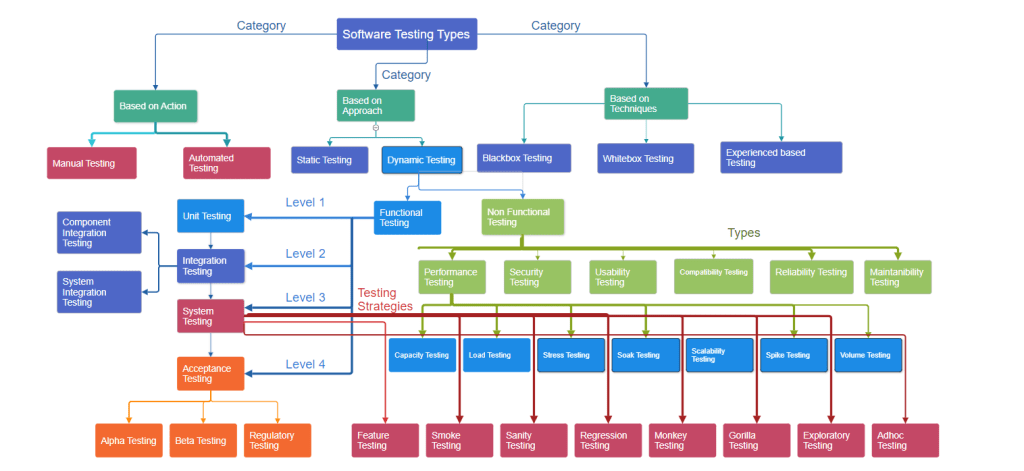
Based on actions:
a. Manual Testing: Manual testing is the process of executing test cases and scenarios without the assistance of automated testing tools. It involves human interaction with the software to ensure its functionality, usability, and to identify any defects or issues.
b. Automated Testing: Automated testing involves the use of scripts or tools to execute and validate predefined test cases, replicating human testing steps. It enables the automatic identification and reporting of bugs or issues in the software, enhancing efficiency and accuracy in the testing process.
Based on Approach:
a. Static Testing: Static testing is a software testing technique that involves reviewing and evaluating the software documentation, code, or other project artifacts without executing the code. Its primary goal is to identify defects, issues, or discrepancies early in the development process, ensuring higher quality by addressing problems at their source.
b. Dynamic Testing: Dynamic testing is a software testing technique that involves the execution of the code to validate its functional behavior and performance. It includes running test cases against the software to assess its functionality, identify defects, and ensure that it meets specified requirements.
Dynamic Testing has 2 types:
1.Functional Testing: Functional testing is a software testing type that verifies that the application’s functions work as intended. It involves testing the software’s features, user interfaces, APIs, databases, and other components to ensure they meet the specified requirements and perform their functions correctly.
2. Non-Functional Testing: Non-functional testing is a type of software testing that assesses aspects of a system that are not related to specific behaviors or functions. It focuses on qualities such as performance, scalability, reliability, usability, and security, ensuring that the software meets requirements related to these non-functional aspects.
Functional Testing has 4 levels:
1.Unit Testing: Unit testing is a software testing technique in which individual units or components of a software application are tested in isolation. The purpose is to validate that each unit functions as designed by checking its coding logic and behavior, typically through automated tests.
2. Integration Testing
a. Component integration testing: Component integration testing checks that different parts of a software system, called components, work well together. It ensures that data is exchanged correctly between these components before moving to more comprehensive testing.
b. System integration testing: System integration testing, in the context of different systems, involves validating the proper flow of data between integrated systems. This testing phase ensures that data exchange and communication between distinct systems occur accurately and according to specified requirements.
System Testing: System testing is a phase of software testing where the entire integrated software system is tested to ensure that it meets the specified requirements. The goal of system testing is to assess the system’s functionality, performance, reliability, and other attributes in a comprehensive manner.
a. Feature testing: Feature testing is a software testing process that specifically focuses on verifying the functionality and behavior of individual features or functionalities within a software application. It aims to ensure that each feature works as intended, meeting the specified requirements, and providing the expected outcomes.
b. Smoke testing: A smoke test is an initial, basic test performed on a software build to check if the essential functionalities of the application work as expected. It aims to identify critical issues early in the testing process, often ensuring that the software build is stable enough for more in-depth testing.
c. Sanity testing: Sanity testing is a brief and focused check performed on related modules of a software application to ensure that recent changes or fixes haven’t adversely affected specific functionalities. It helps quickly verify the stability of the software in key areas after modifications.
d. Regression testing: Regression testing is a type of software testing that verifies whether recent changes to the code, such as new features or bug fixes, have adversely affected the existing functionalities of the software. It involves re-executing previously executed test cases to ensure that the changes haven’t introduced new defects or caused unexpected issues in other parts of the application.
Ad hoc testing: Ad hoc testing is an informal and unplanned approach to software testing, where testers spontaneously and randomly test the application without following any predefined test cases or scripts. The goal is to explore the software in a free-form manner, trying different inputs and interactions to identify unexpected issues or defects. Ad hoc testing is often unstructured and relies on the tester’s experience and intuition to uncover potential problems.
Acceptance Testing: Acceptance testing is a type of software testing that verifies whether a system meets the specified requirements and is acceptable to end-users or stakeholders.
a. Alpha testing: Alpha testing is the initial phase of software testing conducted by the internal development team. It aims to identify and fix issues before releasing the software to a larger audience or to beta testers
b. Beta testing: Beta testing is a phase of software testing where a pre-release version of the software is made available to a selected group of users or the public. The purpose is to gather feedback from real users and identify potential issues or areas for improvement before the official release.
c. Regulatory testing: Regulatory testing refers to the process of testing software applications to ensure compliance with industry regulations, standards, or legal requirements. This type of testing is crucial in sectors where adherence to specific rules and regulations is mandatory, such as finance, healthcare, or government.
What Is Sanity Testing
To understand sanity testing, let’s first understand software build. A software project usually consists of thousands of source code files. It is a complicated and time-consuming task to create an executable program from these source code files. The process to create an executable program uses “build” software and is called “Software Build”.
Sanity testing is performed to check if new module additions to an existing software build are working as expected and can pass to the next level of testing. It is a subset of regression testing and evaluates the quality of regressions made to the software.
Suppose there are minor changes to be made to the code, the sanity test further checks if the end-to-end testing of the build can be performed seamlessly. However, if the test fails, the testing team rejects the software build, thereby saving both time and money.
During this testing, the primary focus is on validating the functionality of the application rather than performing detailed testing. When sanity testing is done for a module or functionality or complete system, the test cases for execution are so selected that they will touch only the important bits and pieces. Thus, it is wide but shallow testing.
What Is Smoke Testing
Smoke Testing is carried out post software build in the early stages of SDLC (software development life cycle) to reveal failures, if any, in the pre-released version of a software. The testing ensures that all core functionalities of the program are working smoothly and cohesively. A similar test is performed on hardware devices to ensure they don’t release smoke when induced with a power supply. Thus, the test gets its name ‘smoke test’. It is a subset of acceptance testing and is normally used in tester acceptance testing, system testing, and integration testing.
The intent of smoke testing is not exhaustive testing but to eliminate errors in the core of the software. It detects errors in the preliminary stage so that no futile efforts are made in the later phases of the SDLC. The main benefit of smoke testing is that integration issues and other errors are detected, and insights are provided at an early stage, thus saving time.
For instance, a smoke test may answer basic questions like “does the program run?”, does the user interface open?”. If this fails, then there’s no point in performing other tests. The team won’t waste further time installing or testing. Thus, smoke tests broadly cover product features within a limited time. They run quickly and provide faster feedback rather than running more extensive test suites that would naturally require much more time.
Sanity Testing vs. Smoke Testing
| Smoke testing | Sanity testing |
| Executed on initial/unstable builds | Performed on stable builds |
| Verifies the very basic features | Verifies that the bugs have been fixed in the received build and no further issues are introduced |
| Verify if the software works at all | Verify several specific modules, or the modules impacted by code change |
| Can be carried out by both testers and developers | Carried out by testers |
| A subset of acceptance testing | A subset of regression testing |
| Done when there is a new build | Done after several changes have been made to the previous build |
What is the software development life cycle (SDLC)?
Software development is an iterative process that is followed for a software project that consists of several phases for building and running software applications. SDLC helps with the measurement and improvement of a process, which allows an analysis of software development each step of the way.
Why is the SDLC important?
- It provides a standardized framework that defines activities and deliverables
- It aids in project planning, estimating, and scheduling
- It makes project tracking and control easier
- It increases visibility on all aspects of the life cycle to all stakeholders involved in the development process
- It increases the speed of development
- It improves client relations
- It decreases project risks
- It decreases project management expenses and the overall cost of production
How does the SDLC work?
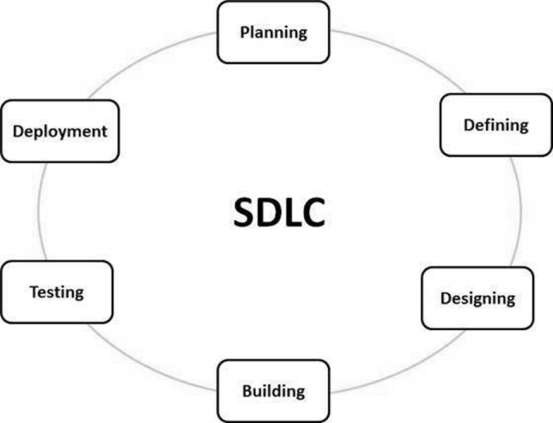
Stage 1: Planning and Requirement Analysis
Requirement analysis is the most important and fundamental stage in SDLC. It is performed by the senior members of the team with inputs from the customer, the sales department, market surveys and domain experts in the industry. This information is then used to plan the basic project approach and to conduct product feasibility study in the economical, operational and technical areas.
Planning for the quality assurance requirements and identification of the risks associated with the project is also done in the planning stage.
Stage 2: Defining Requirements.
Once the requirement analysis is done the next step is to clearly define and document the product requirements and get them approved from the customer or the market analysts. This is done through an SRS (Software Requirement Specification) document which consists of all the product requirements to be designed and developed during the project life cycle.
Stage 3: Designing the Product Architecture
SRS is the reference for product architects to come out with the best architecture for the product to be developed. Based on the requirements specified in SRS, usually more than one design approach for the product architecture is proposed and documented in a DDS – Design Document Specification.
This DDS is reviewed by all the important stakeholders and based on various parameters as risk assessment, product robustness, design modularity, budget and time constraints, the best design approach is selected for the product.
Stage 4: Building or Developing the Product
In this stage of SDLC the actual development starts and the product is built. The programming code is generated as per DDS during this stage. If the design is performed in a detailed and organized manner, code generation can be accomplished without much hassle.
Stage 5: Testing the Product.
This stage is usually a subset of all the stages as in the modern SDLC models, the testing activities are mostly involved in all the stages of SDLC. However, this stage refers to the testing only stage of the product where product defects are reported, tracked, fixed and retested, until the product reaches the quality standards defined in the SRS.
Stage 6: Deployment in the Market and Maintenance.
Once the product is tested and ready to be deployed it is released formally in the appropriate market. Sometimes product deployment happens in stages as per the business strategy of that organization. The product may first be released in a limited segment and tested in the real business environment (UAT- User acceptance testing).
SDLC Models
There are various software development life cycle models defined and designed which are followed during the software development process. These models are also referred as Software Development Process Models”. Each process model follows a Series of steps unique to its type to ensure success in the process of software development
Waterfall Model
This SDLC model is the oldest and most straightforward. With this methodology, we finish one phase and then start the next. Each phase has its own mini-plan and each phase “waterfalls” into the next. The biggest drawback of this model is that small details left incomplete can hold up the entire process.
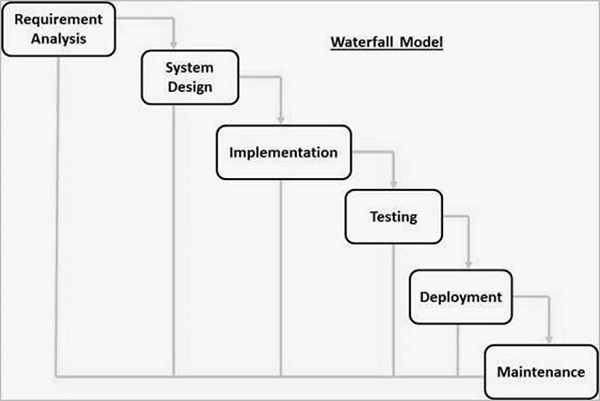
The next phase is started only after the defined set of goals are achieved for previous phase and it is signed off, so the name “Waterfall Model”. In this model, phases do not overlap.
Some situations where the use of Waterfall model is most appropriate are −
- Requirements are very well documented, clear and fixed.
- Product definition is stable.
- Technology is understood and is not dynamic.
- There are no ambiguous requirements.
- Ample resources with required expertise are available to support the product.
- The project is short
Some of the major advantages of the Waterfall Model are as follows −
- Simple and easy to understand and use
- Easy to manage due to the rigidity of the model. Each phase has specific deliverables and a review process.
- Phases are processed and completed one at a time.
- Works well for smaller projects where requirements are very well understood.
- Clearly defined stages.
- Well understood milestones.
- Easy to arrange tasks.
- Process and results are well documented.
Waterfall Model – Disadvantages
The disadvantage of waterfall development is that it does not allow much reflection or revision. Once an application is in the testing stage, it is very difficult to go back and change something that was not well-documented or thought upon in the concept stage.
The major disadvantages of the Waterfall Model are as follows −
- No working software is produced until late during the life cycle.
- High amounts of risk and uncertainty.
- Not a good model for complex and object-oriented projects.
- Poor model for long and ongoing projects.
- Not suitable for the projects where requirements are at a moderate to high risk of changing. So, risk and uncertainty is high with this process model.
- It is difficult to measure progress within stages.
- Cannot accommodate changing requirements.
- Adjusting scope during the life cycle can end a project.
- Integration is done as a “big-bang. at the very end, which doesn’t allow identifying any technological or business bottleneck or challenges early.
V-Model – Design
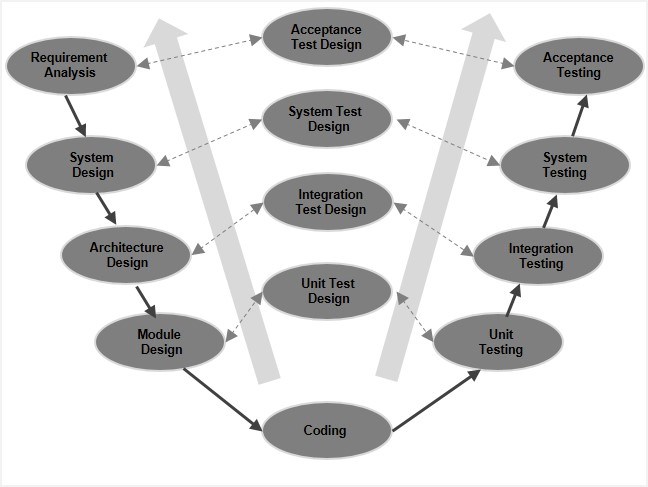
The V-model is an SDLC model where execution of processes happens in a sequential manner in a V-shape. It is also known as Verification and Validation model.
The V-Model is an extension of the waterfall model and is based on the association of a testing phase for each corresponding development stage.
This means that for every single phase in the development cycle, there is a directly associated testing phase. This is a highly-disciplined model and the next phase starts only after completion of the previous phase
SDLC – Agile Model
Agile SDLC model is a combination of iterative and incremental process models with focus on process adaptability and customer satisfaction by rapid delivery of working software product. Agile Methods break the product into small incremental builds. These builds are provided in iterations. Each iteration typically lasts from about one to three weeks.
Agile planning is an iterative approach to managing projects avoiding the traditional concept of detailed project planning with a fixed date and scope.
Agile project planning emphasizes frequent value delivery, constant end-user feedback, cross-functional collaboration, and continuous improvement.
Unlike traditional project planning, Agile planning remains flexible and adaptable to changes that may emerge at any project lifecycle stage.
Following are the Agile Manifesto principles −
- Individuals and interactions − In Agile development, self-organization and motivation are important, as are interactions like co-location and pair programming.
- Working software − Demo working software is considered the best means of communication with the customers to understand their requirements, instead of just depending on documentation.
- Customer collaboration − As the requirements cannot be gathered completely in the beginning of the project due to various factors, continuous customer interaction is very important to get proper product requirements.
- Responding to change − Agile Development is focused on quick responses to change and continuous development.
What Are the Steps in the Agile Planning Process?
- Define project goals: project planning starts with clearly defining what the purpose of this project is. This will create direction for the team to follow and ensure that all efforts are aligned with the primary goals.
- Load backlog with work items: identify what needs to be done to complete a project. Agile teams use work elements like initiatives, epics/ projects and tasks/ user stories to build their work structure and create an alignment between the project goals and execution.
- Release planning: review the backlog and determine the order of work execution. In Scrum, teams conduct Sprint planning, choosing the next highest priority items to execute in the sprint. Kanban teams use historical data to estimate project length and use Kanban boards as a planning tool to prioritize upcoming work.
- Daily stand-up: holding a daily meeting will ensure everyone on the team is in the loop. This meeting aims to identify and resolve issues, find new opportunities for improvement and discuss project progress.
- Process review: examine the end-to-end flow of work from initiation to customer delivery. Gather feedback to identify areas for future improvements. Scrum teams do that during Sprint Review and Retrospective meetings, while Kanban teams have Service Delivery Review meetings.
The 6 Levels of Agile Planning
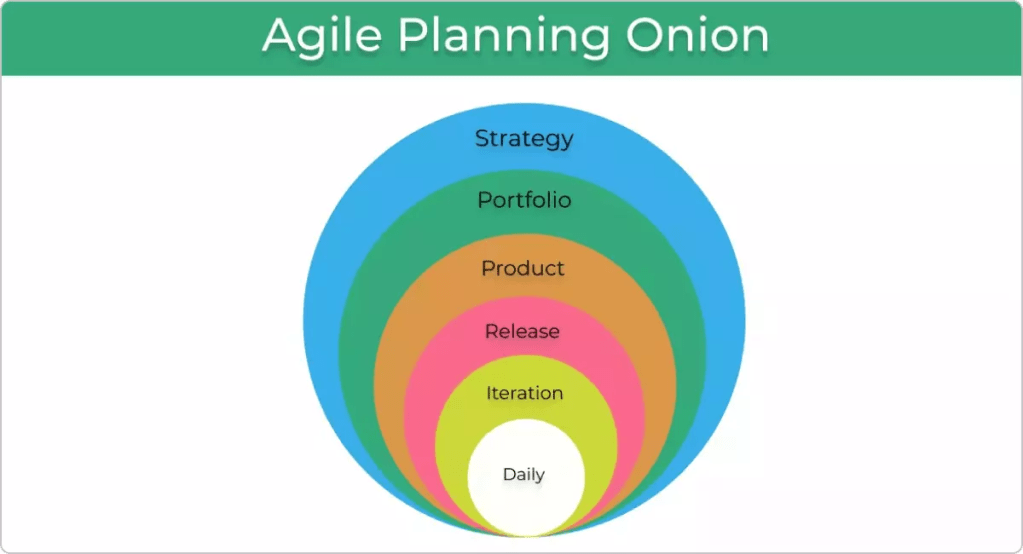
Let’s have a look at each level from a product development perspective:
- Strategy: The outermost layer of the onion represents the overall strategic vision and goals of an organization and how they are going to be achieved. It is usually conducted by the senior leadership team.
- Portfolio: At this level, senior managers discuss and plan out the portfolio of products and services that will support the execution of the strategy defined in the previous level.
- Product: Teams create a high-level plan and break it down into significant deliverables of key features and functionalities that will contribute to accomplishing the strategic objectives.
- Release: The key features defined are set to be delivered within a time-framed box (usually a month).
- Iteration: This level focuses on managing work in a timeframe of a few weeks. Teams select several individual tasks or user stories from the backlog to deliver in small batches.
- Daily: The goal of the daily planning meetings is for teams to walk through their tasks and discuss project progress and any impediments threatening the process. During this time, they create an action plan for the next steps of the project execution.
What Is DevOps?
DevOps is a set of practices, tools, and a cultural philosophy that automate and integrate the processes between software development and IT teams. It emphasizes team empowerment, cross-team communication and collaboration, and technology automation.
The original meaning of the term DevOps is to automate and unify the efforts of two groups, development teams and IT operations teams, that have traditionally operated separately, charting a path for change in software development processes and organizational culture. Delivering high quality software quickly.
DevOps represents the current state of evolution of the software delivery cycle over the past 20 years. This ranges from huge code releases of entire applications every few months or years to iterative updates of small features and functionality released daily or several times a day.
DevOps integrates and automates the work of software development and IT operations teams, enabling them to deliver high-quality software quickly.
In reality, a very good DevOps process and culture extends beyond development and operations and includes all application stakeholders (platform and infrastructure engineering, security, compliance, governance, risk management, line-of-business, , end users, and customers) into the software development lifecycle.
DevOps represents the current state of evolution of the software delivery cycle over the past 20 years. This ranges from huge code releases of entire applications every few months or years to iterative updates of small features and functionality released daily or several times a day.
Ultimately, DevOps is about meeting the ever-increasing demands of software users for frequently released innovative new features and uninterrupted performance and availability.
How DevOps was born?
Just before the year 2000, most software was developed and updated using a waterfall methodology, a linear approach to large-scale development projects. The software development team had spent months developing a huge body of new code. This code affected most or all of the application, and the changes were so extensive that the development team spent several additional months integrating the new code into the code base.
Quality assurance (QA), security, and operations teams then spent several more months testing the code. As a result, software releases range from months to years, often with several important patches and bug fixes between releases. This big bang approach to feature delivery has three characteristics.
To speed development and improve quality, the development team began adopting agile software development methodologies. This approach is iterative rather than linear and emphasizes making smaller, more frequent updates to the application’s code base. At the heart of these methods are continuous integration and continuous delivery , or CI/CD. Small chunks of new code from CI/CD are merged into the code base every week or two, then automatically integrated, tested, and ready to be deployed to production
The more effectively these agile development practices accelerate software development and delivery, the more effectively IT operations (system provisioning, configuration, acceptance testing, management, and monitoring), still in silos, become part of the software delivery lifecycle. The next bottleneck became even more obvious.
This is how DevOps was born from agile methods. DevOps has added new processes and tools to extend the continuous iteration and automation of CI/CD to other parts of the software delivery lifecycle. We also ensured close collaboration between development and operations at every stage of the process.
How DevOps works: DevOps lifecycle
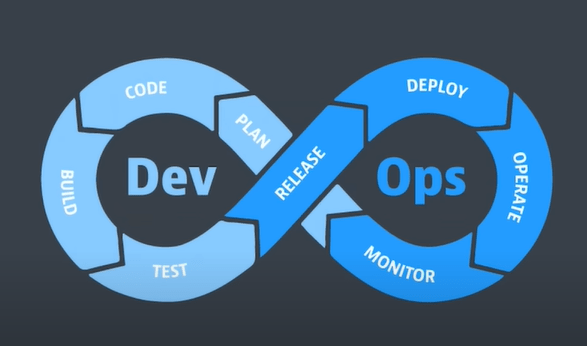
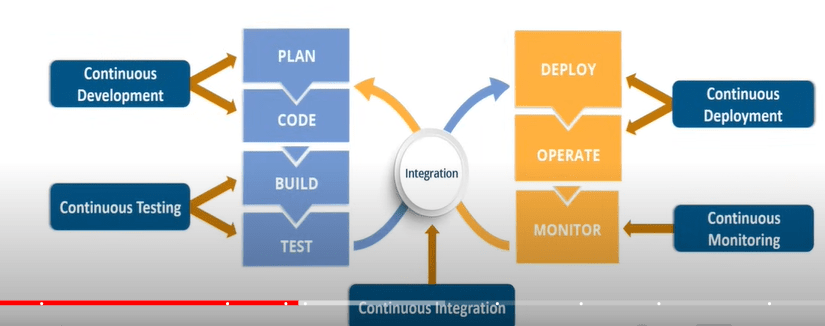
Planning (or ideation). In this workflow, the team takes a closer look at the features and functionality that should be included in the next release. This includes prioritized end-user feedback, customer stories, and input from all internal stakeholders. The goal during this planning stage is to maximize the business value of the product by creating a backlog of features that will produce valuable and desired outcomes when delivered.
development. This is the programming phase, where developers test, code, and build new features and enhancements based on user stories and work items in the backlog
Integration (build, or continuous integration and continuous delivery (CI/CD)). As mentioned above, this workflow integrates new code into an existing code base, then tests it, and packages it into an executable file for deployment.
Deployment (usually called continuous deployment ). Here the runtime build output (from the integration) is deployed to a runtime environment (this environment typically refers to a development environment where runtime tests are performed for quality, compliance, and security)
Operation. Manage the end-to-end delivery of IT services to customers. This includes the practices involved in design, implementation, configuration, deployment, and maintenance of all IT infrastructure that supports an organization’s services.
Observe :
Quickly identify and resolve issues that impact product uptime, speed, and functionality. Automatically notify your team of changes, high-risk actions, or failures, so you can keep services on.
Continuous feedback
DevOps teams should evaluate each release and generate reports to improve future releases. By gathering continuous feedback, teams can improve their processes and incorporate customer feedback to improve the next release.
Three other important continuous workflows occur in between these workflows.
Continuous testing: The classic DevOps lifecycle includes a separate “testing” phase that occurs between integration and deployment. However, with evolved DevOps, planning (behavioral-driven development), development (unit testing, contract testing), integration (static code scanning, CVE scanning, linting), and deployment (smoke testing, penetration testing, configuration testing) Certain elements of testing now occur during , production (chaos testing, compliance testing), and learning (A/B testing)
Security: Waterfall methodologies and agile implementations “add” security workflows after delivery or deployment. DevOps, on the other hand, aims to embed security from the beginning (planning), when security issues are easiest and least expensive to resolve, and throughout the remaining stages of the development cycle. This has led to the rise of DevSecOps
Compliance: with laws and regulations Compliance (governance and risk) efforts are also best addressed early and throughout the development lifecycle. Regulated industries are frequently mandated to provide a certain level of observability, traceability, and access to how functionality is delivered and managed in the runtime production environment
DevOps Tools
Project management tools: Tools that allow teams to create a backlog of user stories (requirements) that make up a coding project, break the project into smaller tasks, and track tasks to completion. Many tools support the agile project management methodologies that developers are adopting for DevOps, such as Scrum, Lean, and Kanban. Popular open source options include GitHub Issues and Jira.
Jira Product Discovery organizes this information into actionable inputs and prioritizes actions for development teams.
we recommend tools that allow development and operations teams to break work down into smaller, manageable chunks for quicker deployments. This allows you to learn from users sooner and helps with optimizing a product based on the feedback. Look for tools that provide sprint planning, issue tracking, and allow collaboration, such as Jira.

Build
Collaborative source code repository: A version-controlled coding environment. Multiple developers can work on the same code base. The code repository integrates with CI/CD, testing, and security tools so that when code is committed to the repository, you can automatically take the next step. Open source code repositories include GiHub and GitLab.
Refer *
https://www.ibm.com/jp-ja/topics/devops
https://www.atlassian.com/devops/devops-tools
What is Scrum?
A framework within which people can address complex adaptive problems, while productively and creatively delivering products of the highest possible value.”
In simple terms, scrum is a lightweight agile project management framework that can be used to manage iterative and incremental projects of all types. The concept here is to break large complex projects into smaller stages, reviewing and adapting along the way
History of Scrum
The term “scrum” was first introduced by two professors Hirotaka Takeuchi and Ikujiro Nonaka in the year 1986, in Harvard Business Review article. There they described it as a “rugby” style approach to product development, one where a team moves forward while passing a ball back and forth.
Software developers Ken Schwaber and Jeff Sutherland each came up with their own version of Scrum, which they presented at a conference in Austin, Texan in 1995. In the year 2010, the first publication of official scrum guide came out.
Scrum Roles
There are three distinct roles defined in Scrum:
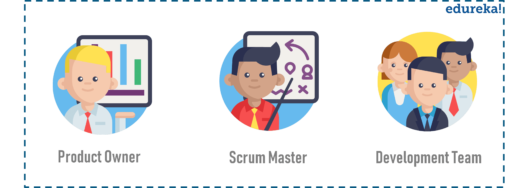
- The Product Owner is responsible for the work the team is supposed to complete. The main role of a product owner is to motivate the team to achieve the goal and the vision of the project. While a project owner can take input from others but when it comes to making major decisions, ultimately he/she is responsible.
- The Scrum Master ensures that all the team members follow scrum’s theories, rules, and practices. They make sure the Scrum Team has whatever it needs to complete its work, like removing roadblocks that are holding up progress, organizing meetings, dealing with challenges and bottlenecks
- The Development Team(Scrum Team) is a self-organizing and a cross-functional team, working together to deliver products. Scrum development teams are given the freedom to organize themselves and manage their own work to maximize the team’s effectiveness and efficiency.
Events in Scrum
In particular, there are four events that you will encounter during the scrum process. But before we proceed any further you should be aware of what sprint is.
A sprint basically is a specified time period during which a scrum team produces a product.
The four events or ceremonies of Scrum Framework are:
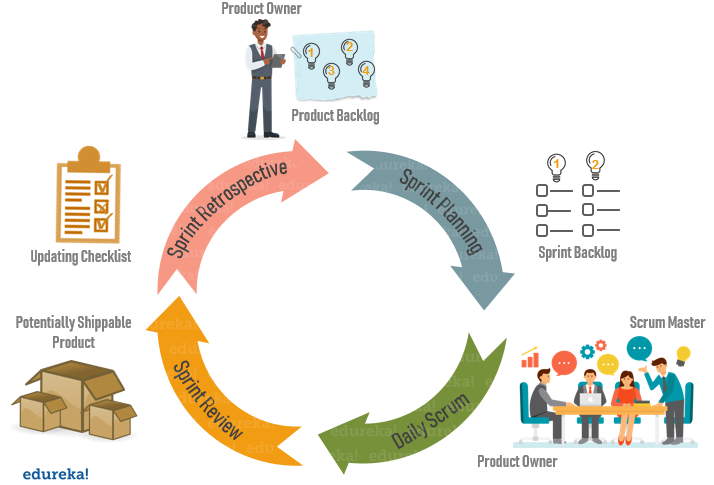
- Sprint Planning: It is a meeting where the work to be done during a sprint is mapped out and the team members are assigned the work necessary to achieve that goal.
- Daily Scrum: Also known as a stand-up, it is a 15-minute daily meeting where the team has a chance to get on the same page and put together a strategy for the next 24 hours.
- Sprint Review: During the sprint review, product owner explains what the planned work was and what was not completed during the Sprint. The team then presents completed work and discuss what went well and how problems were solved.
- Sprint Retrospective: During sprint retrospective, the team discusses what went right, what went wrong, and how to improve. They decide on how to fix the problems and create a plan for improvements to be enacted during the next sprint.
Scrum Artifacts
Artifacts are just physical records that provide project details when developing a product. Scrum Artifacts include:
- Product Backlog: It is a simple document that outlines the list of tasks and every requirement that the final product needs. It is constantly evolving and is never complete. For each item in the product backlog, you should add some additional information like:
- Description
- Order based on priority
- Estimate
- Value to the business
- Sprint Backlog: It is the list of all items from the product backlog that need to be worked on during a sprint. Team members sign up for tasks based on their skills and priorities. It is a real-time picture of the work that the team currently plans to complete during the sprint.
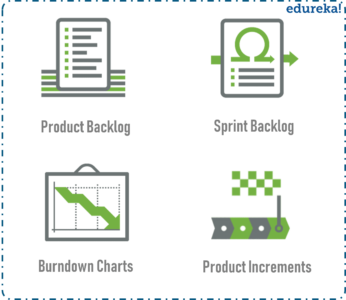
- Burndown Chart: It is a graphical representation of the amount of estimated remaining work. Typically the amount of remaining work is will featured on the vertical axis with time along the horizontal axis.
- Product Increment: The most important artifact is the product improvement, or in other words, the sum of product work completed during a Sprint, combined with all work completed during previous sprints.
Key Features of Effective Scrum Tools
When assessing Scrum tools, one must consider features like the capability of sprint management, monitoring of tasks, and performance evaluation. Specifically, Scrum tools must include the following features:
- The tool must be able to generate a task board offering a visual representation of the progress of ongoing sprints.
- They must document user stories. It means an informal explanation of features from the user’s point of view that aids in understanding the goal of the team collectively.
- They should have the potential to conduct sprint planning, including defining each sprint concerning the goal, workflow, team assigned, task, and outcome.
- They must provide real-time updates. For instance, it tracks the status of the ongoing task in percentages on the task board.
1. Best for backlog management: Jira Software.
2. Best for documentation and knowledge management: Confluence
3. Best for sprint planning: Jira Software
4. Best for sprint retrospective: Confluence whiteboards
Reference
https://www.atlassian.com/agile/project-management/scrum-tools
Agile vs. Scrum: What’s the Difference?
Put simply, Agile project management is a project philosophy or framework that takes an iterative approach towards the completion of a project.
There are many different project management methodologies used to implement the Agile philosophy. Some of the most common include Kanban, Extreme Programming (XP), and Scrum.
Scrum project management is one of the most popular Agile methodologies used by project managers.
“Whereas Agile is a philosophy or orientation, Scrum is a specific methodology for how one manages a project,” Griffin says. “It provides a process for how to identify the work, who will do the work, how it will be done, and when it will be completed by.”
- Agile is a philosophy, whereas Scrum is a type of Agile methodology
- Scrum is broken down into shorter sprints and smaller deliverables, while in Agile everything is delivered at the end of the project
- Agile involves members from various cross-functional teams, while a Scrum project team includes specific roles, such as the Scrum Master and Product Owner
WHEN TO USE SCRUM IN YOUR PROJECT
1. WHEN REQUIREMENTS ARE NOT CLEARLY DEFINED
2. WHEN THE PROBABILITY OF CHANGES DURING THE DEVELOPMENT IS HIGH
3. WHEN THERE IS A NEED TO TEST THE SOLUTION
4. WHEN THE PRODUCT OWNER (PO) IS FULLY AVAILABLE
5. WHEN THE TEAM HAS SELF-MANAGEMENT SKILLS
7. WHEN THE CLIENT’S CULTURE IS OPEN TO INNOVATION AND ADAPTS TO CHANGE
The key Scrum advantages
Adaptable and flexible
Adaptation is at the heart of the Scrum framework. It’s suitable for situations where the scope and requirements are not clearly defined. Changes can be quickly integrated into the project without affecting project output.
Faster delivery
Since the goal is to produce a working product with every sprint, Scrum can result in faster delivery and an earlier time to market. In more traditional frameworks, completed work is finished in total at the end of the project.
Encourages creativity
In Scrum, there is a focus on continuous improvement, and Scrum teams embrace new ideas and techniques. This leads to better quality, which allows your products to stand out in an increasingly competitive market.
Lower costs
Scrum can be cost-effective for organizations as it requires less documentation and control. It can also lead to increased productivity for the Scrum team, meaning less time and effort is wasted.
Improves customer satisfaction
Better quality work means greater customer satisfaction. Clients can test the product at the end of each sprint and communicate their feedback to the team. Since Scrum is designed for adaptability, changes can be made quickly and easily.
Improves employee morale
Every member of the Scrum team takes full ownership of their work, with the Scrum master on hand to support and protect them from outside pressure. As a result, team members feel capable and motivated to do their best work.
Difference between Scrum and Kanban
https://www.youtube.com/watch?v=GLFuzBiy18o
Model-based systems engineering (MBSE)
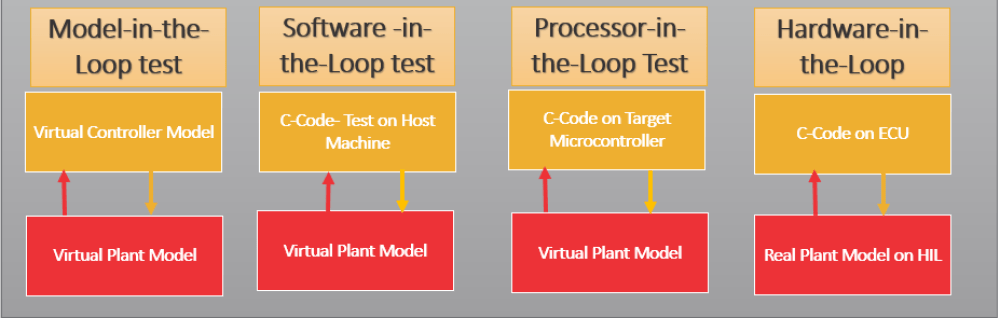
supports requirements development, design, analysis, verification, and validation of complex systems Verification (simulation) and validation (testing) are key elements of MBSE. Model in the loop (MIL), software in the loop (SIL), processor in the loop (PIL), and hardware in the loop (HIL) simulation and testing take place at specific points during the MBSE process to ensure a robust and reliable result.
MIL, SIL, PIL, and HIL testing come in the verification part of the Model-Based Design approach after you have recognized the requirement of the component/system you are developing and they have been modeled at the simulation level (e.g. Simulink platform). Before the model is deployed to the hardware for production, a few verification steps take place which are listed below.
- Model-in-the-Loop (MIL) simulation or Model-Based Testing
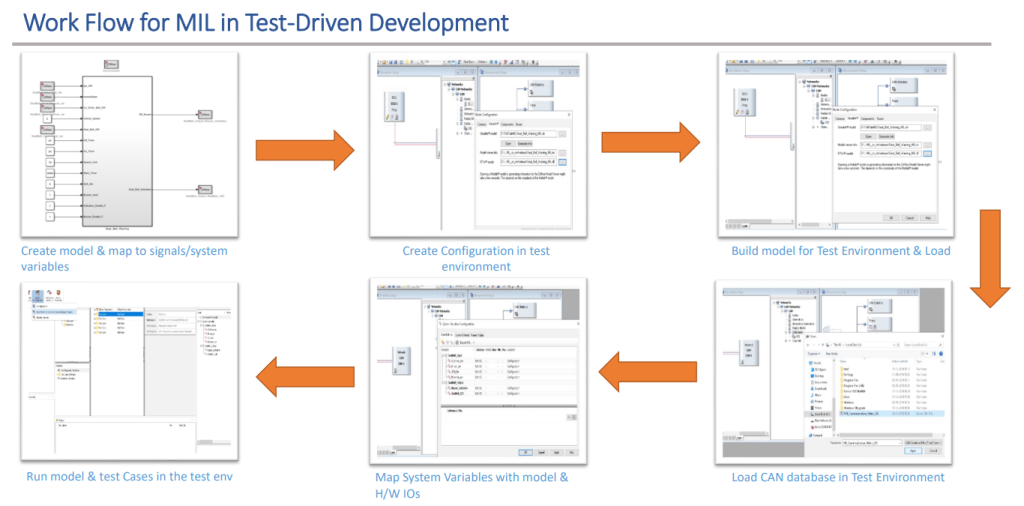
First, you have to develop a model of the actual plant (hardware) in a simulation environment such as Simulink, which captures most of the important features of the hardware system. After the plant model is created, develop the controller model and verify if the controller can control the plant (which is the model of the motor in this case) as per the requirement. This step is called Model-in-Loop (MIL) and you are testing the controller logic on the simulated model of the plant. If your controller works as desired, you should record the input and output of the controller which will be used in the later stage of verification.
MIL testing is used to evaluate the functionality of a system model in a simulated environment. This is typically done by connecting the model to a simulator that represents the system’s environment.
For example, after a plant model has been developed, MIL is used to validate that the controller module can control the plant as desired. It verifies that the controller logic produces the required functionality.
2) Software-in-the-Loop (SIL) simulation
Once your model has been verified in MIL simulation, the next stage is Software-in-Loop(SIL), where you generate code only from the controller model and replace the controller block with this code. Then run the simulation with the Controller block (which contains the C code) and the Plant, which is still the software model (similar to the first step). This step will give you an idea of whether your control logic i.e., the Controller model can be converted to code and if it is hardware implementable. You should log the input-output here and match it with what you have achieved in the previous step. If you experience a huge difference in them, you may have to go back to MIL and make necessary changes and then repeat steps 1 and 2. If you have a model which has been tested for SIL and the performance is acceptable you can move forward to the next step.
3) Processor-in-the-Loop (PIL) or FPGA-in-the-Loop (FIL) simulation
The next step is Processor-in-the-Loop (PIL) testing. In this step, we will put the Controller model onto an embedded processor and run a closed-loop simulation with the simulated Plant. So, we will replace the Controller Subsystem with a PIL block which will have the Controller code running on the hardware. This step will help you identify if the processor is capable of running the developed Control logic. If there are glitches, then go back to your code, SIL or MIL, and rectify them.
4) Hardware-in-the-Loop (HIL) Simulation
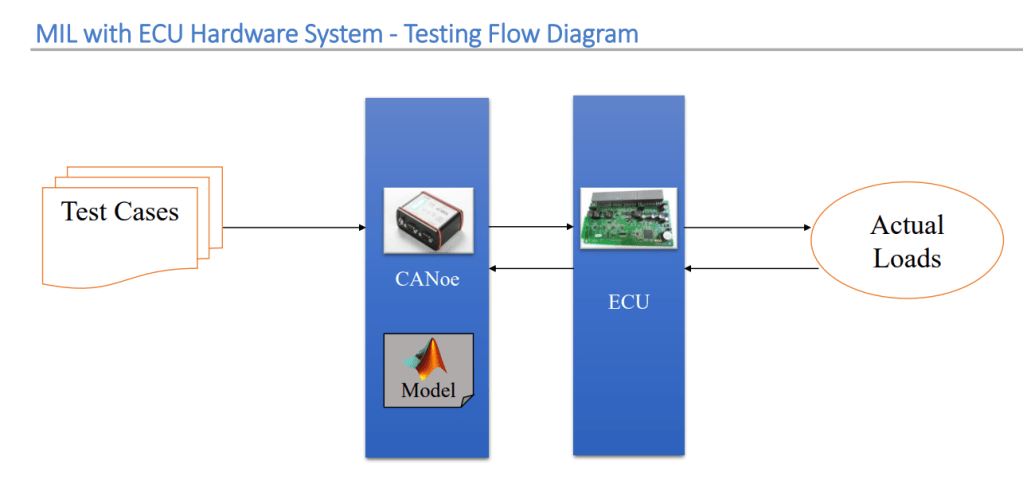
Before connecting the embedded processor to the actual hardware, you can run the simulated plant model on a real-time system such as Speedgoat. The real-time system performs deterministic simulations and have physical real connections to the embedded processor, for example analog inputs and outputs, and communication interfaces such as CAN and UDP. This will help you with identifying issues related to the communication channels and I/O interface, for example, attenuation and delay which are introduced by an analog channel and can make the controller unstable. These behaviors cannot be captured in simulation. HIL testing is typically performed for safety-critical applications, and it is required by automotive and aerospace validation standards
The software development life cycle from the initial definition of requirements to the completed integration process and deployment.
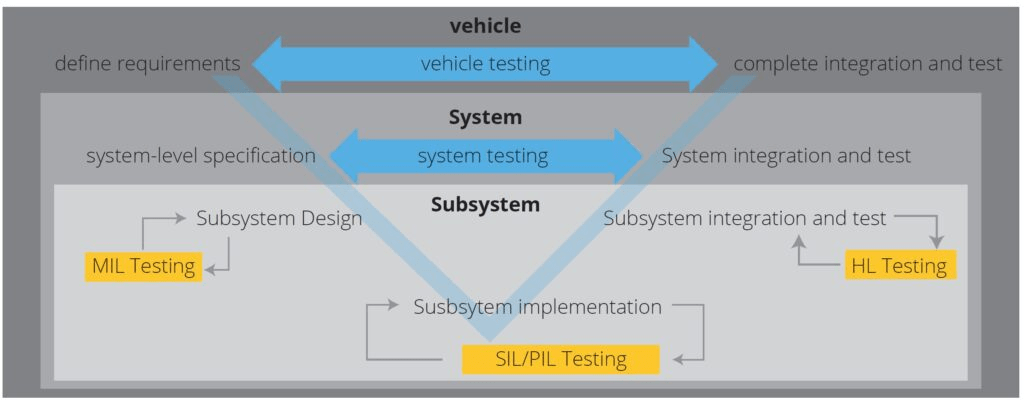
Importance of early and thorough design verification
MBE approaches can provide early design verification and speed the development process. MBSE, for example, is particularly valuable in numerous scenarios such as:
- Complex systems. Increasing functional complexity from generation to generation can exponentially complicate the design process, especially when new functionalities are added on top of an existing system, such as vehicles with more and more advanced driver assistance system (ADAS) functions that must work in harmony and share access to multiple electronic control units (ECUs).
- Stricter safety and performance requirements. Safety and performance expectations for aerospace systems, vehicles, and even Industry 4.0 cyber-physical systems are increasingly complex. MBSE tools support early-stage testing and simulations that can save time and expense while still meeting challenging performance and safety requirements.
- Cost and time to market. Better, faster, cheaper has been the mantra of the electronics industry for decades, and that same expectation now extends to complex systems. The use of MBD and MBSE enables faster development of increasingly complex cyber-physical systems and systems of systems, and that in turn supports better system performance and reduced costs.
References :
https://www.linkedin.com/pulse/models-loop-madhavan-vivekanandan/
https://www.analogictips.com/how-do-mil-sil-pil-and-hil-simulation-and-testing-relate-to-mbse-faq/
https://www.aptiv.com/en/insights/article/what-is-hardware-in-the-loop-testing
 Automotive Diagnostics