Transmission Control Protocol
- TCP uses a reliable delivery system to deliver layer 4 segments to the destination. This would be analogous to using a certified, priority, or next-day service with the US Postal Service.
- For example, with a certified letter, the receiver must sign for it, indicating the destination actually received the letter: Proof of the delivery is provided. TCP operates under a similar premise: It can detect whether or not the destination received a sent segment
- TCP’s main responsibility is to provide a reliable, full-duplex, connection-oriented, logical service between two devices. TCP goes through a three-way handshake to establish a session before data can be sent.
- Both the source and destination can simultaneously send data across the session. It uses windowing to implement flow control so that a source device doesn’t overwhelm a destination with too many segments.
- it supports data recovery, where any missed or corrupted information can be re-sent by the source. Any packets that arrive out of order because the segments traveled different paths to reach the destination can easily be reordered, since segments use sequence numbers to keep track of the ordering.
- TCP provides a reliable, connection-oriented, logical service through the use of sequence and acknowledgment numbers, windowing for flow control, error detection and correction (resending bad segments) through checksums, reordering packets, and dropping extra duplicated packets.
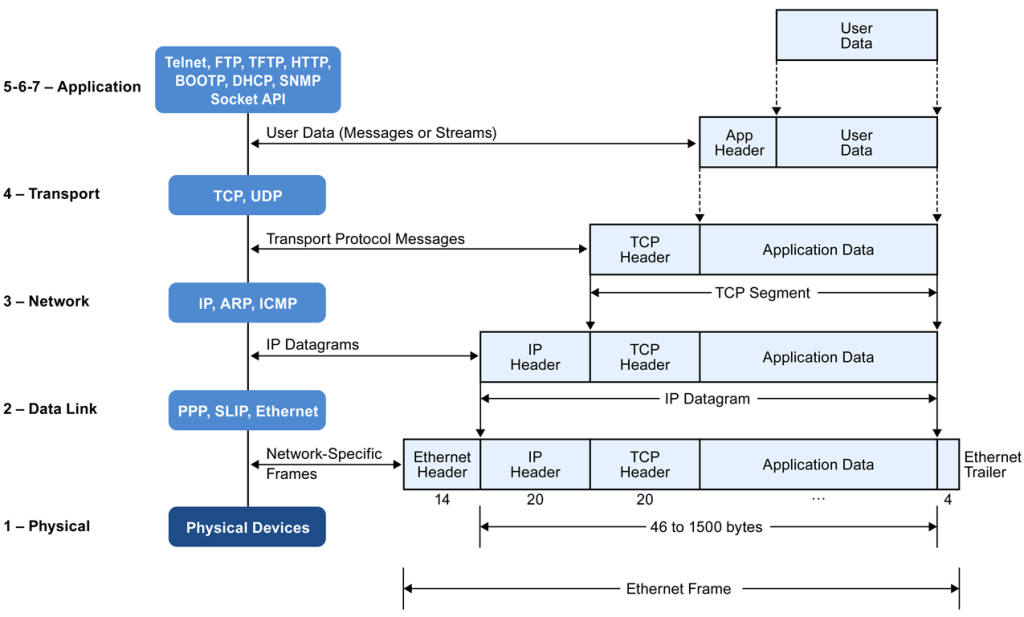
- IP datagram contains a protocol field, indicating the protocol that is encapsulated in the payload. In the case of TCP, the protocol field contains 6 as a value, indicating that a TCP segment is encapsulated.
TCP segments are encapsulated in the IP datagram
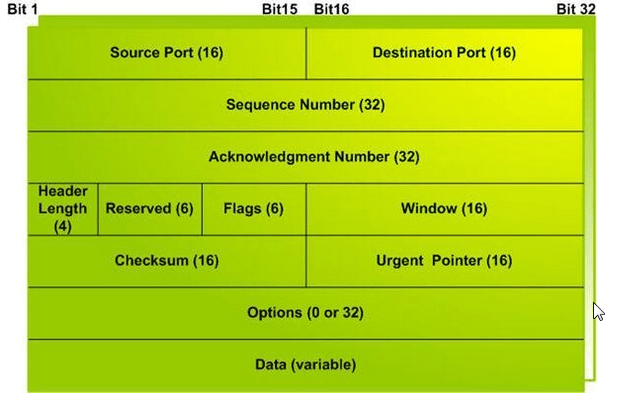
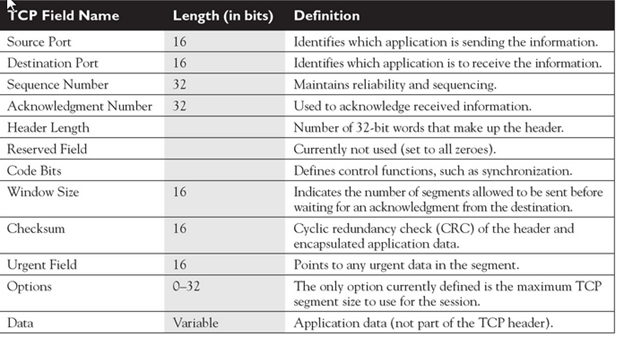
1) Source Port-
- Source Port is a 16 bit field.
- It identifies the port of the sending application.
2) Destination Port
- Destination Port is a 16 bit field.
- It identifies the port of the receiving application.
Source Port and Destination Port fields together identify the two local end points of the particular connection. A port plus its hosts’ IP address forms a unique end point. Ports are used to communicate with the upper layer and distinguish different application sessions on the host.
It is important to note-
- A TCP connection is uniquely identified by using-
- Combination of port numbers and IP Addresses of sender and receiver
- IP Addresses indicate which systems are communicating.
- Port numbers indicate which end to end sockets are communicating.
3) Sequence Number-
- Sequence number is a 32 bit field.
- TCP assigns a unique sequence number to each byte of data contained in the TCP segment.
- This field contains the sequence number of the first data byte.
- It ensures that the data is received in proper order by ordered segmenting and reassembling them at the receiving end.
4) Acknowledgement Number-
- Acknowledgment number is a 32 bit field.
- It contains sequence number of the data byte that receiver expects to receive next from the sender.
- It is always sequence number of the last received data byte incremented by 1.
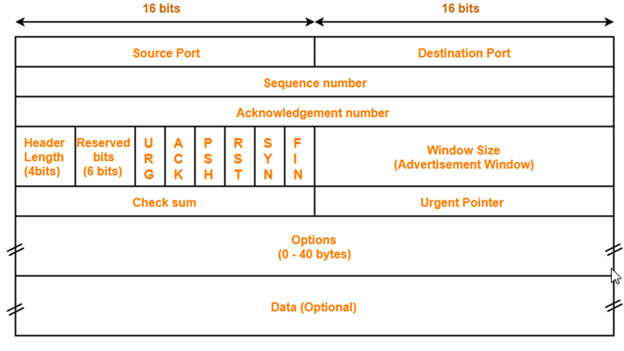
5) Header Length
- Header length is a 4 bit field.
- It contains the length of TCP header.
- It helps in knowing from where the actual data begins.
Minimum and Maximum Header length-
| The length of TCP header always lies in the range- [20 bytes , 60 bytes] |
- The initial 5 rows of the TCP header are always used.
- So, minimum length of TCP header = 5 x 4 bytes = 20 bytes.
- The size of the 6th row representing the Options field vary.
- The size of Options field can go up to 40 bytes.
- So, maximum length of TCP header = 20 bytes + 40 bytes = 60 bytes.
Concept of Scaling Factor-
- Header length is a 4 bit field.
- So, the range of decimal values that can be represented is [0, 15].
- But the range of header length is [20, 60].
- So, to represent the header length, we use a scaling factor of 4.
In general,
| Header length = Header length field value x 4 bytes |
Examples-
- If header length field contains decimal value 5 (represented as 0101), then-
Header length = 5 x 4 = 20 bytes
- If header length field contains decimal value 10 (represented as 1010), then-
Header length = 10 x 4 = 40 bytes
- If header length field contains decimal value 15 (represented as 1111), then-
Header length = 15 x 4 = 60 bytes
NOTES
It is important to note-
- Header length and Header length field value are two different things.
- The range of header length field value is always [5, 15].
- The range of header length is always [20, 60].
While solving questions-
- If the given value lies in the range [5, 15] then it must be the header length field value.
- This is because the range of header length is always [20, 60].
6. Reserved Bits-
- The 6 bits are reserved.
- These bits are not used.
7) Flags
URG Bit-
| URG bit is used to treat certain data on an urgent basis. |
When URG bit is set to 1,
- It indicates the receiver that certain amount of data within the current segment is urgent.
- Urgent data is pointed out by evaluating the urgent pointer field.
- The urgent data has be prioritized.
- Receiver forwards urgent data to the receiving application on a separate channel.
ACK Bit-
| ACK bit indicates whether acknowledgement number field is valid or not. ACK (Acknowledgment): Its purpose is transfer the acknowledgement of whether the the sender has received data. |
- When ACK bit is set to 1, it indicates that acknowledgement number contained in the TCP header is valid.
- For all TCP segments except request segment, ACK bit is set to 1.
- Request segment is sent for connection establishment during Three Way Handshake.
PSH Bit-
| PSH bit is used to push the entire buffer immediately to the receiving application. |
When PSH bit is set to 1,
- All the segments in the buffer are immediately pushed to the receiving application.
- No wait is done for filling the entire buffer.
- This makes the entire buffer to free up immediately.
| NOTE It is important to note- Unlike URG bit, PSH bit does not prioritize the data. It just causes all the segments in the buffer to be pushed immediately to the receiving application. The same order is maintained in which the segments arrived. It is not a good practice to set PSH bit = 1. This is because it disrupts the working of receiver’s CPU and forces it to take an action immediately. |
RST Bit-
| RST bit is used to reset the TCP connection. |
When RST bit is set to 1,
- It indicates the receiver to terminate the connection immediately.
- It causes both the sides to release the connection and all its resources abnormally.
- The transfer of data ceases in both the directions.
- It may result in the loss of data that is in transit.
This is used only when-
- There are unrecoverable errors.
- There is no chance of terminating the TCP connection normally.
SYN Bit-
| SYN bit is used to synchronize the sequence numbers. Responsible for connecting the sender and receiver. |
When SYN bit is set to 1,
- It indicates the receiver that the sequence number contained in the TCP header is the initial sequence number.
- Request segment sent for connection establishment during Three way handshake contains SYN bit set to 1.
FIN Bit-
FIN (Finish): It informs whether the TCP connection is terminated or not. |
When FIN bit is set to 1,
- It indicates the receiver that the sender wants to terminate the connection.
- FIN segment sent for TCP Connection Termination contains FIN bit set to 1.
8. Window Size-
- Window size is a 16 bit field.
- It contains the size of the receiving window of the sender.
- It advertises how much data (in bytes) the sender can receive without acknowledgement.
- Thus, window size is used for Flow Control.
| NOTE It is important to note- The window size changes dynamically during data transmission. It usually increases during TCP transmission up to a point where congestion is detected. After congestion is detected, the window size is reduced to avoid having to drop packets. |
9. Checksum-
- Checksum is a 16 bit field used for error control.
- It verifies the integrity of data in the TCP payload.
- Sender adds CRC checksum to the checksum field before sending the data.
- Receiver rejects the data that fails the CRC check.
10. Urgent Pointer-
- Urgent pointer is a 16 bit field.
- It indicates how much data in the current segment counting from the first data byte is urgent.
- Urgent pointer added to the sequence number indicates the end of urgent data byte.
- This field is considered valid and evaluated only if the URG bit is set to 1.
| USEFUL FORMULAS Formula-01: Number of urgent bytes = Urgent pointer + 1 Formula-02: End of urgent byte = Sequence number of the first byte in the segment + Urgent pointer |
11. Options-
- Options field is used for several purposes.
- The size of options field vary from 0 bytes to 40 bytes.
Options field is generally used for the following purposes-
- Time stamp
- Window size extension
- Parameter negotiation
- Padding
A. Time Stamp-
When wrap around time is less than life time of a segment,
- Multiple segments having the same sequence number may appear at the receiver side.
- This makes it difficult for the receiver to identify the correct segment.
- If time stamp is used, it marks the age of TCP segments.
- Based on the time stamp, receiver can identify the correct segment.
B. Window Size Extension-
- Options field may be used to represent a window size greater than 16 bits.
- Using window size field of TCP header, window size of only 16 bits can be represented.
- If the receiver wants to receive more data, it can advertise its greater window size using this field.
- The extra bits are then appended in Options field.
C. Parameter Negotiation-
Options field is used for parameters negotiation.
Example- During connection establishment,
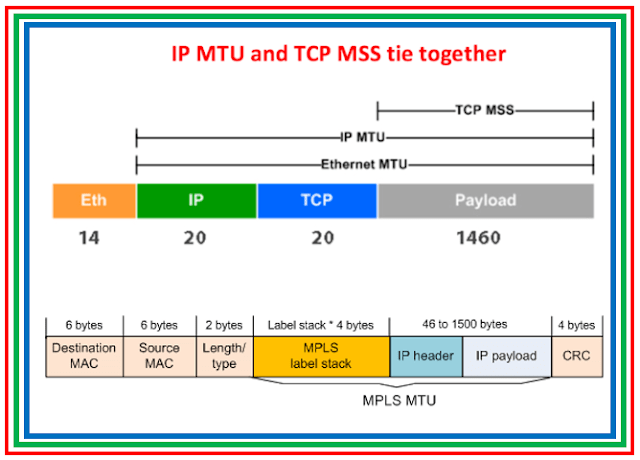
- Both sender and receiver have to specify their maximum segment size.
- To specify maximum segment size, there is no special field.
- So, they specify their maximum segment size using this field and negotiates.
D. Padding-
- Addition of dummy data to fill up unused space in the transmission unit and make it conform to the standard size is called as padding.
- Options field is used for padding.
Example-
- When header length is not a multiple of 4, extra zeroes are padded in the Options field.
- By doing so, header length becomes a multiple of 4.
- If header length = 30 bytes, 2 bytes of dummy data is added to the header.
- This makes header length = 32 bytes.
- Then, the value 32 / 4 = 8 is put in the header length field.
- In worst case, 3 bytes of dummy data might have to be padded to make the header length a multiple of 4.
User Datagram Protocol
- While TCP provides a reliable connection, UDP provides an unreliable connection. UDP doesn’t go through a three-way handshake to set up a connection—it simply begins sending the data.
- UDP does have an advantage over TCP: It has less overhead
- For example, if you need to send only one segment and receive one segment in reply, and that’s the end of the transmission, it makes no sense to go through a three-way handshake to establish a connection and then send and receive the two segments; this is not efficient. DNS queries are a good example in which the use of UDP makes sense.
- UDP is more efficient than TCP because it has less overhead.
- When transmitting a UDP segment, an IP header will show 17 as the protocol number in the protocol field.
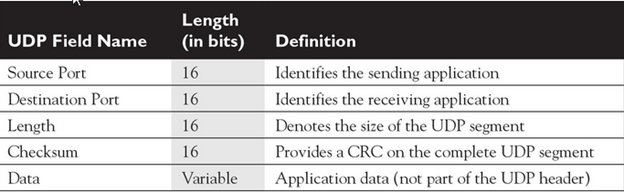
- First, since UDP is connectionless, sequence and acknowledgment numbers are not necessary. Second, since there is no flow control, a window size field is not needed. As you can see, UDP is a lot simpler and more efficient than TCP. Its only reliability component, like TCP, is a checksum field, which allows UDP, at the destination, to detect a bad UDP segment and then drop it. Any control functions or other reliability functions that need to be implemented for the session are not accomplished at the transport layer; instead, these are handled at the application layer.
Characteristics of UDP-
- It is a connectionless protocol.
- It is a stateless protocol.
- It is an unreliable protocol.
- It is a fast protocol.
- It offers the minimal transport service.
- It is almost a null protocol.
- It does not guarantee in order delivery.
- It does not provide congestion control mechanism.
- It is a good protocol for data flowing in one direction.
Need of UDP-
- TCP proves to be an overhead for certain kinds of applications.
- The Connection Establishment Phase, Connection Termination Phase etc of TCP are time consuming.
- To avoid this overhead, certain applications which require fast speed and less overhead use UDP.
Applications Using UDP-
Following applications use UDP-
- Applications which require one response for one request use UDP. Example- DNS.
- Routing Protocols like RIP and OSPF use UDP because they have very small amount of data to be transmitted.
- Trivial File Transfer Protocol (TFTP) uses UDP to send very small sized files.
- Broadcasting and multicasting applications use UDP.
- Streaming applications like multimedia, video conferencing etc use UDP since they require speed over reliability.
- Real time applications like chatting and online games use UDP.
- Management protocols like SNMP (Simple Network Management Protocol) use UDP.
- Bootp / DHCP uses UDP.
- Other protocols that use UDP are- Kerberos, Network Time Protocol (NTP), Network News Protocol (NNP), Quote of the day protocol etc.
Note-01:
| Size of UDP Header= 8 bytes |
- Unlike TCP header, the size of UDP header is fixed.
- This is because in UDP header, all the fields are of definite size.
- Size of UDP Header = Sum of the size of all the fields = 8 bytes.
Note-02:
| UDP is almost a null protocol. |
This is because-
- UDP provides very limited services.
- The only services it provides are check summing of data and multiplexing by port number.
Note-03:
| UDP is an unreliable protocol. |
This is because-
- UDP does not guarantee the delivery of datagram to its respective user (application).
- The lost datagrams are not retransmitted by UDP.
Note-04:
| Checksum calculation is not mandatory in UDP. |
This is because-
- UDP is already an unreliable protocol and error checking does not make much sense.
- Also, time is saved and transmission becomes faster by avoiding to calculate it.
It may be noted-
- To disable the checksum, the field value is set to all 0’s.
- If the computed checksum is zero, the field value is set to all 1’s.
Note-05:
| UDP does not guarantee in order delivery. |
This is because-
- UDP allows out of order delivery to ensure better performance.
- If some data is lost on the way, it does not call for retransmission and keeps transmitting data.
Note-06:
| Application layer can perform some tasks through UDP. |
Application layer can do the following tasks through UDP-
- Trace Route
- Record Route
- Time stamp
When required,
- Application layer conveys to the UDP which conveys to the IP datagram.
- UDP acts like a messenger between the application layer and the IP datagram.
Which One Should You Use?
Choosing the right transport protocol to use depends on the type of data to be transferred. For information that needs reliability, sequence transmission and data integrity — TCP is the transport protocol to use. For data that require real-time transmission with low overhead and less processing — UDP is the right choice.
Common TCP/IP Ports
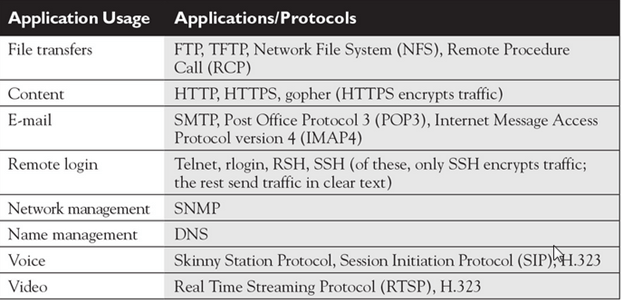
TCP/IP’s transport layer uses port numbers and IP addresses to multiplex sessions between multiple hosts. If you look back at Tables , you’ll see that both the TCP and UDP headers have two port fields: a source port and a destination port. These, as well as the source and destination IP addresses in the IP header, are used to identify each session uniquely between two or more hosts. As you can see from the port number field, the port numbers are 16 bits in length, allowing for port numbers from 0 to 65,535 (a total of 65,536 ports).
Port numbers fall under three types:
Well-known These port numbers range from 0 to 1023 and are assigned by the Internet Assigned Number Authority (IANA) to applications commonly used on the Internet, such as HTTP, DNS, and SMTP.
Registered These port numbers range from 1024 to 49,151 and are assigned by IANA for proprietary applications, such as Microsoft SQL Server, Shockwave, Oracle, and many others.
Dynamically assigned These port numbers range from 49,152 to 65,535 and are dynamically assigned by the operating system to use for a session.
Remember a few examples of applications (and their ports) that use TCP: HTTP (80), FTP (21), POP3 (110), SMTP (25), SSH (22), and telnet (23). Remember a few examples of UDP applications, along with their assigned port numbers: DNS queries (53), RIP (520), SNMP (161), and TFTP (69).
Application Mapping
When you initiate a connection to a remote application, your operating system should pick a currently unused dynamic port number from 49,152 to 65,535 and assign this number as the source port number in the TCP or UDP header. Based on the application that is running, the application will fill in the destination port number with the well-known or registered port number of the application. When the destination receives this segment, it looks at the destination port number and knows by which application this segment should be processed. This is also true for traffic returning from the destination.
No matter where a session begins, or how many sessions a device encounters, a host can easily differentiate between various sessions by examining the source and destination port numbers, as well as the source and destination layer 3 IP addresses.
TCP and UDP provide a multiplexing function for simultaneously supporting multiple sessions to one or more hosts: This allows multiple applications to send and receive data to and from many devices simultaneously. With these protocols, port numbers (at the transport layer) and IP addresses (at the Internet layer) are used to differentiate the sessions.
As shown in Tables 8-1 and 8-2, however, two port numbers are included in the segment: source and destination. When you initiate a connection to a remote application, your operating system should pick a currently unused dynamic port number from 49,152 to 65,535 and assign this number as the source port number in the TCP or UDP header. Based on the application that is running, the application will fill in the destination port number with the well-known or registered port number of the application. When the destination receives this segment, it looks at the destination port number and knows by which application this segment should be processed. This is also true for traffic returning from the destination.
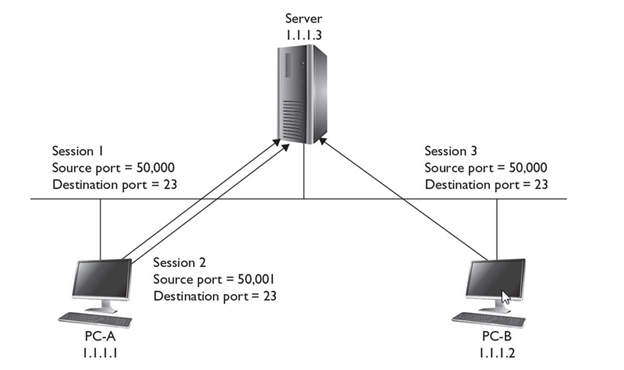
Let’s look at an example, shown in Figure 8-1, that uses TCP for multiplexing sessions. In this example, PC-A has two telnet connections between itself and the server. You can tell these are telnet connections by examining the destination port number (23). When the destination receives the connection setup request, it knows that it should start up the telnet process. Also notice that the source port number is different for each of these connections (50,000 and 50,001). This allows both the PC and the server to differentiate between the two separate telnet sessions. This is a simple example of multiplexing connections.
FIGURE 8-1 Multiplexing connections
Of course, if more than one device is involved, things become more complicated. In the example shown in Figure 8-1, PC-B also has a session to the server. This connection has a source port number of 50,000 and a destination port number of 23—another telnet connection. This brings up an interesting dilemma. How does the server differentiate between PC-A’s connection that has port numbers 50,000/23 and PC-B’s, which has the same? Actually, the server uses not only the port numbers at the transport layer to multiplex sessions, but also the layer 3 IP addresses of the devices associated with these sessions. In this example, notice that PC-A and PC-B have different layer 3 addresses: 1.1.1.1 and 1.1.1.2, respectively.
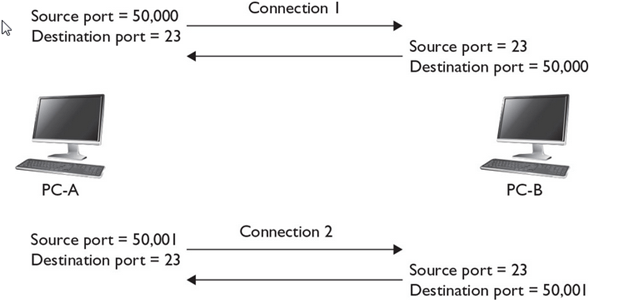
Figure 8-2 shows a simple example of using port numbers between two computers. PC-A opens two telnet sessions to PC-B. Notice that the source port numbers on PC-A are different, which allows PC-A to differentiate between the two telnet sessions. The destination ports are 23 when sent to PC-B, which tells PC-B which application should process the segments. Notice that when PC-B returns data to PC-A, the port numbers are reversed, since PC-A needs to know what application this is from (telnet) and which session is handling the application.
No matter where a session begins, or how many sessions a device encounters, a host can easily differentiate between various sessions by examining the source and destination port numbers, as well as the source and destination layer 3 IP addresses.
Session Establishment in UDP & TCP
The source sends a UDP segment to the destination and receives a response. As to which of the two are used, that depends on the application. And as to when a UDP session is over, that is also application specific The application can send a message, indicating that the session is now over, which could be part of the data payload. An idle timeout is used, so if no segments are encountered over a predefined period, the application assumes the session is over.
TCP, on the other hand, is much more complicated. It uses what is called a defined state machine. A defined state machine defines the actual mechanics of the beginning of the state (building the TCP session), maintaining the state (maintaining the TCP session), and ending the state (tearing down the TCP session). The following sections cover TCP’s mechanics in much more depth
TCP’s Three-Way Handshake
With reliable TCP sessions, before a host can send information to another host, a handshake process must take place to establish the connection.
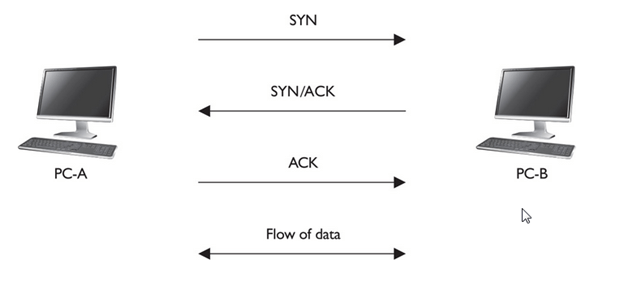
The two hosts go through a three-way handshake to establish the reliable session. The following three steps occur during the three-way handshake:
1. The source sends a synchronization (SYN) segment (where the SYN control flag is set in the TCP header) to the destination, indicating that the source wants to establish a reliable session.
- The destination responds with both an acknowledgment and synchronization in the same segment. The acknowledgment indicates the successful receipt of the source’s SYN segment, and the destination’s SYN flag indicates that a session can be set up (it’s willing to accept the setup of the session). Together, these two flag settings in the TCP segment header are commonly referred to as SYN/ACK; they are sent together in the same segment header.
- Upon receiving the SYN/ACK, the source responds with an ACK segment (where the ACK flag is set in the TCP header). This indicates to the destination that its SYN was received by the source and that the session is now fully established.
Concept Of Wrap Around-
Here is a simple example of a three-way handshake with sequence and acknowledgment numbers:
1. Source sends a SYN: sequence number = 1
2. Destination responds with a SYN/ACK: sequence number = 10, acknowledgment = 2
3. Source responds with an ACK segment: sequence number = 2, acknowledgment = 11
In this example, the destination’s acknowledgment (step 2) number is one greater than the source’s sequence number, indicating to the source that the next segment expected is 2. In the third step, the source sends the second segment, and, within the same segment in the acknowledgment field, indicates the receipt of the destination’s segment with an acknowledgment of 11—one greater than the sequence number in the destination’s SYN/ACK segment.
TCP’s Flow Control and Windowing
The larger the window size for a session, the fewer acknowledgments that are sent, thus making the session more efficient. Too small a window size can affect throughput, since a host has to send a small number of segments, wait for an acknowledgment, send another bunch of small segments, and wait again. The trick is to figure out an optimal window size that allows for the best efficiency based on the current conditions in the network and on the two hosts’ current capabilities.
A nice feature of this TCP windowing process is that the window size can be dynamically changed through the lifetime of the session. This is important because many more sessions may arrive at a host with varying bandwidth needs. Therefore, as a host becomes saturated with segments from many different sessions, it can, assuming that these sessions are using TCP
Advantage of Changing Window Size:
A nice feature of this TCP windowing process is that the window size can be dynamically changed through the lifetime of the session. This is important because many more sessions may arrive at a host with varying bandwidth needs. Therefore, as a host becomes saturated with segments from many different sessions, it can, assuming that these sessions are using TCP, lower the window size to slow the flow of segments it is receiving. Likewise, a congestion problem might crop up in the network between the source and destination, where segments are being lost; the window size can be lowered to accommodate this problem and, when the network congestion disappears, can be raised to take advantage of the extra bandwidth that now exists in the network path between the two.
Reducing the window size increases reliability but reduces throughput.
What makes this situation even more complicated is that the window sizes on the source and destination hosts can be different for a session. For instance, PC-A might have a window size of 3 for the session, while PC-B has a window size of 10. In this example, PC-A is allowed to send ten segments to PC-B before waiting for an acknowledgment, while PC-B is allowed to send only three segments to PC-A.
Applications that use TCP include FTP (21), HTTP (80), SMTP (25), SSH (22), and telnet (23). UDP provides unreliable connections and is more efficient than TCP. Examples of applications that use UDP include DNS (53), RIP (520), SNMP (161), and TFTP (69). Please note that some protocols, like DNS and syslog, support both TCP and UDP.
The transport layer provides for flow control through windowing and acknowledgments, reliable connections through sequence numbers and acknowledgments, session multiplexing through port numbers and IP addresses, and segmentation through segment PDUs.
The TCP header is 20 bytes long and contains two port fields, sequence and acknowledgment number fields, code bit fields, a window size field, a checksum field, and others.
UDP provides a best-effort delivery and is more efficient than TCP because of its lower overhead.
The UDP header has source and destination port fields, a length field, and a checksum field.
Well-known (0 to 1023) and registered (1024 to 49,151) port numbers are assigned to applications; dynamic port numbers (49,152 to 65,535) are assigned by the operating system to the source connection of a session.
Common TCP applications/protocols and their ports are FTP (21), SSH (22), telnet (23), SMTP (25), and HTTP (80). Common UDP applications/protocols and their ports are DNS (53), TFTP (69), and SNMP (161)
Multiplexing sessions are achieved through source and destination port numbers and IP addresses.
Here’s a quick overview of the protocols:
DHCP Dynamically acquires IP addressing information on a host, including an IP address, subnet mask, default gateway address, and a DNS server address.
DNS Resolves names to layer 3 IP addresses.
ARP Resolves layer 3 IP addresses to layer 2 MAC addresses so that devices can communicate in the same broadcast domain.
TCP Reliably transmits data between two devices. It uses a three-way handshake to build a session and windowing to implement flow control, and it can detect and resend lost or bad segments.
UDP Delivers data with a best effort. No handshaking is used to establish a session—a device starts a session by sending data.
References
https://www.geeksforgeeks.org/tcp-ip-packet-format
 Automotive Diagnostics